Forge Logger — In-Game Bug Reporting & Player Feedback
An asset by [email protected]
Install Asset
Install via Godot
To maintain one source of truth, Godot Asset Library is just a mirror of the old asset library so you can download directly on Godot via the integrated asset library browser
Quick Information

Forge Logger — In-Game Bug Reporting & Player Feedback
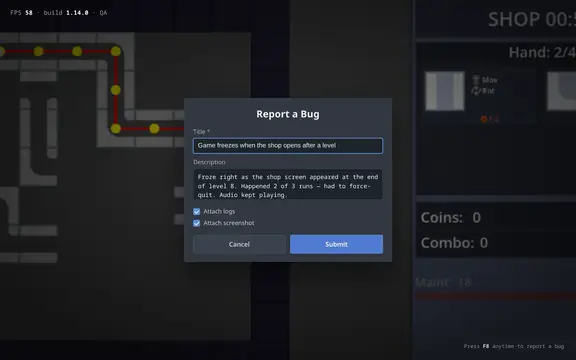
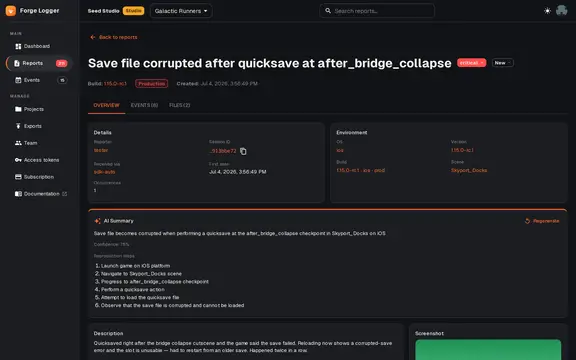
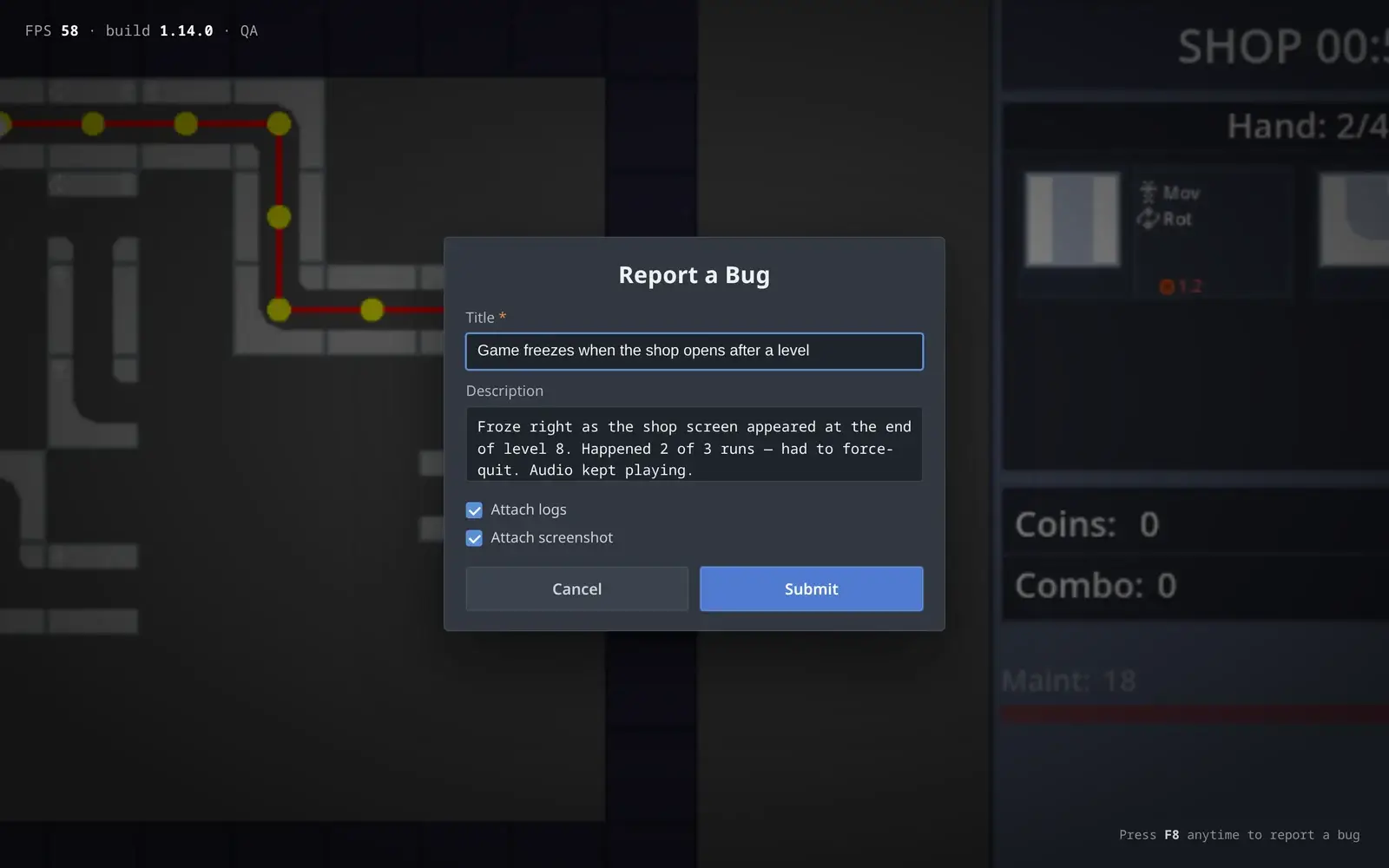
In-game bug reporting for Godot 4. Your playtesters press one key (F8), type what broke, and you get a structured bug report with a screenshot, the log file, and the exact scene, build and environment it happened in — instead of a blurry screenshot dumped in Discord.FEATURES- Built-in report popup bound to F8 (rebindable input action), or fire reports from code with capture_bug()- Screenshot + log upload, session timeline events (record_event)- Offline retry queue with idempotent submits — reports survive unclean shutdowns- Privacy-first: device info is opt-in and off by default; point base_url at your own backend and no data leaves your infra- Optional free hosted dashboard: AI summaries and reproduction steps, duplicate detection, team triage, GitHub export (Jira, GitLab & Discord on paid tiers)SETUP (10 minutes): install → enable plugin → paste project_id + logger token from the free dashboard → run your game → press F8. MIT licensed, free forever as a plugin; the hosted dashboard has a free tier (100 reports/month, no card).Note: this is player-triggered bug reporting — it does not auto-capture crashes or stack traces (that's on the roadmap).
Supported Engine Version
4.4
Version String
0.1.0
License Version
MIT
Support Level
community
Modified Date
1 day ago
Git URL
Issue URL
Forge Logger — In-Game Bug Reporting & Player Feedback for Godot
Your playtesters press one key, type what broke, and you get a structured bug report — with a screenshot and the exact scene, build, and environment it happened in — instead of a blurry screenshot dumped in Discord.
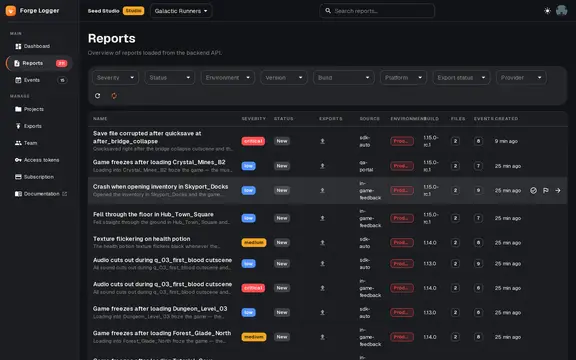
A free, open-source Godot 4.x plugin. Drop it in, set one project ID, and your game can collect real bug reports from real players. Triage them yourself against your own backend, or connect the optional hosted dashboard for AI summaries and one-click export to GitHub.




Why
Playtest feedback is chaos. Testers paste screenshots into Discord with "it crashed lol", you can't tell which build they were on, and triage becomes archaeology. Forge Logger turns that into something you can act on — captured from inside the game, the moment the bug happens.
- Player-facing, not just a crash logger. Testers report what they noticed, in their words, with a screenshot attached.
- Context comes for free. Each play session is stamped with the scene, game version, build hash, and environment, and every report links back to its session — no "which version were you on?" round-trips.
- Works offline. Reports that fail to send are queued to disk and retried after an unclean shutdown — or whenever you call
retry_queued()— with idempotency so retries never duplicate. - Godot-native. Built for Godot first, not a Unity tool with Godot bolted on. One autoload, configured in Project Settings.
- Yours to keep. MIT-licensed. Point it at your own ingest backend, or use the hosted dashboard — your call.
Install
From the Godot Asset Library (recommended)
- In the editor: AssetLib tab → search "Forge Logger" → Download → Install.
- Project → Project Settings → Plugins → enable Forge Logger.
Manual
- Copy the
forge_logger/folder into your project'saddons/directory (so it lives ataddons/forge_logger/). - Project → Project Settings → Plugins → enable Forge Logger.
Enabling the plugin registers the ForgeLogger autoload singleton. The forge_logger_report input action (default key F8) is registered automatically the first time your game runs — rebind it under Project Settings → Input Map.
Quick start
1. Point it at a project. Open Project → Project Settings, turn on Advanced Settings, and find the forge_logger/ section:
| Setting | What it does |
|---|---|
base_url |
Ingest endpoint. Defaults to https://ingest.forgelogger.dev. Self-hosting? Put your own URL here. |
project_id |
Your project UUID (from the dashboard, or your own backend). |
api_key |
Your project's logger token (flg_…). Required for the hosted backend; leave it empty only if your self-hosted ingest runs without auth. |
game_name / game_version / build_hash |
Stamped onto the session (build + metadata); build_hash is omitted when empty. |
environment |
development · staging · production. |
enable_screenshot |
Capture & attach a screenshot with reports (off by default — flip it on). |
enable_logs |
Attach engine/game logs to reports. |
auto_start_session |
Start a session automatically on launch (on by default). |
collect_device_info |
Include the device model + locale in session telemetry. Off by default — set it on to opt in. |
Using the hosted dashboard? Both values are one click away: create a free project, then mint a logger token under Project → Tokens and paste the flg_… value into api_key.
Privacy: session telemetry carries engine version, platform, and current scene. The device model and locale are sent only if you turn
collect_device_infoon — off by default. Pointbase_urlat your own backend and no report data reaches Forge Logger's servers.
2. Let players report. The smallest possible integration — bind the built-in popup to the report action:
func _unhandled_input(event: InputEvent) -> void:
    if event.is_action_pressed("forge_logger_report"):
        ForgeLogger.show_report_popup()
The player types a title and description; the report is sent with session metadata attached (plus a screenshot if you've turned on enable_screenshot). Done.
3. Or wire your own UI / fire reports from code:
# Submit from your own form (attach_logs, attach_screenshot)
ForgeLogger.submit_ui_report("Stuck in wall", "Walked into the crate near spawn and clipped through.", true, true)

# Capture a bug programmatically — e.g. from an error handler
ForgeLogger.capture_bug({
    "title": "Null inventory",
    "description": "Opened shop with no save loaded",
    "severity": "high",
    "tags": ["inventory"],
    "custom_data": { "scene": get_tree().current_scene.name },
})

# Drop lightweight events onto the session timeline
ForgeLogger.record_event("level_started", { "level": "forest_02" })
Public API
| Call | Does |
|---|---|
ForgeLogger.show_report_popup() |
Open the built-in report popup. |
ForgeLogger.submit_ui_report(title, description, attach_logs, attach_screenshot=true) -> String |
Send a report from your own UI. |
ForgeLogger.capture_bug(data: Dictionary) -> String |
Fire a report from code; returns the report id. |
ForgeLogger.record_event(type, payload) / send_events() |
Add events to the session timeline. |
ForgeLogger.start_session() -> bool / get_session_id() -> String |
Manage the session manually. |
ForgeLogger.retry_queued() -> int |
Flush reports queued while offline. |
ForgeLogger.check_health() -> Dictionary |
Ping the backend. |
ForgeLogger.post_event(type, payload) -> bool |
Send a single event immediately, bypassing the buffer. |
ForgeLogger.get_event_count() -> int |
How many events are buffered but not yet sent. |
ForgeLogger.clear_events() |
Drop buffered events without sending them. |
ForgeLogger.await_session_ready() |
await until the auto-start attempt has finished. |
signal session_ready |
Fires once the auto-start attempt completes (whether the session started or failed). Only emitted when auto_start_session is on. |
Free plugin + optional hosted dashboard
The plugin and the Discord bot are free forever and MIT-licensed. Point base_url at your own backend and you never pay a thing.
If you'd rather not run infrastructure, the hosted dashboard is optional:
| Free | Indie — €12/mo | Studio — €39/mo | |
|---|---|---|---|
| Reports / month | 100 | 1,000 | 5,000 |
| Triage dashboard, filters, GitHub export | ✓ | ✓ | ✓ |
| AI summary + reproduction steps | first 10 | ✓ | ✓ |
| Jira & Discord export | — | ✓ | ✓ |
| AI dedupe, Linear/Trello/ClickUp, priority support | — | — | ✓ |
→ Create a free project — no card required.
Unity & Unreal: the ingest backend is engine-agnostic and ports are on the roadmap. Want one? Join the waitlist and tell us which engine.
How it talks to the backend
Project scope is carried by the logger token, not the URL. The plugin targets the forge-logger-ingest-be service:
| Method | Endpoint | Purpose |
|---|---|---|
| GET | /health |
Health check |
| POST | /v1/ingest/sessions |
Start session |
| POST | /v1/ingest/uploads |
Request signed upload URL |
| POST | /v1/ingest/reports |
Submit bug report |
| POST | /v1/ingest/events |
Append events (batched, max 500) |
Reports carry a client-generated clientRequestId (UUID), persisted in the offline queue. Retries with the same key return { idempotent: true, ... } and never create duplicates server-side.
Attachment limits: screenshots png/jpeg/webp ≤ 10 MiB · log bundles ≤ 50 MiB · save states ≤ 100 MiB · video webm/mp4 ≤ 500 MiB. Aggregate ≤ 600 MiB/report (otherwise 413).
Roadmap
- Crash dialog: prompt the player to send diagnostics after an unclean shutdown
- Replay / save-file attachments
- Configurable retry backoff
- Custom popup theming
- Unity & Unreal clients (engine-agnostic backend already in place — waitlist)
Links
- 🌐 Website: https://forgelogger.dev · Dashboard: https://forgelogger.dev/auth · Docs: https://forgelogger.dev/docs/plugins/godot
- 📦 Asset Library: [ASSETLIB_URL]
- 💻 Source — issues & PRs welcome: https://github.com/stoneforgelabs/forge-logger-godot
License
MIT. Use it in commercial games, fork it, ship it. See LICENSE.
In-game bug reporting for Godot 4. Your playtesters press one key (F8), type what broke, and you get a structured bug report with a screenshot, the log file, and the exact scene, build and environment it happened in — instead of a blurry screenshot dumped in Discord.
FEATURES
- Built-in report popup bound to F8 (rebindable input action), or fire reports from code with capture_bug()
- Screenshot + log upload, session timeline events (record_event)
- Offline retry queue with idempotent submits — reports survive unclean shutdowns
- Privacy-first: device info is opt-in and off by default; point base_url at your own backend and no data leaves your infra
- Optional free hosted dashboard: AI summaries and reproduction steps, duplicate detection, team triage, GitHub export (Jira, GitLab & Discord on paid tiers)
SETUP (10 minutes): install → enable plugin → paste project_id + logger token from the free dashboard → run your game → press F8. MIT licensed, free forever as a plugin; the hosted dashboard has a free tier (100 reports/month, no card).
Note: this is player-triggered bug reporting — it does not auto-capture crashes or stack traces (that's on the roadmap).
Reviews
Quick Information
Forge Logger — In-Game Bug Reporting & Player Feedback
In-game bug reporting for Godot 4. Your playtesters press one key (F8), type what broke, and you get a structured bug report with a screenshot, the log file, and the exact scene, build and environment it happened in — instead of a blurry screenshot dumped in Discord.FEATURES- Built-in report popup bound to F8 (rebindable input action), or fire reports from code with capture_bug()- Screenshot + log upload, session timeline events (record_event)- Offline retry queue with idempotent submits — reports survive unclean shutdowns- Privacy-first: device info is opt-in and off by default; point base_url at your own backend and no data leaves your infra- Optional free hosted dashboard: AI summaries and reproduction steps, duplicate detection, team triage, GitHub export (Jira, GitLab & Discord on paid tiers)SETUP (10 minutes): install → enable plugin → paste project_id + logger token from the free dashboard → run your game → press F8. MIT licensed, free forever as a plugin; the hosted dashboard has a free tier (100 reports/month, no card).Note: this is player-triggered bug reporting — it does not auto-capture crashes or stack traces (that's on the roadmap).
Supported Engine Version
4.4
Version String
0.1.0
License Version
MIT
Support Level
community
Modified Date
1 day ago
Git URL
Issue URL