Lucide icons
An asset by rodrigoalvesr
Install Asset
Install via Godot
To maintain one source of truth, Godot Asset Library is just a mirror of the old asset library so you can download directly on Godot via the integrated asset library browser

Quick Information

Lucide icons
Lucide Icons brings the full Lucide open-source icon library (1 500+ clean, consistent SVG icons) into Godot 4.HOW IT WORKSA custom Lucide node (extends TextureRect) lets you drop icons anywhere in your scene tree.A LucideTexture resource lets you use any icon as a Texture2D on Buttons, Sprites, and any node with a texture slot.On first use the plugin fetches the latest Lucide release from GitHub and extracts the SVGs automatically — no manual setup needed.Icons are rasterized on-the-fly at exactly the size you need. A built-in texture cache ensures each unique combination of icon, size, color, and stroke is only rendered once per session.FEATURES1 500+ icons from the official Lucide libraryInspector properties: icon name, size, color, stroke widthGDScript constructor: Lucide.new("house", 32, Color.WHITE, 2.0)LucideTexture resource: assign Lucide icons to any Texture2D slot in the Inspector or in codeEditor dock with live search, size/stroke/color preview, and one-click "Copy code"One-click Update button to pull the latest Lucide release without leaving the editorUSAGE (CODE)Lucide nodevar icon := Lucide.new("circle-check", 32, Color.GREEN, 1.5)add_child(icon)LucideTexture resourcevar tex := LucideTexture.new()tex.icon_name = "log-out"$Button.icon = texREQUIREMENTSGodot 4.1 or laterInternet connection for the initial icon download and updatesCHANGELOGv 1.1.0- Added LucideTexture resource — use Lucide icons as a Texture2D on any node (buttons, sprites, etc.)- Fixed release asset lookup using the correct field from the GitHub APIv 1.0.0- Initial releaseLICENSEMIT — free for personal and commercial use.Icons are provided by the Lucide project (also MIT licensed).
Supported Engine Version
4.0
Version String
1.1.0
License Version
MIT
Support Level
community
Modified Date
2 months ago
Git URL
Issue URL
Lucide Icons for Godot 4
A Godot 4 plugin that integrates Lucide — a clean, consistent open-source icon library with 1 500+ SVG icons — directly into your projects.
Icons are downloaded from the official Lucide GitHub releases and rasterized on-the-fly at any size, with full control over color and stroke width. A built-in editor dock lets you browse, preview, and copy ready-to-use GDScript code for any icon.
Features
- 1 500+ icons sourced from the official Lucide releases
- Custom
Lucidenode — drop it in any scene like any otherTextureRect - Fully configurable — size, color, and stroke width per node, both in the Inspector and in code
- Auto-download — icons are fetched from GitHub on first use; no manual setup required
- One-click update — check and install the latest Lucide release from the editor dock
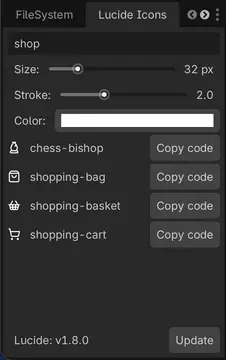
- Editor dock — search, preview, and copy GDScript snippets for any icon
- Texture cache — identical icon configurations are rasterized only once per session
Requirements
- Godot 4.1 or later
- An internet connection for the initial icon download (or updates)
Installation
Via the Godot Asset Library
- Open your project in Godot.
- Go to AssetLib tab and search for "Lucide Icons".
- Click Download, then Install.
- Enable the plugin under Project → Project Settings → Plugins.
Manual
- Download or clone this repository.
- Copy the
addons/lucide/folder into your project'saddons/directory so the path becomesres://addons/lucide/. - Enable the plugin under Project → Project Settings → Plugins → Lucide Icons.
On first activation the plugin will automatically download the latest Lucide icon set from GitHub. Make sure your machine has internet access at that point.
Usage
In the Scene Tree (Inspector)
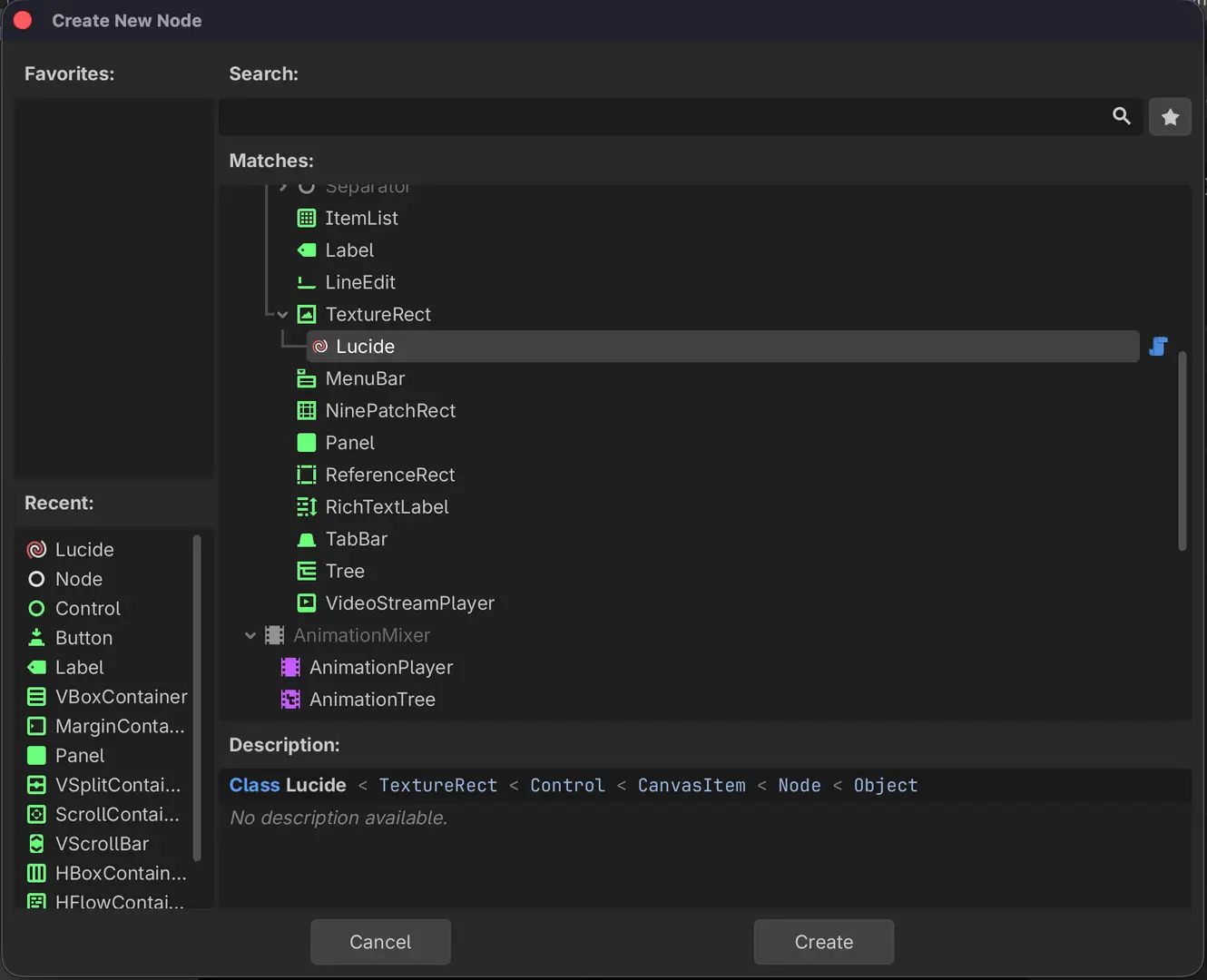
Add a Lucide node to your scene (
Add Node → Lucide).
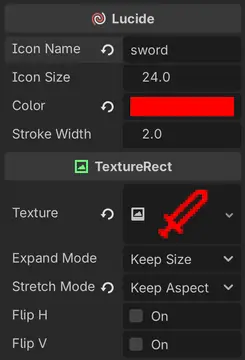
In the Inspector set the exported properties:

| Property | Type | Default | Description |
|---|---|---|---|
icon_name |
String |
"" |
Name of the Lucide icon (e.g. "house", "circle-check") |
icon_size |
float |
24 |
Rendered size in pixels (width and height) |
color |
Color |
WHITE |
Icon tint color |
stroke_width |
float |
2.0 |
SVG stroke width |
In Code (GDScript)
# Minimal — just the icon name
var icon := Lucide.new("house")
add_child(icon)

# Full constructor: name, size, color, stroke
var icon := Lucide.new("circle-check", 32, Color.GREEN, 1.5)
add_child(icon)
You can also change properties after the node is in the scene tree:
$MyIcon.icon_name   = "star"
$MyIcon.icon_size   = 48
$MyIcon.color       = Color.YELLOW
$MyIcon.stroke_width = 1.0
Icon Names
Icon names match the Lucide identifier exactly, in kebab-case (e.g. arrow-up-right, file-text, loader-circle). The full list is available at lucide.dev/icons.
Editor Dock
When the plugin is enabled a Lucide Icons dock appears in the bottom-right panel.

| Control | Description |
|---|---|
| Search | Filter icons by name in real time |
| Size slider | Preview size (8 – 128 px) |
| Stroke slider | Preview stroke width (0.5 – 5.0) |
| Color picker | Preview tint color |
| Copy code button | Copies a ready-to-use Lucide.new(...) call to the clipboard |
| Update button | Checks GitHub for a newer Lucide release and downloads it |
The dock previews update live as you adjust size, stroke, and color.
How It Works
Icon Loading Pipeline
Each time an icon needs to be displayed the plugin:
- Reads the SVG file from
res://addons/lucide/icons/<name>.svg. - Injects the requested
colorandstroke_widthvalues directly into the SVG markup. - Rasterizes the SVG to an
Imageat the requested scale. - Wraps it in an
ImageTextureand assigns it to theTextureRect.
Texture Cache
A static dictionary (Lucide._cache) stores every rendered texture keyed by "path|size|color|stroke". Subsequent requests for the same combination return the cached texture instantly, avoiding redundant disk reads and rasterization.
Lazy Initialization
Property setters skip _reload() until _ready() fires. This means constructing a node with Lucide.new("icon", 32, color, 2.0) triggers a single render pass instead of four.
Auto-Download & Updates
On _enter_tree, the plugin checks whether res://addons/lucide/icons/ exists. If not, it queries the GitHub Releases API for the latest Lucide version and downloads the SVG zip automatically. The installed version is tracked in .lucide-version (excluded from version control).
Project Structure
addons/lucide/
├── plugin.cfg          # Godot plugin manifest
├── plugin.gd           # EditorPlugin — dock, download, update logic
├── lucide.gd           # Lucide node (TextureRect subclass)
├── icon.svg            # Plugin icon shown in the Godot editor
├── icons/              # Downloaded SVG icons (git-ignored)
└── .lucide-version     # Installed version tracker (git-ignored)
License
This plugin is released under the MIT License.
Lucide itself is also MIT licensed. Icon attribution is not required but appreciated.
Lucide Icons brings the full Lucide open-source icon library (1 500+ clean, consistent SVG icons) into Godot 4.
HOW IT WORKS
A custom Lucide node (extends TextureRect) lets you drop icons anywhere in your scene tree.
A LucideTexture resource lets you use any icon as a Texture2D on Buttons, Sprites, and any node with a texture slot.
On first use the plugin fetches the latest Lucide release from GitHub and extracts the SVGs automatically — no manual setup needed.
Icons are rasterized on-the-fly at exactly the size you need. A built-in texture cache ensures each unique combination of icon, size, color, and stroke is only rendered once per session.
FEATURES
1 500+ icons from the official Lucide library
Inspector properties: icon name, size, color, stroke width
GDScript constructor: Lucide.new("house", 32, Color.WHITE, 2.0)
LucideTexture resource: assign Lucide icons to any Texture2D slot in the Inspector or in code
Editor dock with live search, size/stroke/color preview, and one-click "Copy code"
One-click Update button to pull the latest Lucide release without leaving the editor
USAGE (CODE)
Lucide node
var icon := Lucide.new("circle-check", 32, Color.GREEN, 1.5)
add_child(icon)
LucideTexture resource
var tex := LucideTexture.new()
tex.icon_name = "log-out"
$Button.icon = tex
REQUIREMENTS
Godot 4.1 or later
Internet connection for the initial icon download and updates
CHANGELOG
v 1.1.0
- Added LucideTexture resource — use Lucide icons as a Texture2D on any node (buttons, sprites, etc.)
- Fixed release asset lookup using the correct field from the GitHub API
v 1.0.0
- Initial release
LICENSE
MIT — free for personal and commercial use.
Icons are provided by the Lucide project (also MIT licensed).
Reviews
Quick Information
Lucide icons
Lucide Icons brings the full Lucide open-source icon library (1 500+ clean, consistent SVG icons) into Godot 4.HOW IT WORKSA custom Lucide node (extends TextureRect) lets you drop icons anywhere in your scene tree.A LucideTexture resource lets you use any icon as a Texture2D on Buttons, Sprites, and any node with a texture slot.On first use the plugin fetches the latest Lucide release from GitHub and extracts the SVGs automatically — no manual setup needed.Icons are rasterized on-the-fly at exactly the size you need. A built-in texture cache ensures each unique combination of icon, size, color, and stroke is only rendered once per session.FEATURES1 500+ icons from the official Lucide libraryInspector properties: icon name, size, color, stroke widthGDScript constructor: Lucide.new("house", 32, Color.WHITE, 2.0)LucideTexture resource: assign Lucide icons to any Texture2D slot in the Inspector or in codeEditor dock with live search, size/stroke/color preview, and one-click "Copy code"One-click Update button to pull the latest Lucide release without leaving the editorUSAGE (CODE)Lucide nodevar icon := Lucide.new("circle-check", 32, Color.GREEN, 1.5)add_child(icon)LucideTexture resourcevar tex := LucideTexture.new()tex.icon_name = "log-out"$Button.icon = texREQUIREMENTSGodot 4.1 or laterInternet connection for the initial icon download and updatesCHANGELOGv 1.1.0- Added LucideTexture resource — use Lucide icons as a Texture2D on any node (buttons, sprites, etc.)- Fixed release asset lookup using the correct field from the GitHub APIv 1.0.0- Initial releaseLICENSEMIT — free for personal and commercial use.Icons are provided by the Lucide project (also MIT licensed).
Supported Engine Version
4.0
Version String
1.1.0
License Version
MIT
Support Level
community
Modified Date
2 months ago
Git URL
Issue URL