RumblePak
An asset by Elliptical
Install Asset
Install via Godot
To maintain one source of truth, Godot Asset Library is just a mirror of the old asset library so you can download directly on Godot via the integrated asset library browser
Quick Information

RumblePak
A tool for easily adding customizable controller haptic feedback.
Supported Engine Version
4.6
Version String
1.0
License Version
MIT
Support Level
community
Modified Date
1 day ago
Git URL
Issue URL
RumblePak
A tool for easily adding customizable controller haptic feedback.

About
I was a bit disappointed by Godot's lack of multiple channels when it comes to controller vibration. Any change to vibration would override the last setting, so I decided to make a plugin to fix that!
Features
- Multiple independent rumble channels
- Curve-based haptic presets
- Bus-based intensity control
- Global rumble scaling
- Easy integration with existing projects

|
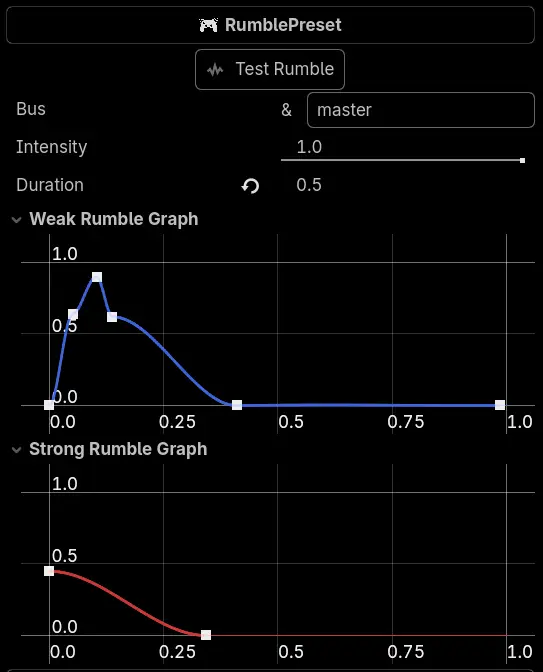
RumblePresetWith RumblePresets, you can easily create controller haptic profiles for any event needed in your game through Godot's curve editor. Changing the bus name allows you to manually control the intensity of all haptic events running on it by setting the global intensity of that bus in code. |
How to use
Simply create a RumblePreset resource, configure it, and attach it to a node.
Then, in your script, just run
RumblePak.add_rumble(rumble_preset)

RumblePak.set_bus_strength(0.5, &"explosion")
To change the strength of a specific bus, call
func set_bus_strength(0.5, &"explosion")

func set_bus_strength(0.7, &"master")
Changing "master" will affect the global rumble intensity.
Installation
- Click on the green "Code" button and select "Download ZIP".
- Extract the
addonsfolder into the root of your Godot project. - Enable the plugin in your Godot project settings.
Tested with Godot 4.6
A tool for easily adding customizable controller haptic feedback.
Reviews
Quick Information
RumblePak
A tool for easily adding customizable controller haptic feedback.
Supported Engine Version
4.6
Version String
1.0
License Version
MIT
Support Level
community
Modified Date
1 day ago
Git URL
Issue URL