AI dialogue for NPCs using open-source, offline, totally local LLMs.See the repository readme for usage instructions: https://github.com/nobodywho-ooo/nobodywhoor check out the docs at:https://docs.nobodywho.ooo
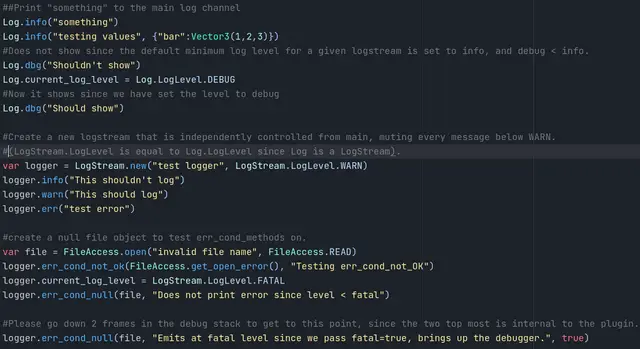
Your one stop shop for all your logging needs in Godot. Updated to Godot 4.5, but should work for any Godot 4.x version,(if you comment out the variadic function versions of the log methods which is a 4.5+ exclusive feature only).2.1.1: - Implemented variadic versions of all logging functions.- Fixed a bug for when Log is used for an external plugin.2.1:- Changed the log(debug, info,warning, etc...) method signatures to accommodate easier porting from print() to Log while retaining backwards compatibility.2.0:- Makes the logging into it's own thread, bringing down the average time for a log message from 4ms to 10-100us on the main thread.´- Renames Config to LogConfig and Settings to LogSettings due to collisions with other plugins.- Added more settings and options to control logging more granularly.1.2.1:- Fixed a bug with cyclic loading of resources at editor startup.1.2:- Added a setting for whether or not to print tree on error.- Fixed bugs.1.1.2:- Fixed bugs1.1:- Updated documentation- Integrated settings into the EditorSettings singletonNew for the fork:- Adds multiple log streams so you can control the log level independently for different parts of your project.- Adds a fatal log level that causes your project to crash in a way that you can control.- Adds comments to updated parts of the plugin.- Adds options in top of the log stream.- Adds shorthand methods for debug & error.- Adds err_cond_... methods for quick error checking.- Adds a scripted breakpoint (optional in setting) so errors freeze the execution and shows relevant info in the godot debugger.- Adds support for multiple log files.- Adds a test scene that can be used as an example of how the plugin can be used.Original:- Adds a basic logger to print out Nodes,Objects,Arrays,Dictionarys etc.- Adds support for easily reading env vars & cmd line args.
Quake .map file support for Godot 4.x.FuncGodot is a plugin for Godot 4 that allows users to generate Godot scenes using the Quake MAP file format. Map files can be made in a variety of editors, the most commonly recommended one being TrenchBroom. It is a reworking and rewrite of the Qodot plugin for Godot 3 and 4.
Helper Autoload to spawn, despawn and pool scenes to speed up creating/destroying lots of small things, like e.g. bullets
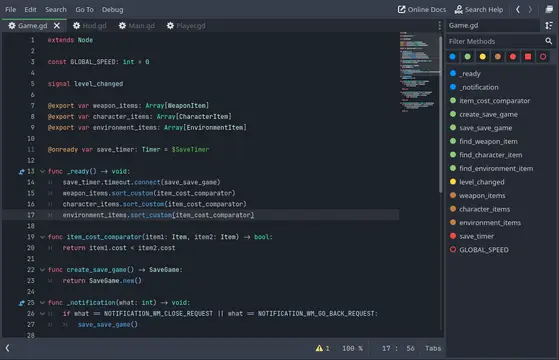
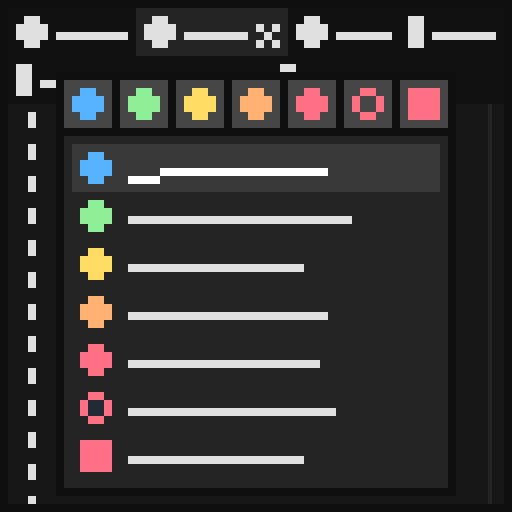
Transforms the Script UI into an IDE like UI.Multiline Tabs are used for navigating between scripts. Tab can be split.The default Outline got an overhaul and now shows all members of the script (not just methods) with unique icons for faster navigation.Enhanced keyboard navigation for Scripts and Outline.Fast quick search functionality.Quick function Override functionality.Features:- Scripts are now shown as Multiline Tabs- Script Tab can be split- The Outline got an overhaul and showed more than just the methods of the script. It includes the following members with a unique icon: -- Classes (Red Square) -- Constants (Red Circle) -- Signals (Yellow) -- Export variables (Orange) -- (Static) Variables (Red) -- Engine callback functions (Blue) -- (Static) Functions (Green) - Setter functions (Green circle, with an arrow inside it pointing to the right) - Getter functions (Green circle, with an arrow inside it pointing to the left)- All the different members of the script can be hidden or made visible again by the outline filter. This allows fine control of what should be visible (e.g., only signals, (Godot) functions, ...)- A `Right Click` enables only the clicked filter, another `Right Click` will enable all filters again- The Outline can be opened in a Popup with a defined shortcut for quick navigation between methods- You can navigate through the Outline with the `Arrow` keys (or `Page up/Page down`) and scroll to the selected item by pressing `ENTER`- Scripts can be opened in a Popup with a defined shortcut or when clicking the three dots on the top right of the Tabs for quick navigation between scripts- The currently edited script is automatically selected in the Filesystem Dock- Files can be quickly searched by the Quick Search Popup with `Shift`+`Shift`- You can find and quickly override any method from your super classes with `Alt`+`Ins`- The plugin is written with performance in mind, there are no unneeded features and works without any lags or stutteringCustomization:- The Outline is on the right side (can be changed to be on the left side again)- The Outline can be toggled via `File -> Toggle Scripts Panel`. This will hide or show it- The order in the Outline can be changed- There is also the possibility to hide private members, this is all members starting with a `_`- The Script ItemList is not visible by default but can be made visible againAll settings can be changed in the `Editor Settings` under `Plugin` -> `Script Ide`:- `Open Outline Popup` = Shortcut to control how the Outline Popup should be triggered (default=CTRL+O or META+O)- `Outline Position Right` = Flag to control whether the outline should be on the right or on the left side of the script editor (default=true)- `Outline Order` = List which specifies the order of all different types in the Outline- `Hide Private Members` = Flag to control whether private members (methods/variables/constants starting with '_') should be hidden in the Outline or not (default=false)- `Open Script Popup` = Shortcut to control how the Script Popup should be triggered (default=CTRL+U or META+U)- `Script List Visible` = Flag to control whether the script list should still be visible or not (above the outline) (default=false)- `Script Tabs Singleline` = Flag to control whether the script tabs should be in a single line (instead of multiline) (default=false)- `Script Tabs Visible` = Flag to control whether the script tabs should be visible or not (default=true)- `Script Tabs Position Top` = Flag to control whether the script tabs should be on the top or on the bottom (default=true)- `Script Tabs Close Button Always` = Flag to control whether the script tabs should always have the close button or only the select tab (default=false)- `Auto Navigate in FileSystem Dock` = Flag to control whether the script that is currently edited should be automatically selected in the Filesystem Dock (default=true)- `Open Quick Search Popup` = Shortcut to control how the Quick Search Popup should be triggered (default=Shift+Shift, double press behavior is hardcoded for now)- `Open Override Popup` = Shortcut to control how the Override Popup should be triggered (default=Alt+Ins)- `Cycle Tab forward` = Shortcut to cycle the script tabs in the forward direction (only works in the 'Script' Editor Tab) (default=CTRL+TAB)- `Cycle Tab backward` = Shortcut to cycle the script tabs in the backward direction (only works in the 'Script' Editor Tab) (default=CTRL+SHIFT+TAB)- All outline visibility settings
Fuku is a plugin for Godot Engine that integrates multiple AI providers, enabling you to interact with powerful LLMs (large language models) directly in your editor.Chatbot: Ask something into the chat box and the LLM will generate a relevant response.Experiment with different models and instructions to optimize your results.
Beehave is a powerful addon for Godot Engine that enables you to create robust AI systems using behavior trees. With Beehave, you can easily design complex NPC behaviors, build challenging boss battles, and create other advanced setups with ease.Using behavior trees, Beehave makes it simple to create highly adaptive AI that responds to changes in the game world and overcomes unexpected obstacles. Whether you are a beginner or an experienced developer, Beehave is the perfect tool to take your game AI to the next level.
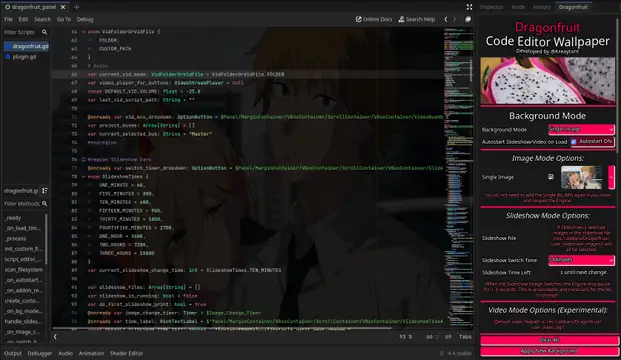
Add a customizable background image, slideshow, or video to your Code Editor's background!
Addon to store data in text or encrypted files, in Godot Engine 4, in an easy way.More info:https://github.com/TheVulcoreTeam/PersistenceYou can download in releases too, if you don't want download all source code:https://github.com/TheVulcoreTeam/Persistence/releases
GodotSize is a simple utility that helps you identify which files in your project are taking up the most space. It checks the size of each file in your project folder (or import data, if you so choose), and displays them in a list, with the ones taking up more space displayed on top.To access it, navigate to Project > Tools and click the "Show Size Map..." option.
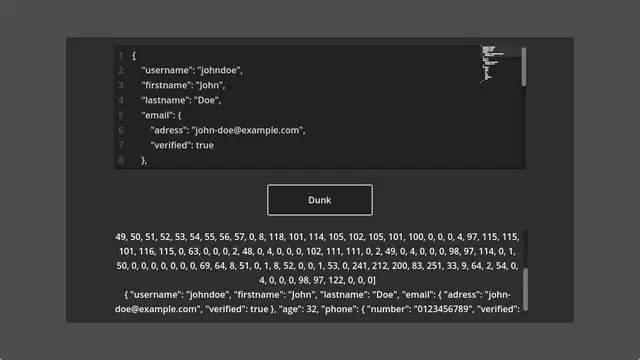
This is a simple BSON serializer and deserializer written in GDScript that is originally designed to be compatible with JSON for Modern C++'s BSON components, but it can be used with any other BSON tool.From bsonspec.org:BSON, short for Binary JSON, is a binary-encoded serialization of JSON-like documents. Like JSON, BSON supports the embedding of documents and arrays within other documents and arrays.This plugin is useful for server/client communication, interacting with MongoDB, reducing JSON file sizes, etc.
SignalBus is a Godot editor plugin that enables the creation of global signals! Global signals may be emitted from and/or connected to any script in your project.