Steamworks API wrapper for Godot Engine (version 3.x)... now for GDNative. Available for the Windows, Linux, and Mac platforms. It is based on GodotSteam 3.27 with Steamworks SDK 1.60.This version is meant for Godot Engine 3.6, but it should work with previous Godot 3.x versions.Previous versions of the plug-in can be found at the GodotSteam repository: https://codeberg.org/godotsteam/godotsteam/releases.You can find the full documentation with tutorials at https://godotsteam.com.
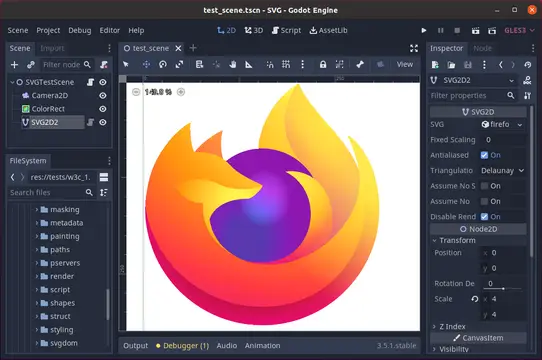
A realtime SVG rendering plugin for Godot that draws SVG paths on the GPU, allowing for infinite scaling with no additional performance cost for zooming in infinitely. When importing a SVG into your project, choose "Import As:" SVG. Then place a "SVG2D" node into your scene to render that SVG.This plugin is in Alpha testing.See full documentation at https://github.com/Giwayume/godot-svg#readmeReport bugs at https://github.com/Giwayume/godot-svg/issues
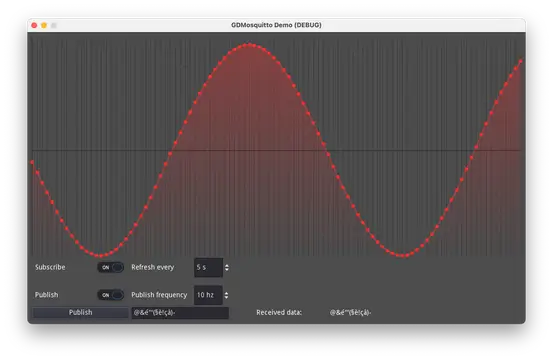
This plugin is deprecated, use GDPaho instead here: https://github.com/GDWired/GDPaho or on the asset store (pending, the link coming soon)Mosquitto library implementation for Godot3.5.1.This plugin provides methods to communicate using the MQTT protocol. MQTT is a lightweight, publish-subscribe, machine-to-machine network protocol for message queuing services.
Arcweave Godot Plugin is a plugin for importing Arcweave Projects from arcweave.com in Godot and using them in your Projects.
This is a godot 3.5.x plugin for easier integration with the Godot Google Play Game Services Android Plugin (available to download on https://github.com/Iakobs/godot-google-play-game-services-android-plugin). While this plugin is by no means necessary to integrate Google play game services to your godot project, it provides a layer of abstraction on top of the android plugin, giving you some interesting aids like code completion or mapping to typed objects.Please, remember that you NEED the android plugin to integrate Game Services.
Steamworks Server API wrapper for Godot Engine (version 3.x)... now for GDNative. Available for the Windows, Linux, and Mac platforms. It is based on GodotSteam Server 3.3 with Steamworks SDK 1.58.This version is meant for Godot Engine 3.5.3, but it should work with previous Godot 3.x versions.Previous versions of the plug-in can be found at the GodotSteam Server repository: https://codeberg.org/godotsteam/godotsteam-server/releases.You can find the full documentation with tutorials at https://godotsteam.com.
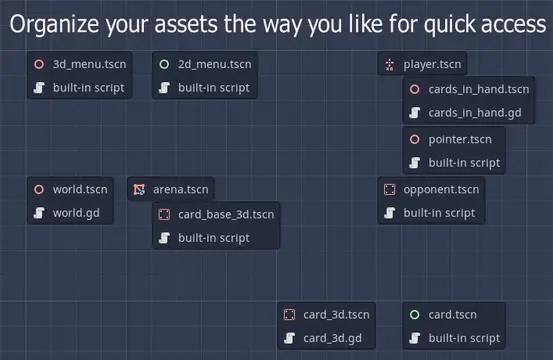
This addon lets you create a "map" of your project to get a better overview and to quickly access your most-used files. It adds a new tab "Project" to your editor.Simply drag and drop files you need to access often into the graph, and organize them how you like. Click on the nodes to access the scenes/scripts. Use CTRL + SPACEBAR from anywhere to access the project map.You can leave feedback or ideas in the Github "Feedback" issue (https://github.com/Yogoda/Project-Map/issues/1).This plugin is open-source, feel free to improve it <3
Plugin for easy screen transitions and node references. (More features to come in the future!)Just install and use it directly in your code:SceneManager.change_scene('res://demo/test.tscn')We also have more customization options!SceneManager.change_scene( 'res://demo/test2.tscn', { "pattern": "scribbles", "pattern_leave": "squares })You can now add references to single important nodes (like Player or Tilemap) for easy access without knowledge of your tree structure.SceneManager.get_entity("Player")Read the Wiki for more details https://github.com/glass-brick/Scene-Manager/wiki
Playgama Bridge is a unified SDK for publishing HTML5 games on various web-platforms.Documentation:https://wiki.playgama.com/playgama/sdk/engines/godot/intro
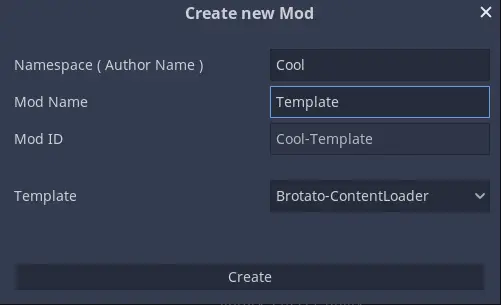
This is a minimal Brotato - Content Loader Template for the Mod Loader Dev Tool.To use this template, follow these steps:1. Ensure that you have the latest version of the Mod Loader Dev Tool installed. You can find it on the Asset Library or the Releases page on GitHub. For detailed installation instructions, please visit the Dev Tool Repository.2. Download or install this template, and place the `Brotato-ContentLoader-minimal` directory in the Dev Tool template directory located at `res://addons/mod_tool/templates`. ( Just click install if you are in the Editor AssetLib )Now you can create a new mod using this template and start developing your Content Loader mod!Enjoy modding with the Mod Loader Dev Tool!
This plugin helps to use the AdMob Plugin created by Poing Studios.Android: https://github.com/Poing-Studios/godot-admob-androidiOS: https://github.com/Poing-Studios/godot-admob-ios
This Godot Addon make advanced variable inspector exporter in Godot easier.More Info: https://github.com/Multirious/gd-advanced-inspector-exporter/blob/main/README.md






![Google Play Games Services [Godot Plugin] hero image](https://img.godotassetlibrary.com/G5yLOvvI_2FSIvrrLp8T1BwJDq7NT5obLrxbkvR3aVg/rs:fit:640:360:0/g:no/aHR0cHM6Ly9yYXcuZ2l0aHVidXNlcmNvbnRlbnQuY29tL0lha29icy9nb2RvdC1nb29nbGUtcGxheS1nYW1lLXNlcnZpY2VzLXBsdWdpbi9tYWluL2Fzc2V0cy9pbWFnZXMvc2NyZWVuc2hvdHMvc2lnbl9pbi5wbmc.webp)
![Google Play Games Services [Godot Plugin] icon image](https://img.godotassetlibrary.com/L_JloshCyS2Y6mnwp9QxuaxxPkhDIpzx5VPBn-rGAjA/rs:fit:50:50:0/g:no/aHR0cHM6Ly9yYXcuZ2l0aHVidXNlcmNvbnRlbnQuY29tL0lha29icy9nb2RvdC1nb29nbGUtcGxheS1nYW1lLXNlcnZpY2VzLXBsdWdpbi9tYWluL2Fzc2V0cy9pbWFnZXMvYnJhbmQvaWNvbi5wbmc.webp)