Pawn is an extendable library for native nodes, such as RigidBody and CharacterBody. It aims to simplify how to lead with speed/velocity and make it easy to set up a Player or an Enemy. Inspired by Unreal Pawn achicheture
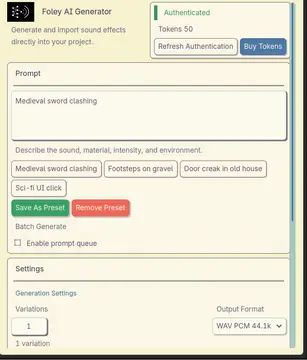
Generate and import Foley AI sound effects directly inside the Godot editor.Features:- Docked generator panel for full Foley generation workflows- Quick Generate dialog from the FileSystem context menu- Variation generation from previously generated clips- Prompt presets, recent prompts, and batch prompt queues- Token/account lookup and retry handling for transient API failures- Import pipeline with deterministic naming and metadata sidecars- Preview, reveal, and copy-path actions for imported clipsRequirements:- Godot 4.6- A Foley AI API keyNotes:- Make sure to create an API key at www.foley-ai.com under "settings" and paste it into the project settings for the plugin.- Output defaults to res://audio/foley_ai- Metadata is stored as hidden .foley.json sidecars beside each generated clip- This is an editor-only addon
OS.execute() lets you get the output, but it blocks the thread.OS.create_process() kicks off a process in the background, but drops the output.Better Processes lets you interactively create a background process.It's built in Rust. Compiles to GDExtention. You won't have to worry about that.Add a ProcessNode. Connect the stdout/stderr signals. Set the cmd,args, start_on_ready (or run "start" as needed) if you need it. If the process is still running when this node is deleted, it will close the child process. Or create a Process object and call `start(cmd,args)`. You'll have to explicitly call `read_stdout()` and `read_stderr`. However the advantage is that when the last reference goes out of scope, it closes the child process.Note: Due to GodotRust's current strictness, you must use the correct type args, no implicit typing. For example:`myProcess.start("ping",["google.com"] as PackedStringArray)`The `as PackedStringArray` is important here.
Steamworks API plug-in for Godot Engine. Available for the Windows 32/64-bit, Linux 32/64-bit platforms, and Mac universal. It is based on GodotSteam 4.15 with Steamworks SDK 1.62.This version is meant for Godot Engine 4.1 to 4.3 but should also work in 4.4; other versions include:Godot 4.4: https://godotengine.org/asset-library/asset/2445 Godot 4.0: https://godotengine.org/asset-library/asset/1768Previous versions of the plug-in can also be found at the GodotSteam repository: https://codeberg.org/godotsteam/godotsteam/releases.You can find the full documentation with tutorials at https://godotsteam.com.It does not require enabling but you may need to restart your editor.
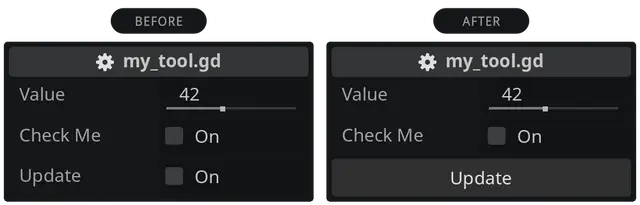
A lightweight Godot addon that turns your bool button-like checkboxes into real buttons. Just in place. Without changing the code logic or having dependencies. It's easier than you might think.Just download the addon and enable it in your project settings. Prefix your bool exports with btn_ and enjoy your buttons. Reload the scene (Scene > Reload Saved Scene) if you see no buttons.For more info see https://github.com/domske/godot-addon-simple-tool-button

Designer-friendly Finite State Machine implemented in "Godotic" wayThis version is only compatible with Godot 4.x, check out godot3(https://github.com/imjp94/gd-YAFSM/tree/godot3) branch for older version- Design StateMachine in a flowchart-like editor- Visualize flow of StateMachine & inspect parameters in realtime- Visualize game/UI state from flowchart- Similar workflow as using AnimationTree, and not required to inherit any custom class, just plug and play- Nested Finite State Machine workflow supported to create complex state machine with ease- As a Resource, StateMachine can be used repeatedly in different scenarios(StateMachinePlayer) and provide different outcome based on the input.- Compact data structure for StateMachine resource filev0.6.2:Fixes StateMachineEditor is_instance_valid check on reconnection Fix StateDirectory.get_current_end() doesn't work as expectedFix FlowChartGrid draw_multiline_colors errorFix StateDirectory.get_current_end() and StateMachinePlayer.path_end_dir(Remove some super._init() for godot 4.1.3v0.6.1:Fix _on_update params error, flowchart grid and popup menusv0.6.0:Port to Godot 4.0v0.5.2:Support sorting transitions.Fix "entered" signal is not emitted and trigger is flushed when StateMachinePlayer started.v0.5.1:Fix condition label in graph not removed as deleted from inspector.Fix output flooded with null exception, when stopping scene in remote debug and when switching between local/remote StateMachinePlayer node.v0.5.0:Support remote debug, simply select any StateMachinePlayer node in remote scene tree to view flow of StateMachine in realtime.Fix StateMachinePlayer's nested triggers are not flushed and some UI bugs.v0.4.1:Fix possible to connect to self when reconnecting, validate StateMachine Resource everytime loaded in editor, and minor improve on UI.v0.4.0:gd-YAFSM now support nested FSM workflow in 0.4.0 & fixed various annoying UI bugsCheck out CHANGELOG(https://github.com/imjp94/gd-YAFSM/blob/master/CHANGELOG.md) for more details*Always backup project files before update
Prototype to implement OpenAI assistance to Godot 4. Inspired by https://github.com/keijiro/AICommand
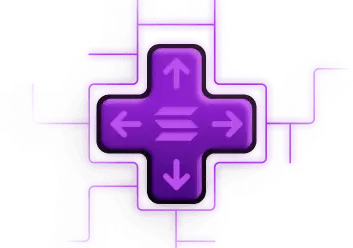
Play Solana Gen 1 Input key mappingRead docs:https://github.com/mira4sol/psg1_input_binding
This tool lets you generate normal and specular maps using Laigter: https://github.com/azagaya/laigter from within the editor.
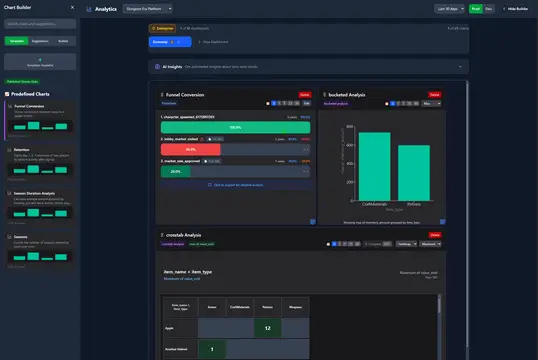
Imagine having a crystal ball that shows exactly how players experience your game, what excites them, what frustrates them, and what keeps them coming back for more. Tokebi Metrics gives Godot developers that power. With just a few clicks, you gain deep, actionable insights into player behavior and game performance. No guesswork, no blind spots.Unlock the secrets behind your players’ journeys and turn raw data into smart decisions that level up your game’s fun and success. All while keeping your players’ privacy front and center. If you want to build games players love and grow your community, Tokebi is your secret weapon.Learn more: https://tokebimetrics.comDocumentation: https://tokebimetrics.com/documentation-guide/godot-plugin-guide
An integration for ink, a powerful narrative scripting language. GodotInk is mainly aimed at C# games, but is completely interoperable from GDScript. - Project home page: https://github.com/paulloz/godot-ink/- Installation: https://github.com/paulloz/godot-ink/wiki#%EF%B8%8F-installation- Quick start guide: https://github.com/paulloz/godot-ink/wiki#-quick-start-guide
This plugin adds ability to preview all available icons in Godot Editor. Can be used to facilitate the process of developing Godot editor plugins without the need to import custom icons or any other design purpose.With this updated version, you can save icons as png or directly copy paste the texture into a property in the inspector.Full documentation has also been added : https://docs.google.com/document/d/1y2aPsn72dOxQ-wBNGqLlQvrw9-SV_z12a1MradBglF4/edit?usp=sharingCredits : The original 3.2 version has been created by Xrayez and I recently took over devellopement.