SaveFlow Lite
An asset by zoroiscrying
Install Asset
Install via Godot
To maintain one source of truth, Godot Asset Library is just a mirror of the old asset library so you can download directly on Godot via the integrated asset library browser
Quick Information

SaveFlow Lite
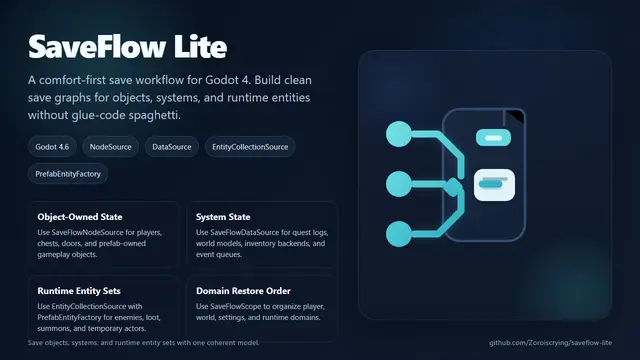
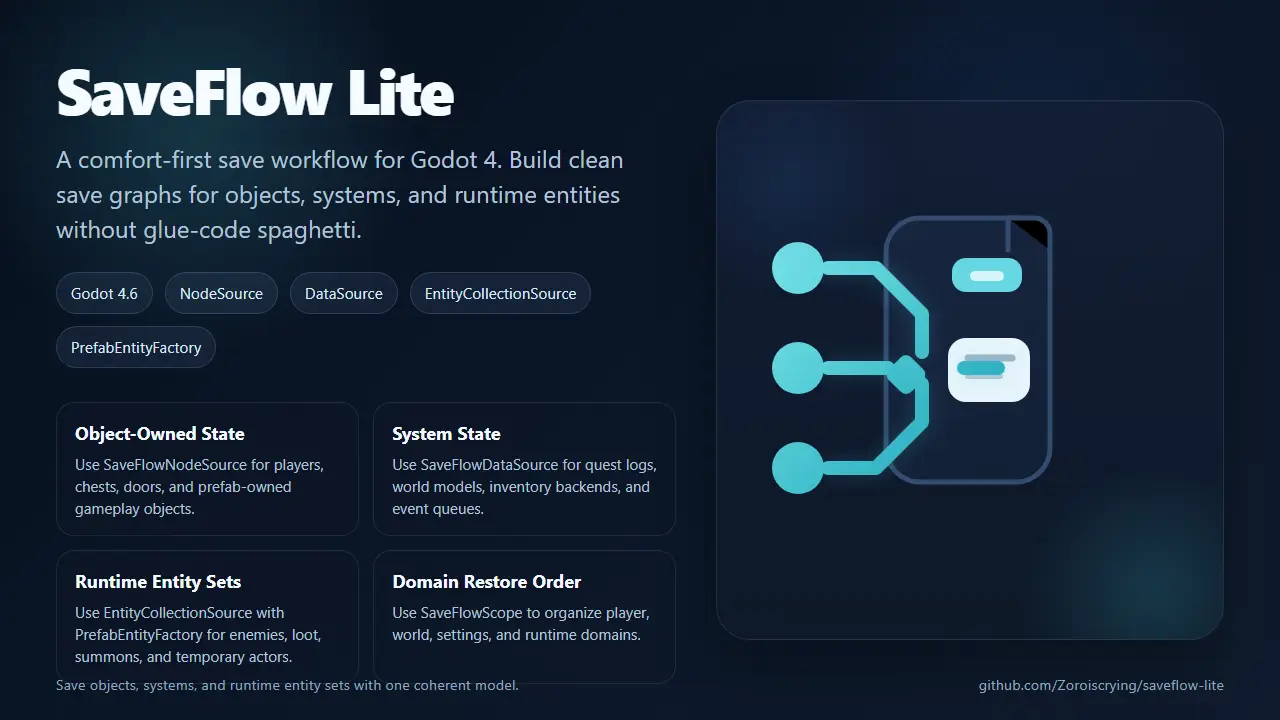
A comfort-first save workflow plugin for Godot 4. Build clean save graphs for objects, systems, and runtime entities without glue-code spaghetti.Suggested Feature List:- SaveFlowNodeSource for object-owned state, built-in node state, and selected child participants- SaveFlowDataSource for system, table, queue, and model-style state- SaveFlowEntityCollectionSource for runtime entity sets- SaveFlowPrefabEntityFactory for default prefab-backed runtime restore- SaveFlowScope for domain boundaries, restore order, and hierarchical save graphs- Slot helpers for save, load, delete, copy, rename, list, and metadata- JSON in editor and binary in export through AUTO format- Inspector previews for main SaveFlow components
Supported Engine Version
4.6
Version String
0.1.0
License Version
MIT
Support Level
community
Modified Date
11 hours ago
Git URL
Issue URL
SaveFlow Lite
SaveFlow Lite is a comfort-first save workflow plugin for Godot 4.
It is built for developers who do not just need to write save files, but need a cleaner way to organize save logic as projects grow.
Status
- Godot:
4.6 - Plugin version:
0.1.0 - License: MIT
- Tests: runtime suite passing locally
Plugin Preview


At A Glance
Use SaveFlow Lite when your project looks like one of these:
| You Need To Save | Typical Example | Recommended Path |
|---|---|---|
| One authored or prefab-owned object | player, chest, NPC, door, lever |
SaveFlowNodeSource |
| One system, model, table, or queue | quest log, inventory backend, world progression table | custom SaveFlowDataSource |
| A changing set of runtime entities | room enemies, dropped loot, summoned units | SaveFlowEntityCollectionSource + SaveFlowPrefabEntityFactory |
If your save must restore several domains in order, add SaveFlowScope as a domain boundary and put the right leaf sources inside it.
Install
- Copy
addons/saveflow_liteinto your projectaddons/folder. - Enable
SaveFlow Litein the Godot plugin settings. - Godot will register the
SaveFlowautoload for you.
Start Here
- Quick component choice: saveflow-quick-selection-map.md
- Recommended integration path: saveflow-recommended-integration.md
- Concept relationship map: saveflow-concept-map.md
- Source tree map: saveflow-source-map.md
- Release notes: CHANGELOG.md
Quick Use Cases
Save one gameplay object
Use SaveFlowNodeSource when the mental model is "save this Godot object".
Examples:
- player state
- a chest that can be opened
- a door or lever with built-in node state
- an NPC with exported gameplay fields and an
AnimationPlayer
Save one game system
Use a custom SaveFlowDataSource when the state belongs to a system rather than one scene node.
Examples:
- quest log
- inventory model
- world progression table
- event queue
Save runtime entities in one area
Use SaveFlowEntityCollectionSource when the set of entities changes over time.
Examples:
- current room enemies
- dropped loot
- summoned units
- temporary spawned world actors
Start with SaveFlowPrefabEntityFactory if one type_key maps cleanly to one prefab scene. Move to a custom SaveFlowEntityFactory only when you need pooling, authored spawn points, or custom lookup rules.
Why SaveFlow Lite
Most save plugins help you serialize data. SaveFlow Lite is aimed at an earlier pain point: structuring save/load code without ending up with glue-code spaghetti.
SaveFlow Lite focuses on:
- clean slot-based save/load APIs
- a scene and node workflow through
save_scene()andload_scene() - a hierarchical save graph workflow through
save_scope()andload_scope() - a node-centric workflow through
SaveFlowNodeSourcefor built-in Godot node state - exported-field persistence by default, instead of hand-written serializer glue
- system and table persistence through custom
SaveFlowDataSource - readable JSON in editor and binary output in exported builds
- lighter boilerplate for multi-system saves
- integration seams for runtime entity factories through
SaveFlowEntityCollectionSource,SaveFlowPrefabEntityFactory, andSaveFlowEntityFactory - a path that can grow into commercial project needs
Current Lite Features
SaveFlow.save_data()andSaveFlow.load_data()for direct payload savesSaveFlow.save_scene()andSaveFlow.load_scene()for scene/node workflowsSaveFlow.save_scope()andSaveFlow.load_scope()for hierarchical save graphsSaveFlow.inspect_scope()for graph diagnosticsSaveFlow.save_nodes()andSaveFlow.load_nodes()for custom saveable-node workflowsSaveFlowNodeSourcefor target-node built-ins and selected child participantsSaveFlowDataSourcefor manager, table, queue, and model-style stateSaveFlowEntityCollectionSourceandSaveFlow.restore_entities()as the runtime-entity seamSaveFlowPrefabEntityFactoryas the default low-boilerplate runtime factory- slot operations: save, load, delete, copy, rename, list
- slot metadata helpers
- safe-write pipeline with temp file replacement
- JSON in editor, binary in export through
AUTOformat - demo sandbox scene
- GdUnit4 runtime tests
Quick Start
Enable the SaveFlow Lite plugin in the Godot editor.
It registers an autoload named SaveFlow.
Option 1: Save a plain dictionary
var game_data := {
    "player": {
        "hp": 100,
        "coins": 42,
    },
    "settings": {
        "language": "zh_CN",
    },
}

var save_result: SaveResult = SaveFlow.save_data(
    "slot_1",
    game_data,
    {
        "display_name": "Slot 1",
        "game_version": "0.1.0",
    }
)

if not save_result.ok:
    push_error(save_result.error_message)

var load_result: SaveResult = SaveFlow.load_data("slot_1")
if load_result.ok:
    var loaded_data: Dictionary = load_result.data
    print(loaded_data)
Option 2: Save a scene through SaveFlowNodeSource
For the common path, you should not need to hand-write custom source classes for every gameplay node.
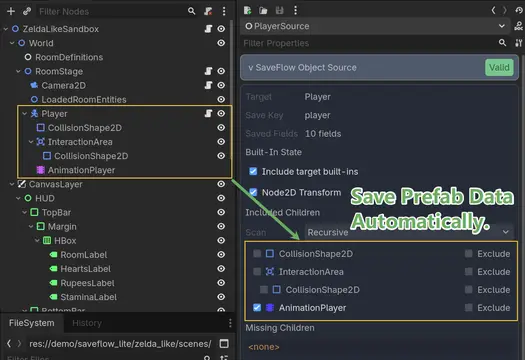
Instead, add a SaveFlowNodeSource as a child and mark the business fields you want persisted with @export or @export_storage.
SaveFlowNodeSource will persist exported fields by default, can include extra target properties, and can also include built-in transform/layout state plus selected child participants such as AnimationPlayer.
Example target node:
extends Node

@export var hp := 100
@export var coins := 42
var runtime_only_cache := {}
Then add a SaveFlowNodeSource under it and configure:
save_key = "player"- leave
property_selection_modeatExported Fields + Additional Properties - use
additional_propertiesonly for extra target properties you want beyond exported fields - use
ignored_propertieswhen a target property should not be saved - optionally include child participants like
AnimationPlayer
When the node source is selected in the editor, the Inspector now shows a compact SaveFlow panel so you can verify target fields, toggle built-ins, pick child participants, and catch missing paths before writing a slot.
Save and load the scene root:
var save_result: SaveResult = SaveFlow.save_scene(
    "slot_1",
    $StateRoot,
    {
        "display_name": "Slot 1",
        "game_version": "0.1.0",
    }
)

var load_result: SaveResult = SaveFlow.load_scene("slot_1", $StateRoot)
This is the main SaveFlow Lite workflow. It is meant to reduce both:
- manual payload assembly
- repeated hand-written save/load glue on every stateful node
- separate "business fields" and "built-ins" save nodes for the same object
If you want full control, save_nodes() and load_nodes() support custom SaveFlowSource subclasses.
Option 2.5: Save a node and selected built-in child parts
When the user mental model is "save this Godot object", the recommended path is now SaveFlowNodeSource.
Use it when:
- the target node has built-in Godot state that should be saved by type
- selected child nodes such as
AnimationPlayershould travel with the same object - you want less hand-written source code for common engine types
Example:
Player
|- AnimationPlayer
|- SaveFlowNodeSource     # exported fields + built-ins + selected child participants
SaveFlowNodeSource binds to one target node and:
- gathers exported target fields by default
- gathers supported built-ins from the target type
- lets you include selected child relative paths such as
AnimationPlayer - stores a structured payload for the target and its included participants
When selected in the editor, SaveFlowNodeSource now shows an inspector panel that lets you:
- verify which target fields will be persisted
- toggle target built-ins on and off
- pick discovered child participants from the target subtree
- verify missing paths before saving
Current first-wave built-ins:
Node2DNode3DControlAnimationPlayer
You can also inspect what SaveFlow will collect before writing a slot:
var inspect_result: SaveResult = SaveFlow.inspect_scene($StateRoot)
if inspect_result.ok:
    print(inspect_result.data)
Option 3: Save a hierarchical graph of systems
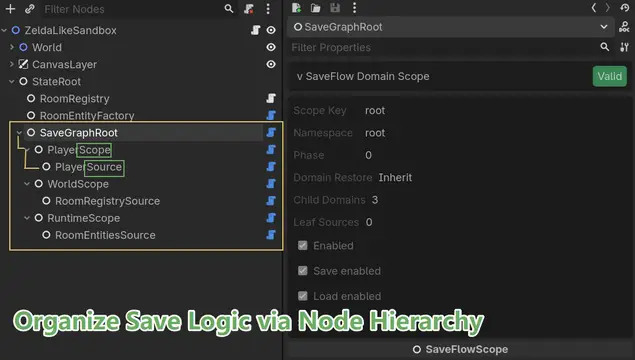
Once a project grows beyond a flat scene save, the main path should move to SaveFlowScope and SaveFlowSource.
SaveFlowScopeorganizes a logical domain such asplayer,world,settings, orspawned_enemiesSaveFlowSourceis a leaf source inside that graphSaveFlowNodeSourcealready works as aSaveFlowSource, so you can reuse the same node-first workflow while changing how systems are organized
Treat SaveFlowScope as a domain boundary, not as a payload serializer.
It answers:
- which systems belong to one gameplay domain
- what order sibling domains should restore in
- how that domain should react to restore errors
It does not replace object ownership and it should not be used as a generic "container that saves things by itself".
Example graph:
SaveGraphRoot
|- PlayerScope
|  |- PlayerCoreSource
|  |- PartyScope
|     |- AriaSource
|     |- BramSource
|- WorldScope
|  |- WorldStateSource
|  |- QuestStateSource
|  |- EnemyScope
|     |- WolfAlphaSource
|     |- SlimeBetaSource
|- SettingsScope
   |- SettingsStateSource
Save and load the graph root:
var save_result: SaveResult = SaveFlow.save_scope(
    "slot_1",
    $StateRoot/SaveGraphRoot,
    {
        "display_name": "Slot 1",
        "game_version": "0.2.0",
    }
)

var load_result: SaveResult = SaveFlow.load_scope(
    "slot_1",
    $StateRoot/SaveGraphRoot,
    true
)
Use this path when:
- one gameplay domain spans multiple nodes
- restore order matters
- you want an explicit save hierarchy instead of one flat
save_keynamespace - runtime entities should eventually be delegated into an entity-factory-driven runtime workflow
You can inspect the graph before saving:
var inspect_result: SaveResult = SaveFlow.inspect_scope($StateRoot/SaveGraphRoot)
if inspect_result.ok:
    print(inspect_result.data)
For runtime entities, SaveFlow should orchestrate and your game systems should create the entities. The recommended seam is now:
SaveFlowEntityCollectionSourcefor the runtime setSaveFlowPrefabEntityFactorywhen onetype_keymaps directly to one prefab sceneSaveFlowEntityFactorywhen the project already owns pooling, authored spawning, or custom lookup logic
That keeps the save graph explicit in the scene while still letting the project own runtime spawning.
SaveFlowEntityCollectionSource now exposes three restore policies:
Apply ExistingOnly update entities the factory can already find.Create MissingUpdate existing entities and spawn missing ones through the factory. This is the default.Clear And RestoreClear the target container first, then rebuild the saved set through the factory.
failure_policy controls failure behavior:
Report Only: SaveFlow restores what it can and reports the failures in the resultFail On Missing Or Invalid: the load fails if any entity is missing or cannot be restored
Option 4: Save non-node system state through SaveFlowDataSource
Not every commercial save problem lives on scene nodes. Some state belongs to:
- quest managers
- inventory backends
- region tables
- event queues
- profile registries
That is what SaveFlowDataSource is for.
The recommended path is a custom SaveFlowDataSource.
Recommended scene workflow:
# world_data_source.gd
extends SaveFlowDataSource

@export_node_path("Node") var world_state_path: NodePath

func gather_data() -> Dictionary:
    var world_state := get_node_or_null(world_state_path)
    if world_state == null:
        return {}
    return Dictionary(world_state.system_state).duplicate(true)

func apply_data(data: Dictionary) -> void:
    var world_state := get_node_or_null(world_state_path)
    if world_state == null:
        return
    world_state.system_state = data.duplicate(true)
SaveFlowDataSource can also provide editor preview metadata through
describe_data_plan().
That preview uses a fixed top-level schema:
validreasonsource_keydata_versionphaseenabledsave_enabledload_enabledsummarysectionsdetails
Only those top-level fields are rendered by the built-in preview.
If you want custom preview content, put it inside details instead of adding
new top-level keys.
Then wire it into the graph like any other source:
SaveGraphRoot
|- WorldScope
   |- WorldDataSource
This is the preferred path when the state is:
- not naturally represented by exported node fields
- owned by a manager or service
- stored in a dictionary, table, queue, or registry
The main path is a custom SaveFlowDataSource.
Separate adapter-node patterns are possible, but they are no longer the recommended starting point.
Demo
Open:
res://demo/saveflow_lite/plugin_sandbox/plugin_sandbox.tscnres://demo/saveflow_lite/complex_sandbox/complex_sandbox.tscn
The sandbox demonstrates:
- mutate local state
- save into a slot
- load the slot back
- list slots
- delete the slot
- node-source-driven persistence using exported fields
The complex sandbox demonstrates:
- a
SaveScopegraph over player, world, settings, party, and enemy domains - how a larger save hierarchy can stay readable
- the current limitation around missing runtime entities
- why entity collections need an entity factory integration seam
Related files:
Testing
Import the project headlessly:
.\tools\import_project.ps1
Run runtime tests:
.\tools\run_gdunit.ps1 -ContinueOnFailure
Current runtime coverage includes:
- JSON save/load
- binary save/load
- slot copy/rename/delete
- source collection and restore
- node-source-driven scene save/load
- scene inspection and exported-field collection
- hierarchical save graph gather/apply
- strict graph failure when a source target disappears
- data-source graph save/load
- entity collection restoration delegation
C# Direction
C# is part of the product direction, but the first-class wrapper layer is not implemented yet.
The intended shape is:
SaveFlow.SaveData(...)SaveFlow.LoadData(...)SaveFlow.SaveNodes(...)SaveFlow.LoadNodes(...)
The goal is not just "call the GDScript autoload from C#". The goal is a wrapper that feels idiomatic for Godot C# users and supports stronger typing over time.
Lite vs Pro Direction
SaveFlow Lite should solve:
- clean save architecture for jam and lightweight projects
- slot handling without boilerplate
- practical node/system save workflow
- explicit save graphs for multi-system authored state
- manager and table state through a first-class data-source path
SaveFlow Pro should solve:
- migration workflow
- richer debugging and inspection
- stronger commercial-project safety
- advanced recovery, async, encryption, and long-lived project ergonomics
- runtime entity sync policies and more complete world reconstruction
Project Status
Current status:
- brand renamed to
SaveFlow Lite - main runtime entry is
SaveFlow - demo scene is working
- runtime tests are passing
- C# wrapper layer is planned, not shipped
A comfort-first save workflow plugin for Godot 4. Build clean save graphs for objects, systems, and runtime entities without glue-code spaghetti.
Suggested Feature List:
- SaveFlowNodeSource for object-owned state, built-in node state, and selected child participants
- SaveFlowDataSource for system, table, queue, and model-style state
- SaveFlowEntityCollectionSource for runtime entity sets
- SaveFlowPrefabEntityFactory for default prefab-backed runtime restore
- SaveFlowScope for domain boundaries, restore order, and hierarchical save graphs
- Slot helpers for save, load, delete, copy, rename, list, and metadata
- JSON in editor and binary in export through AUTO format
- Inspector previews for main SaveFlow components
Reviews
Quick Information
SaveFlow Lite
A comfort-first save workflow plugin for Godot 4. Build clean save graphs for objects, systems, and runtime entities without glue-code spaghetti.Suggested Feature List:- SaveFlowNodeSource for object-owned state, built-in node state, and selected child participants- SaveFlowDataSource for system, table, queue, and model-style state- SaveFlowEntityCollectionSource for runtime entity sets- SaveFlowPrefabEntityFactory for default prefab-backed runtime restore- SaveFlowScope for domain boundaries, restore order, and hierarchical save graphs- Slot helpers for save, load, delete, copy, rename, list, and metadata- JSON in editor and binary in export through AUTO format- Inspector previews for main SaveFlow components
Supported Engine Version
4.6
Version String
0.1.0
License Version
MIT
Support Level
community
Modified Date
11 hours ago
Git URL
Issue URL