tkCRTshader(emulator)
An asset by TsuishiKen
Install Asset
Install via Godot
To maintain one source of truth, Godot Asset Library is just a mirror of the old asset library so you can download directly on Godot via the integrated asset library browser

Quick Information

tkCRTshader(emulator)
- Not a look-alike filter: it builds a real NTSC signal, degrades it as RF reception, then demodulates. Artefacts are by-products.- Phosphor mask: slot, aperture grille or shadow mask.- RF loss: tuning error, phase noise, sync jitter, snow, AGC wobble.- Beam misalignment and curvature give a real tube's false colour.- Interlaced even/odd fields.- Vertical (tate) games rotate the whole plane, scanlines and mask.- No frame drops in normal use.- Drop-in node, 48 parameters, 5 presets, MIT.
Supported Engine Version
4.6
Version String
1.0.0
License Version
MIT
Support Level
community
Modified Date
10 hours ago
Git URL
Issue URL
CRT Shader for Godot
English | 日本語
A two-stage NTSC/CRT television shader for Godot 4, packaged as a drop-in
CRTScreen node.

- Not a simulator that imitates how a CRT looks. It builds a real RF signal, receives it, and lights an RGB phosphor mask with a beam. The artefacts are a by-product of that process, not effects painted on top.
- The phosphor mask arrangement is selectable: slot mask, aperture grille or shadow mask.
- Signal degradation of RF reception is reproducible: tuning error, colour-burst phase noise, horizontal-sync jitter, ghosting, snow and AGC wobble, all scaled by a single master amount.
- Adjusting the slight misalignment and bending of the beam — convergence error and tube curvature — produces the same false colours as a real monitor.
- Interlace is supported: even and odd lines are drawn on alternating fields.
- Vertical (tate) games rotate the plane exactly as a real monitor would be turned on its side; scanlines and the phosphor mask rotate with the tube.
- No dropped frames in normal use, unless you go looking for unusual parameter combinations. The expensive Stage 1 filter runs at the signal resolution, so its cost does not grow with window size.
- 48 parameters in one inspectable
CRTSettingsresource, 5 presets, and JSON round-trip for your own settings screens. - Works in the editor: assign a
CRTSettingsresource and the viewport updates live while you drag sliders.
This is the CRT emulator from TurnTV, extracted and rebuilt as a reusable Godot addon.
How it works
Most CRT filters paint scanlines and a mask on top of a finished image. This one reproduces the mechanism instead, and lets the artefacts fall out of it:
- The picture is converted to YIQ and modulated onto an NTSC colour subcarrier — a real composite signal is built.
- That signal is degraded the way a received RF signal is: imperfect Y/C separation, limited Y/I/Q bandwidth, tuning error, colour-burst phase noise, horizontal-sync PLL residual, ghosting, snow and AGC wobble.
- It is demodulated again. The rainbow false colours, dot crawl and colour bleeding you see are what the round trip failed to recover — not effects painted on afterwards.
- The recovered picture is written by a beam onto an RGB phosphor mask. The beam widens with brightness, and you choose how the phosphor stripes are arranged: slot, aperture grille or shadow mask.
- A slight misalignment and bending of the beam — convergence error and tube curvature — produce the same coloured edges a real monitor shows.
- Interlace draws the even and odd lines on alternating fields, 480i style.
- For vertical games the whole plane rotates, exactly like turning a real monitor on its side (see Vertical (tate) games).
Stage 1 covers cross-colour and cross-luminance, chroma delay, Y/I/Q bandwidth limiting, dot crawl, ghosting, analogue noise, horizontal-sync jitter, RF tuning error, colour-burst phase noise, snow and AGC wobble. Stage 2 covers luminance-dependent beam width, phosphor masks, gamma, barrel curvature, rounded corners, vignette, bezel darkening, 480i field display, horizontal sharpening, RGB convergence error and halation.
Requirements
- Godot 4.6 or later
- Both the Forward+ and Compatibility renderers work. The demo project uses Compatibility so it runs on older GPUs.
Installation
From the Asset Library tab in Godot, or by copying the addons/crt_shader
folder into your project.
No plugin activation is needed: CRTScreen, CRTSettings and CRTPresets
register themselves through class_name, so CRTScreen appears in the Create
New Node dialog right away. The folder is self-contained and refers to its own
files relatively, so it can be moved or renamed — it does not have to live under
addons/.
The Asset Library download contains only the addon. Clone the repository to get the demo and the documentation.
Quick start
Show a texture
var crt := CRTScreen.new()
crt.set_anchors_preset(Control.PRESET_FULL_RECT)
crt.source_texture = preload("res://art/title.png")
add_child(crt)
Run your game through it
Everything under get_content_root() is drawn at the signal resolution and fed
through both shader stages:
@onready var crt: CRTScreen = $CRTScreen

func _ready() -> void:
    crt.signal_resolution = Vector2i(320, 240)
    crt.get_content_root().add_child(preload("res://game/game.tscn").instantiate())
Content added this way is not stored in the scene file. To keep your game in a
saved scene instead, render it in your own SubViewport and feed that texture
in:
crt.source_texture = $GameViewport.get_texture()
Change the look
crt.apply_preset(CRTPresets.FAMICOM_RF)   # a whole preset
crt.set_param("scanline_strength", 0.55)  # one parameter
For inspector editing, assign a CRTSettings resource to the node's
Settings property (New CRTSettings in the inspector). Every parameter then
appears grouped in the inspector and updates the screen live. Saving that
resource as a .tres gives you a reusable look.
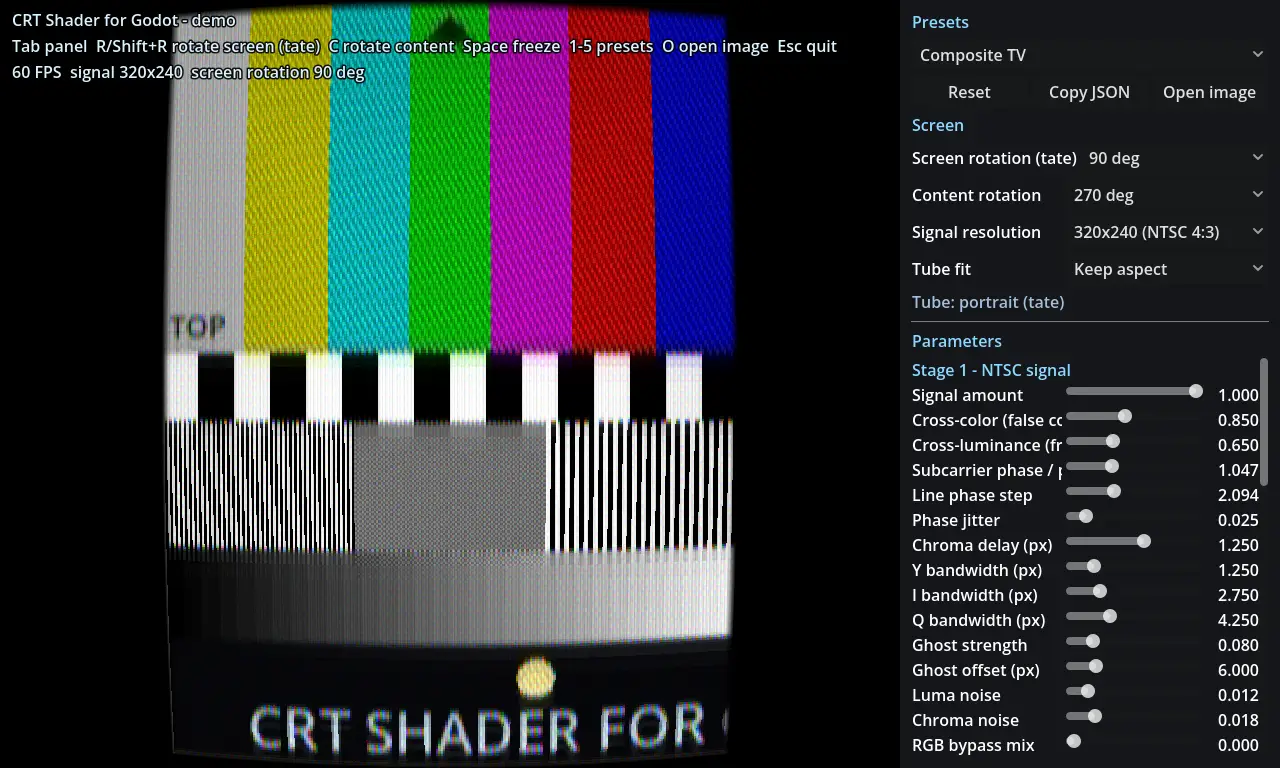
Vertical (tate) games
Two independent quarter-turn rotations cover every arrangement:
| Property | What turns | Scanlines |
|---|---|---|
screen_rotation |
The whole CRT plane, mask and scanlines included | Follow the tube |
content_rotation |
Only the picture inside the tube | Stay horizontal |
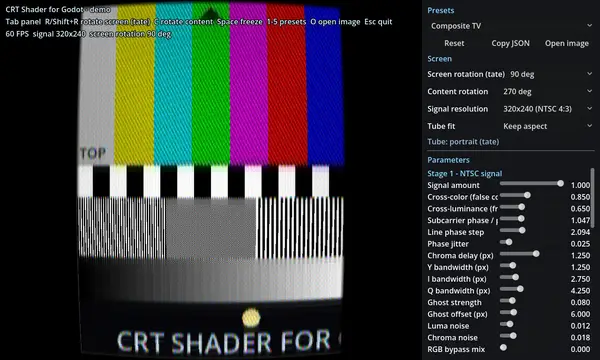
The classic vertical arcade setup is a landscape tube turned on its side with the game drawn rotated to match. In Godot that is:
crt.screen_rotation = CRTScreen.Rotation.DEG_90   # lay the tube on its side
crt.content_rotation = CRTScreen.Rotation.DEG_270 # draw the game upright

The result is a portrait picture with vertical scanlines and a vertical phosphor mask, which is what a rotated monitor actually looks like — not a portrait crop of a horizontal CRT.
A quarter turn transposes the drawing area, so get_content_size() returns
240x320 for a 320x240 signal, and the content_size_changed signal tells your
game to lay itself out for the new shape. If your game is already authored
portrait, set signal_resolution to the portrait size and use screen_rotation
alone.
display_fit controls what happens when the Control is not the same shape as
the tube: KEEP_ASPECT (default) fits the tube and fills the rest with
letterbox_color; STRETCH covers the whole Control. Set screen_aspect
explicitly for non-square pixels, for example 4.0 / 3.0 for a 256x224 picture
on a 4:3 television.
Presets
| Preset | Look |
|---|---|
COMPOSITE_TV |
The defaults: a composite-video television |
CRT_STUDIO |
Clean sharp monitor; no RF instability, more halation |
FAMICOM_RF |
Antenna-socket console: false colour, snow, sync instability |
RGB_DIRECT |
RGB/SCART: no composite artefacts, still a CRT |
LIGHTWEIGHT |
Scanlines and mask only, for weak GPUs |
Presets only set video parameters, and a preset that omits a parameter leaves it at its default.
Parameters
All 48 parameters are documented in docs/PARAMETERS.md (Japanese: docs/PARAMETERS_ja.md). The shader source comments are in Japanese and go into the signal-processing detail behind each one.
Performance
Stage 1 runs a 17-tap FIR filter per pixel at the signal resolution, so it costs the same whether the window is 640x480 or 4K. Stage 2 runs per displayed pixel and adds up to eight extra texture samples (four for halation, two for convergence, two for sharpening).
On weak GPUs, start with LIGHTWEIGHT. To tune by hand, in this order:
halation_strengthto 0 (removes four samples)convergence_x_pxandconvergence_y_pxto 0 (removes two)horizontal_sharpnessto 0 (removes two)signal_amountto 0 (skips the whole 17-tap filter)- Reduce
signal_resolutionor the size of the Control
Demo
Open the project in Godot and run it. Keys:
| Key | Action |
|---|---|
| Tab / F1 | Show or hide the parameter panel |
| R / Shift+R | Rotate the CRT plane (tate mode) |
| C | Rotate the content |
| Space | Freeze the animation |
| 1-5 | Apply a preset |
| O | Open an image file |
| P | Back to the test pattern |
| Esc | Quit |
An image file dropped on the window is displayed through the CRT. Copy JSON puts the current settings on the clipboard, ready to paste into your own project.
Demo environment variables
Used for scripted screenshots; normal use does not need them.
| Variable | Behaviour |
|---|---|
CRTSHADER_SHOT=<PNG path> |
Save a screenshot and quit |
CRTSHADER_SHOT_FRAME=<n> |
Which frame to capture (default 60) |
CRTSHADER_CLEAN=1 |
Hide the UI for a clean capture |
CRTSHADER_SCREEN_ROTATION=<deg> |
Start with the tube rotated |
CRTSHADER_CONTENT_ROTATION=<deg> |
Start with the content rotated |
CRTSHADER_LANG=en|ja |
Override the UI language |
Credits
The shaders were written for a retro game in development, first released in TurnTV, and extended with techniques inspired by:
- ShaderGlass — preset workflow, horizontal sharpness, RGB convergence error, highlight halation.
- famicom-rf-hackrf-decoder — horizontal-sync PLL residual, RF tuning error, colour-burst phase instability, AGC variation, RF snow, post-demodulation hue and saturation.
The implementation is original; no source code from those projects was copied.
License
MIT. See LICENSE.
- Not a look-alike filter: it builds a real NTSC signal, degrades it as RF reception, then demodulates. Artefacts are by-products.
- Phosphor mask: slot, aperture grille or shadow mask.
- RF loss: tuning error, phase noise, sync jitter, snow, AGC wobble.
- Beam misalignment and curvature give a real tube's false colour.
- Interlaced even/odd fields.
- Vertical (tate) games rotate the whole plane, scanlines and mask.
- No frame drops in normal use.
- Drop-in node, 48 parameters, 5 presets, MIT.
Reviews
Quick Information
tkCRTshader(emulator)
- Not a look-alike filter: it builds a real NTSC signal, degrades it as RF reception, then demodulates. Artefacts are by-products.- Phosphor mask: slot, aperture grille or shadow mask.- RF loss: tuning error, phase noise, sync jitter, snow, AGC wobble.- Beam misalignment and curvature give a real tube's false colour.- Interlaced even/odd fields.- Vertical (tate) games rotate the whole plane, scanlines and mask.- No frame drops in normal use.- Drop-in node, 48 parameters, 5 presets, MIT.
Supported Engine Version
4.6
Version String
1.0.0
License Version
MIT
Support Level
community
Modified Date
10 hours ago
Git URL
Issue URL