


Template for new Godot games. It has a main menu, options menus, pause menu, credits, scene loader, extra tools, and an example game scene.Created in collaboration with members of the Godot Wild Jam community.For usage information, visit the following: https://github.com/Maaack/Godot-Game-Template/blob/main/README.md#usage
Advanced Movement System Godot (AMSG) Template
An asset by ywmaa
Quick Information

Advanced Movement System Godot (AMSG) Template
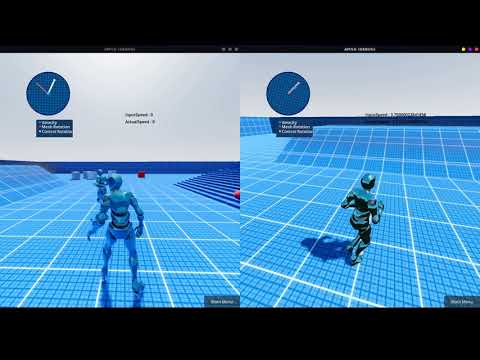
This project is a template for creating advanced Third/First Person movement in GodotSupports CharacterBody3D, and RigidBody3D.Current Features :Stance System :StandCrouchGait System :WalkRunSprintView Mode System :First PersonThird PersonSmooth Rotation System :Velocity DirectionLooking Direction : In Place Rotation and orientation warpingInAir RotationAim RotationDistance Matching :Stop AnimationOrientation warpingMotion warpingCamera system :FOV change on speedCamera Inertia Flashlight(G) To toggle High graphics : SDFGI (Global illumination),SSIL, SSAO,SSR,Glowgithub : https://github.com/ywmaa/Advanced-Movement-System-Godot
Supported Engine Version
4.3
Version String
0.95
Support Level
community
Modified Date
1 year ago
Git URL
Issue URL
Welcome to the Advanced-Movement-System-Godot
The Project is made using Godot 4
you can get Godot 4.0 Stable here : https://godotengine.org/
Watch this video for preview :
(adding to existing project)
1- copy the files to your Godot project
2- copy and paste the following into your project's "project.godot" file
[input]

forward={
"deadzone": 0.5,
"events": [Object(InputEventKey,"resource_local_to_scene":false,"resource_name":"","device":0,"window_id":0,"store_command":true,"alt_pressed":false,"shift_pressed":false,"meta_pressed":false,"command_pressed":false,"pressed":false,"keycode":87,"physical_keycode":0,"unicode":0,"echo":false,"script":null)
]
}
back={
"deadzone": 0.5,
"events": [Object(InputEventKey,"resource_local_to_scene":false,"resource_name":"","device":0,"window_id":0,"store_command":true,"alt_pressed":false,"shift_pressed":false,"meta_pressed":false,"command_pressed":false,"pressed":false,"keycode":83,"physical_keycode":0,"unicode":0,"echo":false,"script":null)
]
}
left={
"deadzone": 0.5,
"events": [Object(InputEventKey,"resource_local_to_scene":false,"resource_name":"","device":0,"window_id":0,"store_command":true,"alt_pressed":false,"shift_pressed":false,"meta_pressed":false,"command_pressed":false,"pressed":false,"keycode":65,"physical_keycode":0,"unicode":0,"echo":false,"script":null)
]
}
right={
"deadzone": 0.5,
"events": [Object(InputEventKey,"resource_local_to_scene":false,"resource_name":"","device":0,"window_id":0,"store_command":true,"alt_pressed":false,"shift_pressed":false,"meta_pressed":false,"command_pressed":false,"pressed":false,"keycode":68,"physical_keycode":0,"unicode":0,"echo":false,"script":null)
]
}
jump={
"deadzone": 0.5,
"events": [Object(InputEventKey,"resource_local_to_scene":false,"resource_name":"","device":0,"window_id":0,"store_command":true,"alt_pressed":false,"shift_pressed":false,"meta_pressed":false,"command_pressed":false,"pressed":false,"keycode":32,"physical_keycode":0,"unicode":0,"echo":false,"script":null)
]
}
sprint={
"deadzone": 0.5,
"events": [Object(InputEventKey,"resource_local_to_scene":false,"resource_name":"","device":0,"window_id":0,"store_command":true,"alt_pressed":false,"shift_pressed":false,"meta_pressed":false,"command_pressed":false,"pressed":false,"keycode":16777237,"physical_keycode":0,"unicode":0,"echo":false,"script":null)
]
}
aim={
"deadzone": 0.5,
"events": [Object(InputEventMouseButton,"resource_local_to_scene":false,"resource_name":"","device":0,"window_id":0,"store_command":true,"alt_pressed":false,"shift_pressed":false,"meta_pressed":false,"command_pressed":false,"button_mask":0,"position":Vector2(0, 0),"global_position":Vector2(0, 0),"factor":1.0,"button_index":2,"pressed":false,"double_click":false,"script":null)
]
}
crouch={
"deadzone": 0.5,
"events": [Object(InputEventKey,"resource_local_to_scene":false,"resource_name":"","device":0,"window_id":0,"store_command":true,"alt_pressed":false,"shift_pressed":false,"meta_pressed":false,"command_pressed":false,"pressed":false,"keycode":16777238,"physical_keycode":0,"unicode":0,"echo":false,"script":null)
]
}
interaction={
"deadzone": 0.5,
"events": [Object(InputEventKey,"resource_local_to_scene":false,"resource_name":"","device":0,"window_id":0,"store_command":true,"alt_pressed":false,"shift_pressed":false,"meta_pressed":false,"command_pressed":false,"pressed":false,"keycode":70,"physical_keycode":0,"unicode":0,"echo":false,"script":null)
]
}
switch_camera_view={
"deadzone": 0.5,
"events": [Object(InputEventKey,"resource_local_to_scene":false,"resource_name":"","device":0,"window_id":0,"store_command":true,"alt_pressed":false,"shift_pressed":false,"meta_pressed":false,"command_pressed":false,"pressed":false,"keycode":67,"physical_keycode":0,"unicode":0,"echo":false,"script":null)
]
}
ragdoll={
"deadzone": 0.5,
"events": [Object(InputEventKey,"resource_local_to_scene":false,"resource_name":"","device":0,"window_id":0,"store_command":true,"alt_pressed":false,"shift_pressed":false,"meta_pressed":false,"command_pressed":false,"pressed":false,"keycode":88,"physical_keycode":0,"unicode":0,"echo":false,"script":null)
]
}
flashlight={
"deadzone": 0.5,
"events": [Object(InputEventKey,"resource_local_to_scene":false,"resource_name":"","device":0,"window_id":0,"store_command":true,"alt_pressed":false,"shift_pressed":false,"meta_pressed":false,"command_pressed":false,"pressed":false,"keycode":76,"physical_keycode":0,"unicode":0,"echo":false,"script":null)
]
}
EnableSDFGI={
"deadzone": 0.5,
"events": [Object(InputEventKey,"resource_local_to_scene":false,"resource_name":"","device":0,"window_id":0,"store_command":true,"alt_pressed":false,"shift_pressed":false,"meta_pressed":false,"command_pressed":false,"pressed":false,"keycode":71,"physical_keycode":0,"unicode":0,"echo":false,"script":null)
]
}
exit={
"deadzone": 0.5,
"events": [Object(InputEventKey,"resource_local_to_scene":false,"resource_name":"","device":0,"window_id":0,"store_command":true,"alt_pressed":false,"shift_pressed":false,"meta_pressed":false,"command_pressed":false,"pressed":false,"keycode":16777217,"physical_keycode":0,"unicode":0,"echo":false,"script":null)
]
}
fire={
"deadzone": 0.5,
"events": [Object(InputEventMouseButton,"resource_local_to_scene":false,"resource_name":"","device":-1,"window_id":0,"store_command":true,"alt_pressed":false,"shift_pressed":false,"meta_pressed":false,"command_pressed":false,"button_mask":0,"position":Vector2(0, 0),"global_position":Vector2(0, 0),"factor":1.0,"button_index":1,"pressed":false,"double_click":false,"script":null)
]
}
3- autoload the "Global.gd" GDscript, you can find it in "res://addons/AMSG/Global.gd"
This project is a template for creating advanced Third/First Person movement in GODOT
You may use it in any other camera type like RTS, but you will need to tweak it yourself.
Animation Retargeting in Godot 4 tutroial :
https://godotengine.org/article/animation-retargeting-in-godot-4-0 .
For how to fix the armature wrong bones orientation and create a control rig for mixamo character in blender to animate the character :
https://youtu.be/zfaskQ2BK1s .
Guide for combining animations from mixamo
https://youtu.be/3NrsSdEUSWI .
Guide for importing animations from blender (If you don't have a ready game rig (Control Rig only)
https://youtu.be/qwz9aPdVoFg .
if you don't know what does this (game rig,control rig) mean, then this will help
https://youtube.com/playlist?list=PLdcL5aF8ZcJvCyqWeCBYVGKbQgrQngen3) .
How to Move (Key Bindings) :
(W,A,S,D) Move In The Four Directions
(Shift) Run
(Shift) Sprint (Press Shift Again before the character returns to walking (0.4 second))
(C) Long Press : Switch First/Third Person View
(C) One Press : Switch Camera Angle (Right Shoulder,Left Shoulder,Head(Center) )
(Space) Jump
(CTRL) Crouch/UnCrouch
(F) Interaction
(L) Flashlight
(G) To toggle High graphics : SDFGI (Global illumination),SSIL, SSAO,SSR,Glow
This project is a template for creating advanced Third/First Person movement in Godot Supports CharacterBody3D, and RigidBody3D. Current Features : Stance System : Stand Crouch Gait System : Walk Run Sprint View Mode System : First Person Third Person Smooth Rotation System : Velocity Direction Looking Direction : In Place Rotation and orientation warping InAir Rotation Aim Rotation Distance Matching : Stop Animation Orientation warping Motion warping Camera system : FOV change on speed Camera Inertia Flashlight (G) To toggle High graphics : SDFGI (Global illumination),SSIL, SSAO,SSR,Glow github : https://github.com/ywmaa/Advanced-Movement-System-Godot
Reviews
0 total reviews
Quick Information
Advanced Movement System Godot (AMSG) Template
This project is a template for creating advanced Third/First Person movement in GodotSupports CharacterBody3D, and RigidBody3D.Current Features :Stance System :StandCrouchGait System :WalkRunSprintView Mode System :First PersonThird PersonSmooth Rotation System :Velocity DirectionLooking Direction : In Place Rotation and orientation warpingInAir RotationAim RotationDistance Matching :Stop AnimationOrientation warpingMotion warpingCamera system :FOV change on speedCamera Inertia Flashlight(G) To toggle High graphics : SDFGI (Global illumination),SSIL, SSAO,SSR,Glowgithub : https://github.com/ywmaa/Advanced-Movement-System-Godot
Supported Engine Version
4.3
Version String
0.95
Support Level
community
Modified Date
1 year ago
Git URL
Issue URL
Related Assets
More in Templates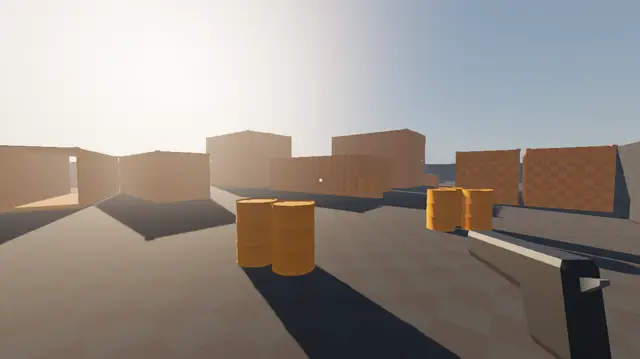

An FPS multiplayer template with everything you'd need to get started. Includes a full map with custom 3d assets.Features:- Multiplayer- Full map with custom assets- Controller support (including menus)- Cinematic Main menu- Pause menu- Options menu with: - Fullscreen - Fps and ping counters - Mouse and controller sensitivity- Bullets wall collision- Random respawn on map- Adjusted light and environment ("better graphics")QOL:- Configurable random respawns Player > Inspector > Spawns- Tooltips for exported variablesThe 3d assets are made by me and go by the same MIT license, so you are free to use them in your commercial games.Credits:- Textures used are made by https://kenney.nl/ and pre-packaged for Godot by Calinou- The base multiplayer functionality was made by following a tutorial from DevLogLogan https://youtu.be/n8D3vEx7NAE
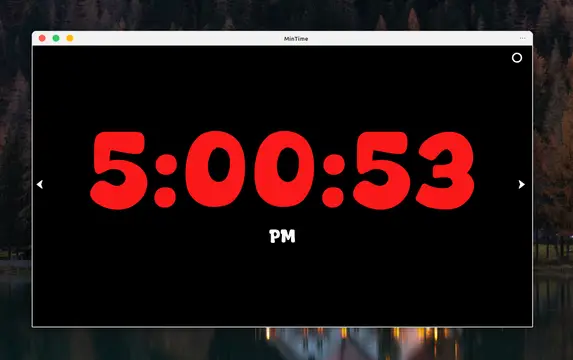

I made this simple clock desktop app for my personal use to display the time. It has stopwatch and timer.I was experimenting use of Godot to build the GUI applications and I had fun while building this. Hope this project can be helpful for some people who are just starting. Also don't forget to go to my Github page show some love, I have some cool projects there that I am working on.


FeaturesInventory Management: Players can collect and manage a variety of items within their inventory.Item Interaction: Items can be used or selected to interact with other elements in the game world.Crafting System: Players can craft new items by combining collected items according to specific recipes.Interactive Environment: The system includes interactive doors and drawers that can be locked/unlocked and opened/closed by dragging with the mouse. There is also a ladder and elevator system.Camcorder with Night Vision: A camcorder equipped with night vision that players can use and recharge, adding a layer of depth to gameplay.