Godot Project Doctor Mini
An asset by Vav_Labs
Install Asset
Install via Godot
To maintain one source of truth, Godot Asset Library is just a mirror of the old asset library so you can download directly on Godot via the integrated asset library browser
Quick Information


Godot Project Doctor Mini
Godot Project Doctor Mini is a Godot 4 editor plugin that scans a project and generates Markdown and JSON diagnostic reports. It runs as a dock inside the Godot editor and also supports headless operation for CI pipelines.Checks performed:- Missing scripts: scene and resource references to scripts that no longer exist.- Broken resource paths: referenced res:// paths that cannot be found on disk.- Large textures: textures above a configurable size threshold.- Heavy scenes: scenes with node counts above a configurable threshold.- Scripts using _process(): marks scripts with per-frame work for manual review.- Empty folders: helps keep the project tree tidy.- Export preset readiness: detects missing export presets and obvious preset gaps.- Import settings issues: flags unreadable .import files, missing source references, and large textures in raw import mode.Features:- One-click scan from the Project Doctor dock.- Severity summary (errors, warnings, info) with severity filters.- Settings panel for thresholds, ignore patterns, baseline path, and experimental checks.- Direct buttons to open the generated Markdown and JSON reports.- Headless scan script for local automation and CI.- Reusable GitHub Actions workflow with artifact uploads and optional PR comment summaries.- Baseline file and ignore pattern support to suppress accepted findings.Each scan writes reports/project-doctor-report.md and reports/project-doctor-report.json. The Markdown report uses collapsible sections and renders cleanly on GitHub. The JSON report uses a stable schema suitable for CI automation.The plugin is editor-only and does not appear in the running game. Scans a 500-file project in under one second on a typical machine.
Supported Engine Version
4.6
Version String
0.2.8
License Version
MIT
Support Level
community
Modified Date
2 days ago
Git URL
Issue URL
Godot Project Doctor Mini



Godot Project Doctor Mini is a small Godot 4 editor plugin that scans a project and generates simple Markdown and JSON diagnostic reports.
It helps catch common project hygiene issues such as missing scripts, broken resource paths, oversized textures, heavy scenes, empty folders, and missing export presets.
Status
This project is ready for public portfolio and Asset Library review. The scanner is intentionally conservative and should not be treated as a full dependency graph analyzer, but the repo includes CI automation, a standalone demo project, regression coverage, and a measured benchmark path.
Why I Built This
Godot projects can accumulate broken scene references, old assets, oversized textures, and export-readiness gaps quietly. I built Project Doctor Mini as a small editor tool that makes those issues visible early, both inside the editor and in pull requests.
The implementation favors a few engineering choices:
- Schema-based reports keep the dock, Markdown writer, JSON writer, CI summary, and PR comments aligned around one stable data contract.
- Headless mode makes the scanner useful in CI and for repeatable local checks, not only as an interactive editor dock.
- Separate Markdown and JSON writers keep human review and automation concerns independent while using the same scan result.
- Conservative checks and baseline/ignore controls reduce noisy findings, which matters more than trying to be a full dependency graph analyzer too early.
Features
- Godot editor dock named
Project Doctor - One-click project scan
- Compact dock settings panel for thresholds, ignore patterns, baseline path, and experimental checks
- Markdown and JSON report output
- Direct buttons to open the generated Markdown and JSON reports
- Headless scan script for local automation or CI
- Severity summary for errors, warnings, and info findings
- Severity filters in the editor dock
- Button to open the generated reports folder
- GitHub-friendly Markdown reports with grouped collapsible severity sections
Preview

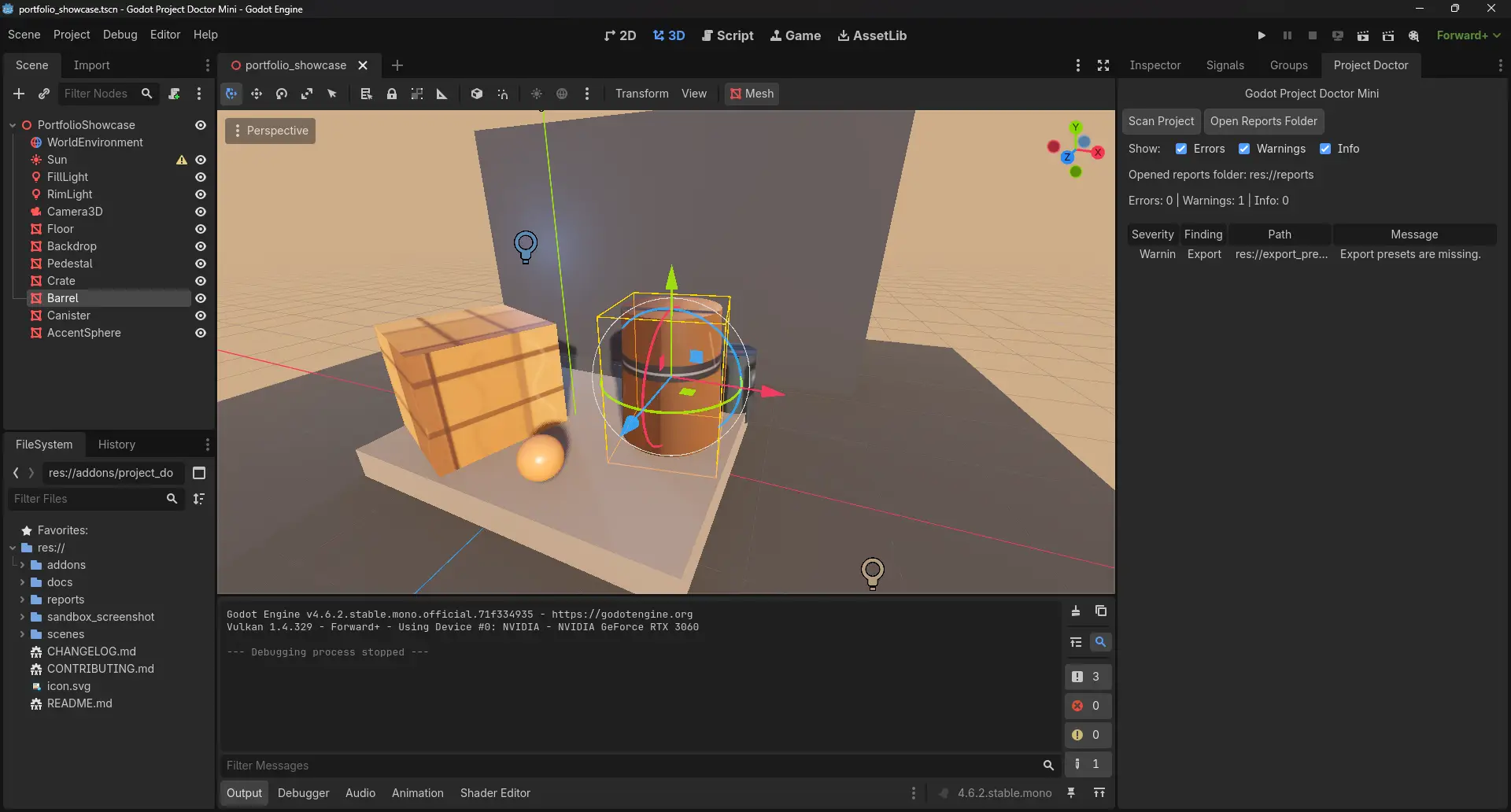
Current preview asset showing the dock layout and primary controls.
Checks
| Check | Severity | Purpose |
|---|---|---|
| Missing scripts | Error | Finds scene/resource references to scripts that no longer exist. |
| Broken resource paths | Error | Finds referenced res:// paths that cannot be found. |
| Large textures | Warning | Flags textures above the current size threshold. |
| Scenes with many nodes | Warning | Highlights scenes that may need review or splitting. |
Scripts using _process() |
Info | Marks scripts with per-frame work for manual review. |
| Empty folders | Info | Helps keep the project tree tidy. |
| Possibly unused files | Info | Experimental check for files not referenced by scanned text resources. Disabled by default. |
| Export preset readiness | Warning | Detects missing export presets and obvious preset readiness gaps such as missing platform, name, or export path. |
| Import settings issues | Warning | Flags unreadable .import files, missing source references, missing generated targets, and large textures left in raw import mode. |
Requirements
- Godot 4.6 or newer
The plugin is written in GDScript and runs inside the Godot editor.
Installation
To use the plugin in another Godot project:
- Copy
addons/project_doctor_mini/into the target project'saddons/folder. - Open the project in Godot.
- Go to
Project > Project Settings > Plugins. - Enable
Godot Project Doctor Mini. - Open the
Project Doctordock in the editor.
To try it in this repository, open this project in Godot and enable the plugin from the same Plugins screen.
Demo Project
A standalone sample project now lives in examples/demo_project. It is intentionally noisy and ignored by default in the root repo scan so the main project report stays stable.
The demo project includes:
- a broken scene script reference,
- an oversized committed texture,
- an intentionally incomplete export preset.
See examples/demo_project/README.md for how to copy the plugin into the demo project and what findings to expect.
Usage
The Project Doctor UI appears inside the Godot editor. It does not appear in the running game window.
- Open the
Project Doctordock. - Expand
Settingsif you want to adjust thresholds, ignore patterns, baseline path, or the experimental unused-file check. - Click
Save Settingsto persist shared scan settings toproject_doctor_settings.cfg. - Click
Scan Project. - Review the summary and findings list.
- Use the severity filters if needed.
- Open the generated reports from
reports/, or use the directOpen Markdown Report/Open JSON Reportbuttons.
Each scan writes:
reports/project-doctor-report.mdreports/project-doctor-report.json
Finding Control
The scanner reads one shared project config file for both dock scans and headless scans:
project_doctor_settings.cfgproject_doctor_baseline.json
Supported controls:
ignored_path_patterns: skip folders or files using project-relative values such asres://reports,res://docs/examples, or glob-style patterns likeres://tests/fixtures/**ignored_finding_ids: hide specific finding IDs from reportsbaseline_file: path to a JSON file of accepted findingsenable_experimental_unused_files: opt in to thepossibly_unused_filecheck
Baseline entries match by id and path, with optional message for stricter matching. Accepted findings are removed before report summaries are built, so counts match the visible findings.
The default config keeps possibly_unused_file disabled because it is still experimental and should not block CI by default.
The dock settings panel writes the same project_doctor_settings.cfg file used by headless scans, so common scanner settings no longer require source edits.
Headless Scan
You can run the scanner without opening the editor dock:
godot --headless --path . --script res://addons/project_doctor_mini/tools/run_project_scan.gd
The headless scan exits non-zero only when the tool cannot create the reports directory or cannot write the Markdown/JSON reports. Normal warning and info findings do not fail the command.
The smoke test validates the report schema and confirms that the report writers can create files:
godot --headless --path . --script res://addons/project_doctor_mini/tools/run_project_doctor_smoke_test.gd
CI
This repository now includes a reusable GitHub Actions entrypoint at .github/workflows/project-doctor.yml for headless validation plus report generation.
Minimal caller workflow:
name: Project Doctor

on:
  pull_request:
  push:

permissions:
  contents: read
  pull-requests: write

jobs:
  project-doctor:
    uses: Vav-Labs/godot-project-doctor-mini/.github/workflows/project-doctor.yml@master
    with:
      mode: warn
      comment-on-pr: true
Available modes:
report-only: always publish reports unless the tool itself fails.warn: keep the job green, but emit a warning annotation when findings exist.fail-on-errors: fail the job only whensummary.errors > 0.
Tool/report write failures still fail the workflow regardless of mode.
When enabled on a pull request, comment-on-pr: true posts or updates one compact comment with the latest counts, scan duration, and an artifact reminder using a stable marker.
Each run uploads:
reports/project-doctor-report.mdreports/project-doctor-report.json
as the predictable artifact project-doctor-reports by default.
The repository smoke workflow also runs the dedicated scanner regression test, the demo-project integration test, and the benchmark script so CI coverage no longer depends on the smoke test alone.
Report Format
The JSON report uses this top-level shape:
{
  "tool": "Godot Project Doctor Mini",
  "tool_version": "0.2.8",
  "generated_at": "2026-05-13T00:00:00",
  "project_root": "res://",
  "scan_duration_ms": 18,
  "summary": {
    "errors": 0,
    "warnings": 1,
    "info": 0
  },
  "findings": []
}
Each finding includes:
{
  "id": "export_presets_missing",
  "severity": "warning",
  "title": "Export Presets Missing",
  "path": "res://export_presets.cfg",
  "message": "Export presets are missing.",
  "recommendation": "Create export presets before release builds."
}
The Markdown report keeps the top-level metadata near the top, includes a severity summary table, and groups findings into GitHub-friendly collapsible <details> sections in Error, Warning, then Info order.
Export And Import Readiness
Project Doctor now performs two conservative release-readiness passes beyond general hygiene:
export_presets.cfgis parsed when present so the scanner can flag presets that are missing obvious readiness fields such as platform, name, or export path..importfiles are parsed withConfigFileso the scanner can flag unreadable import metadata, missing source references, missing generated targets, and large texture imports that still use rawcompress/mode=0settings.
These checks stay intentionally conservative. They focus on obvious issues that are safe to review in CI and should not be treated as a full export-template or importer validator.
If you want to see sample output without running Godot first, open:
Project Structure
addons/project_doctor_mini/
  plugin.cfg
  project_doctor_plugin.gd
  project_doctor_dock.gd
  scanner/project_scanner.gd
  tools/run_project_scan.gd
  tools/run_project_doctor_smoke_test.gd
  tools/run_project_doctor_scanner_test.gd
  tools/run_project_doctor_integration_test.gd
  tools/run_project_doctor_benchmark.gd
  report/markdown_report_writer.gd
  report/json_report_writer.gd
examples/demo_project/
tests/fixtures/scanner/
Testing And Quality
The repo now uses three layers of automated confidence:
run_project_doctor_smoke_test.gdfor schema and writer sanity,run_project_doctor_scanner_test.gdfor deterministic scanner behavior,run_project_doctor_integration_test.gdfor end-to-end scanning of the standalone demo project.
The benchmark script run_project_doctor_benchmark.gd generates 500 temporary scripts, scans the full repo fixture set, and reports the measured scan time before cleaning up the generated files.
Performance note: scans a 500-file generated project fixture plus the repo fixtures in under 1 second locally. Measured on Windows with Godot 4.6.2: 590 total files, including 500 generated scripts, in about 493 ms.
Development
Useful local checks:
godot --headless --path . --quit
godot --headless --path . --script res://addons/project_doctor_mini/tools/run_project_scan.gd
godot --headless --path . --script res://addons/project_doctor_mini/tools/run_project_doctor_smoke_test.gd
godot --headless --path . --script res://addons/project_doctor_mini/tools/run_project_doctor_scanner_test.gd
godot --headless --path . --script res://addons/project_doctor_mini/tools/run_project_doctor_integration_test.gd
godot --headless --path . --script res://addons/project_doctor_mini/tools/run_project_doctor_benchmark.gd
python .github/scripts/project_doctor_summary.py --report reports/project-doctor-report.json --mode warn --artifact-name project-doctor-reports
See docs/TESTING.md for the manual and headless testing flow.
Documentation
Known Limitations
- Dynamic resource loads may not always be detected.
Possibly unused fileis experimental, disabled by default, and must be manually reviewed before deleting files.- The current scanner uses simple text/resource checks, not a full Godot dependency graph.
- Export readiness checks only validate obvious preset fields that are clearly present in
export_presets.cfg. - Import settings analysis is conservative and currently focuses on parse failures, missing references, and a small set of texture import risks.
- The demo project is intentionally excluded from the root repo scan by default so its sample findings do not pollute the main report.
- The plugin is editor-only and does not appear in the running game window.
Roadmap
- Completed in the current release line: finding control, dock settings/report UX, CI automation, export/import readiness checks, demo fixtures, integration tests, and a benchmark path.
- Still open after release closure: deeper scene dependency analysis, broader import heuristics, and Asset Library packaging polish.
Contributing
Issues and small pull requests are welcome.
Good first contribution areas:
- Add a new scanner check.
- Improve false-positive handling.
- Add a sample project for testing.
- Improve report formatting.
- Add screenshots or short usage examples.
Please keep changes small, focused, and aligned with the current release scope.
License
MIT License. See LICENSE.
Godot Project Doctor Mini is a Godot 4 editor plugin that scans a project and generates Markdown and JSON diagnostic reports. It runs as a dock inside the Godot editor and also supports headless operation for CI pipelines.
Checks performed:
- Missing scripts: scene and resource references to scripts that no longer exist.
- Broken resource paths: referenced res:// paths that cannot be found on disk.
- Large textures: textures above a configurable size threshold.
- Heavy scenes: scenes with node counts above a configurable threshold.
- Scripts using _process(): marks scripts with per-frame work for manual review.
- Empty folders: helps keep the project tree tidy.
- Export preset readiness: detects missing export presets and obvious preset gaps.
- Import settings issues: flags unreadable .import files, missing source references, and large textures in raw import mode.
Features:
- One-click scan from the Project Doctor dock.
- Severity summary (errors, warnings, info) with severity filters.
- Settings panel for thresholds, ignore patterns, baseline path, and experimental checks.
- Direct buttons to open the generated Markdown and JSON reports.
- Headless scan script for local automation and CI.
- Reusable GitHub Actions workflow with artifact uploads and optional PR comment summaries.
- Baseline file and ignore pattern support to suppress accepted findings.
Each scan writes reports/project-doctor-report.md and reports/project-doctor-report.json. The Markdown report uses collapsible sections and renders cleanly on GitHub. The JSON report uses a stable schema suitable for CI automation.
The plugin is editor-only and does not appear in the running game. Scans a 500-file project in under one second on a typical machine.
Reviews
Quick Information
Godot Project Doctor Mini
Godot Project Doctor Mini is a Godot 4 editor plugin that scans a project and generates Markdown and JSON diagnostic reports. It runs as a dock inside the Godot editor and also supports headless operation for CI pipelines.Checks performed:- Missing scripts: scene and resource references to scripts that no longer exist.- Broken resource paths: referenced res:// paths that cannot be found on disk.- Large textures: textures above a configurable size threshold.- Heavy scenes: scenes with node counts above a configurable threshold.- Scripts using _process(): marks scripts with per-frame work for manual review.- Empty folders: helps keep the project tree tidy.- Export preset readiness: detects missing export presets and obvious preset gaps.- Import settings issues: flags unreadable .import files, missing source references, and large textures in raw import mode.Features:- One-click scan from the Project Doctor dock.- Severity summary (errors, warnings, info) with severity filters.- Settings panel for thresholds, ignore patterns, baseline path, and experimental checks.- Direct buttons to open the generated Markdown and JSON reports.- Headless scan script for local automation and CI.- Reusable GitHub Actions workflow with artifact uploads and optional PR comment summaries.- Baseline file and ignore pattern support to suppress accepted findings.Each scan writes reports/project-doctor-report.md and reports/project-doctor-report.json. The Markdown report uses collapsible sections and renders cleanly on GitHub. The JSON report uses a stable schema suitable for CI automation.The plugin is editor-only and does not appear in the running game. Scans a 500-file project in under one second on a typical machine.
Supported Engine Version
4.6
Version String
0.2.8
License Version
MIT
Support Level
community
Modified Date
2 days ago
Git URL
Issue URL