


A simple branching dialogue editor and stateless runtime.Create your dialogue right in the Godot Editor itself with a simple script-like language and the built-in syntax checker.Then, in your game, use the DialogueManager global to fetch lines of dialogue. There is an example dialogue balloon to help get you started on creating your own to fit in better with your game.
Pinned Debugger Tabs 3.x
An asset by Wierdox
Quick Information

Pinned Debugger Tabs 3.x
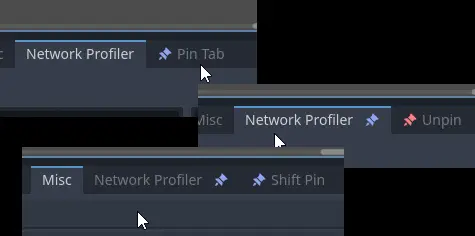
Auto opens a pinned Debugger tab on project run.To pin a tab, press the newly added Pin Tab button on the Debugger tab bar.You can unpin by pressing Unpin.You can also shift the pin by going to a new tab and pressing Shift Pin.This plugin overrides editor setting "run/output/always_open_output_on_play".If the plugin seems to fail, try editing the first variable "time_until_open", it might depend on your PC.For 3.x users, make note that this plugin will cancel out the yellow/red icon on Errors tab if pinned, and the pin may disappear on project run.That is only visual though. And due to the feature not existing, pressing the blue pin on a pinned tab to unpin it isn't in this version.
Supported Engine Version
3.1
Version String
1.0
Support Level
community
Modified Date
2 years ago
Git URL
Issue URL
Godot Plugin: Pinned Debugger Tabs for 3.x and 4.x
Auto opens a pinned Debugger tab on project run.
To pin a tab, press the newly added Pin Tab button on the Debugger tab bar. You can unpin by either pressing Unpin, or pressing the blue pin on the pinned tab. You can also shift the pin by going to a new tab and pressing Shift Pin.
This plugin overrides run/output/always_open_output_on_play.
If the plugin seems to fail, try editing the first variable time_until_open, it might depend on your PC.
For 3.x users, make note that this plugin will cancel out the yellow/red icon on Errors tab if pinned, and the pin may disapear on project run. This is only visual though. And due to the feature not existing, pressing the blue pin on a pinned tab will do nothing.
Auto opens a pinned Debugger tab on project run. To pin a tab, press the newly added Pin Tab button on the Debugger tab bar. You can unpin by pressing Unpin. You can also shift the pin by going to a new tab and pressing Shift Pin. This plugin overrides editor setting "run/output/always_open_output_on_play". If the plugin seems to fail, try editing the first variable "time_until_open", it might depend on your PC. For 3.x users, make note that this plugin will cancel out the yellow/red icon on Errors tab if pinned, and the pin may disappear on project run. That is only visual though. And due to the feature not existing, pressing the blue pin on a pinned tab to unpin it isn't in this version.
Reviews
0 total reviews
Quick Information
Pinned Debugger Tabs 3.x
Auto opens a pinned Debugger tab on project run.To pin a tab, press the newly added Pin Tab button on the Debugger tab bar.You can unpin by pressing Unpin.You can also shift the pin by going to a new tab and pressing Shift Pin.This plugin overrides editor setting "run/output/always_open_output_on_play".If the plugin seems to fail, try editing the first variable "time_until_open", it might depend on your PC.For 3.x users, make note that this plugin will cancel out the yellow/red icon on Errors tab if pinned, and the pin may disappear on project run.That is only visual though. And due to the feature not existing, pressing the blue pin on a pinned tab to unpin it isn't in this version.
Supported Engine Version
3.1
Version String
1.0
Support Level
community
Modified Date
2 years ago
Git URL
Issue URL
Related Assets
More in Tools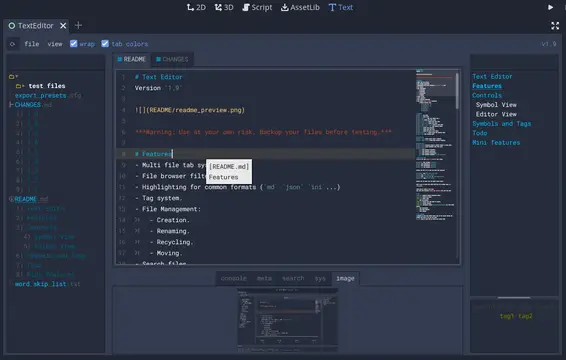

A text editor with many features:- Table of contents.- Tag filtering.- Comment toggling for .md .yaml .json .ini .cfg.- Directory colors.- And tons of Quality of Life features.
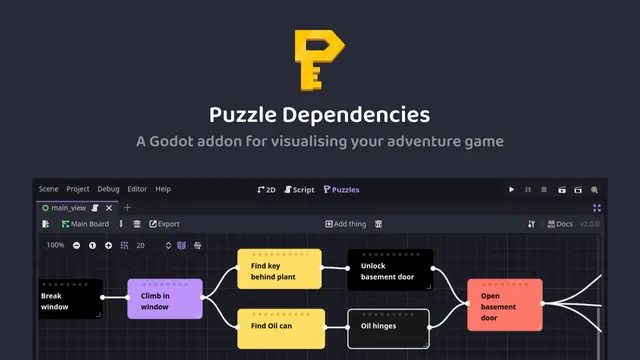

A tool for building puzzle dependency charts to help visualise and map out your adventure game puzzles.

A routeable HTTP server for Godot.