

Replicate Operating System key presses and release into Godot.Useful if there is a need to listen key press/release when Godot window is not focus. Examples:- Overlays (like Steam and Discord show overlays)- Streaming software (like OBS Studio use to change scenes)- VTuber software (change character state)Compatibility with Linux (X11) and Windows.
Taffer's Loader
An asset by Taffer
Quick Information

Taffer's Loader
Load resources for your "Loading…" screen. Receive signals (that you can use to update your UI) when resources are loaded, when errors happen, and when everything is done.
Supported Engine Version
4.3
Version String
1.0
Support Level
community
Modified Date
1 year ago
Git URL
Issue URL
Loader - Taffer's Components
Load resources for your "Loading…" screen.
Using Loader
- Create a Loader instance in your tree:
- Right-click a node and choose "Instantiate Child Scene" (or press Ctrl+Shift+A).
- Choose
addons/taffer_resourceloader/loader.tscn.
- Use the Inspector to configure the instance. Add resource paths ("res://...") to the Resources array.
- Hook up the Loader's signals.
- Call the Loader instance's
load()method. - Access the loaded resources through the Loader's
get_resource()method.
Demo
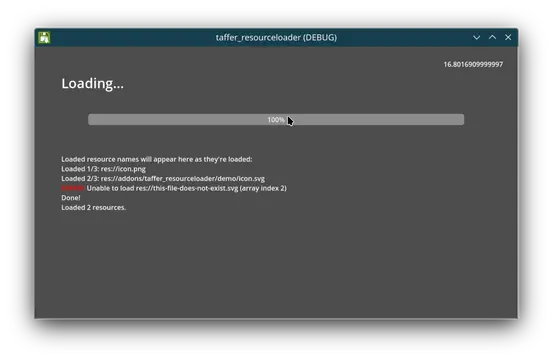
In the demo folder, there's a simple project showing how you can use the
Loader in your own games.
The demo has several nodes:
- A Spinner that's just counting time so you can see that everything is still running while resources are being loaded.
- A Status that updates as resources are loaded.
- A ProgressBar that updates as resources are loaded.
- A Loader instance doing all the work.
Note that the demo code (in loader_demo.gd) is calling load() with a
two-second delay, so you can see things happening. Skip the delay to go
full speed, unless you're trying to show off the Loader.
License
Taffer's Components are licensed with the CC BY 4.0 license. This means:
- You can Share Taffer's Components any way you like, including commercially.
- You can Adapt Taffer's Components for any purposes, even commercial ones.
In return, you must:
- You must give me appropriate credit, provide a link to the license, and indicate if changes were made.
There are no additional restrictions, although if you somehow use these to make the world a worse place, I'll be very disappointed in you.
Load resources for your "Loading…" screen. Receive signals (that you can use to update your UI) when resources are loaded, when errors happen, and when everything is done.
Reviews
0 total reviews
Quick Information
Taffer's Loader
Load resources for your "Loading…" screen. Receive signals (that you can use to update your UI) when resources are loaded, when errors happen, and when everything is done.
Supported Engine Version
4.3
Version String
1.0
Support Level
community
Modified Date
1 year ago
Git URL
Issue URL
Related Assets
More in Scripts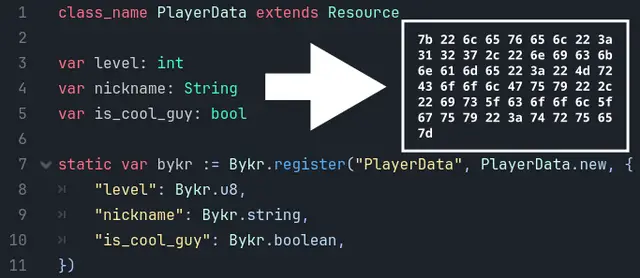

Converts gdscript objects to bytes and vice versa, to save bandwidth or disk space.

JavaScript Signals for Godot! Vue, Solid.js, Qwik like syntax in Godot.Make your code reactive!


Godot PostgreSQL Client is a GDscript script / class that allows you to connect to a Postgres backend and run SQL commands there. It is able to send data and receive it from the backend. Useful for managing player user data on a multiplayer game, by saving a large amount of data on a dedicated Postgres server from GDscript.The class is written in pure GDScript which allows it not to depend on GDExtention. This makes it ultra portable for many platforms.Detailed documentation: https://github.com/Marzin-bot/PostgreSQLClient/wiki/Documentation