


Demonstrate how to use the "Godot LLM" plugin.# How to use1. Get `Godot LLM` directly from the godot asset library, or download the addon from [godot-llm](https://github.com/Adriankhl/godot-llm) and place it to the `addons` folder2. Download models * Text generation recommendation: Meta-Llama-3-8B-Instruct-Q5_K_M.gguf from https://huggingface.co/lmstudio-community/Meta-Llama-3-8B-Instruct-GGUF/tree/main or Phi-3-mini-4k-instruct-Q2_K.gguf from https://huggingface.co/bartowski/Phi-3-mini-4k-instruct-GGUF/tree/main for low-end devices such as Android phone * Similarity recommendation: mxbai-embed-large-v1.Q5_K_M.gguf from https://huggingface.co/ChristianAzinn/mxbai-embed-large-v1-gguf/tree/main * Image to text recommendation: llava-phi-3-mini-int4.gguf from https://huggingface.co/xtuner/llava-phi-3-mini-gguf/tree/main, also download the `llava-phi-3-mini-mmproj-f16.gguf` from the same page* Vector Database setting is similar to `Similarity`3. Open the application with GodotYou will see 4 modes: `Text Generation`, `Similarity`, `Image to Text`, and `Vector Database`In each mode, you need to clide `Model` to point to the correct model `gguf` file. Additionally, in `Image to Text` mode, you need to click `Mmproj` to point to your `*mmproj*gguf` file.# Text GenerationYou will see there are 3 generation mode: `Simple`, `Instruct`, and `Interactive`. ## `Simple` modeJust edit the prompt and click `Generate`. Click `Stop` to stop the generation.You choose `None` schema or `Person` schema, if you choose `None` schema, the model will generate the information of a character with Json format.## `Instruct` mode (currently disabled)Click `Start` first with empty prompt, then modify the prompt and click `Continue` when it is available to talk to the AI. This is an interactive mode. Whenever you see the `Continue` button is available, either input something in the prompt and click `Continue` to send the input, or simply click `Continue` to let the AI talk itself.## `Interactive` modeSimilar to the instruct mode, except that it relies on a good initial prompt and additoinal reverse prompt and input suffix settings to generate a smooth conversation. The preset prompt should work decently well, click the `Start` button with the preset prompt and start talkin to the AI.# SimilarityInput prompts to compute the `Embedding`, or input two prompts to calculate their `Similarity`# Image to TextSelect an `Image` from your device. Alternative, click `From View` to capture your game screen as the image. You can `Compute Base64` encoding for your image, or decode a base64 string back to `Compute Image`. Edit the prompt, and generate text from `Image`, `Base64`, or `View` (your game screen).# Vector DatabaseClick `Metadata: id, year` to define the metadata of the tables, then click `Create tables` to create a some tables for embedding storage and retrieval. Click `Store text` to split the document into chunks and store into the database, you may also click `Split text` to see the chunks. Click `Retrieve` to retrive three most similar text chunks with the upper left prompt, which satisfy the sql-where-clause in the middle right. You may also turn on "Verbose stdout", modify the upper prompt to a valid sql statement, and click execute to run the sql statement directly, you will see the result in godot log.
Advanced FPS Controller Template (C#)
An asset by Wolf64
Quick Information

Advanced FPS Controller Template (C#)
This is a port of Jeheno's "Advanced FPS Controller Template":https://godotengine.org/asset-library/asset/3475All functionality has been ported to Godot .NET using C#. No GDScript remains.All credit goes to Jeheno. Please direct feature requests to their asset page. For technical issues regarding the port, feel free to open an issue on GitHub.-------------------------Original Description----------------------All the informations are on the Github repository page !An advanced FPS Controller Template made in Godot 4This template provides a complete, advanced and fully commented controller, camera, as well as a properties HUDA template map is provided to test the controller.The controller use a finite state machine, designed to be easely editable, allowing to easily add, remove and modify behaviours and actions.He is also very customizable, with a whole set of open variables for every state and for more general stuff. This is the same for the camera.The template is 100% written in [C#].He works on Godot 4.3 and Godot 4.2. I didn't test it in Godot 4.1 and Godot 4.0, but it should work just fine.Features :- Smooth moving- Walking- Crouching- Running- Jumping (multiple jump system)- Jump buffering- Coyote jump/time- Air control- Sliding (and air slide)- Dashing- Bunny hopping- Wall running- Grappling hook (pull type)- Knockback- Camera tilt- Camera bob- Custom smooth FOV- Pause menu- Options menu (keybinding, video, audio)- Crosshair- Properties HUD
Supported Engine Version
4.2
Version String
2.0
Support Level
community
Modified Date
11 months ago
Git URL
Issue URL
An advanced FPS Controller Template made in Godot 4
This is a fork of Jeh3no's Godot-Advanced-FPS-Controller-Template written in GDScript.
All credit goes to Jeh3no. I have simply ported the scripts over to C# for those preferring Mono/.NET over GDScript.
Any feature requests are to be directed to Jeh3no. Issue reports will be investigated and relayed to Jeh3no's project if they are not related to my direct port of the project.
Original Description

General
This template provides a complete, advanced and fully commented controller, camera, as well as a properties HUD
A template map is provided to test the controller.
The controller uses a finite state machine, designed to be easily editable, allowing to easily add, remove and modify behaviours and actions.
It is also very customizable, with a whole set of open variables for every state and for more general stuff. This is the same for the camera.
The template is 100% written in C#.
It works on Godot 4.3 and Godot 4.2. I didn't test it in Godot 4.1 and Godot 4.0, but it should work just fine.
The video showcasing the template features : https://www.youtube.com/watch?v=qdmzIYgVb1E
And the video showcasing the added features of the 2.0 version : https://www.youtube.com/watch?v=3jwx65NFijI
Features
Smooth moving
Walking
Crouching
Running
Jumping (multiple jump system)
Jump buffering
Coyote jump/time
Air control
Sliding (and air slide)
Dashing
Bunny hopping
Wall running
Grappling hook (pull type)
Knockback
Camera tilt
Camera bob
Custom smooth FOV
Pause menu
Options menu (keybinding, video, audio)
Crosshair
Properties HUD
Controls
All keys bindings can be modified
- W, S, A, D (alternatively : up, down, left, right) = move / wall run
- Space = jump
- Left shift = run
- C = crouch / slide
- Left control = dash
- Escape = pause menu
- Left mouse button = grapple hook
- Right click button = knockback tool
Purpose
My main goal with this project was to provide a complete and easy to manage/modify controller for FPS games (It can be apply to first person games in general, even if the movement list has been thinking as an FPS one)
I hope that it will be the case.
How to use
This plugin is a template, which means it's a project that has been designed to be a base of a new project, not an addon to an existing one.
So to correctly use it, you simply have to download it, and then import the project on the Godot app welcome page, and that's all !
Requets
For any bug request, please write on down in the "issues" section.
For any new feature/improvement request, please write it down in the "discussions" section.
Credits
Kenney Prototype Textures, by Kenny, reworked for Godot by Calinou : https://godotengine.org/asset-library/asset/781
This is a port of Jeheno's "Advanced FPS Controller Template": https://godotengine.org/asset-library/asset/3475 All functionality has been ported to Godot .NET using C#. No GDScript remains. All credit goes to Jeheno. Please direct feature requests to their asset page. For technical issues regarding the port, feel free to open an issue on GitHub. -------------------------Original Description---------------------- All the informations are on the Github repository page ! An advanced FPS Controller Template made in Godot 4 This template provides a complete, advanced and fully commented controller, camera, as well as a properties HUD A template map is provided to test the controller. The controller use a finite state machine, designed to be easely editable, allowing to easily add, remove and modify behaviours and actions. He is also very customizable, with a whole set of open variables for every state and for more general stuff. This is the same for the camera. The template is 100% written in [C#]. He works on Godot 4.3 and Godot 4.2. I didn't test it in Godot 4.1 and Godot 4.0, but it should work just fine. Features : - Smooth moving - Walking - Crouching - Running - Jumping (multiple jump system) - Jump buffering - Coyote jump/time - Air control - Sliding (and air slide) - Dashing - Bunny hopping - Wall running - Grappling hook (pull type) - Knockback - Camera tilt - Camera bob - Custom smooth FOV - Pause menu - Options menu (keybinding, video, audio) - Crosshair - Properties HUD
Reviews
0 total reviews
Quick Information
Advanced FPS Controller Template (C#)
This is a port of Jeheno's "Advanced FPS Controller Template":https://godotengine.org/asset-library/asset/3475All functionality has been ported to Godot .NET using C#. No GDScript remains.All credit goes to Jeheno. Please direct feature requests to their asset page. For technical issues regarding the port, feel free to open an issue on GitHub.-------------------------Original Description----------------------All the informations are on the Github repository page !An advanced FPS Controller Template made in Godot 4This template provides a complete, advanced and fully commented controller, camera, as well as a properties HUDA template map is provided to test the controller.The controller use a finite state machine, designed to be easely editable, allowing to easily add, remove and modify behaviours and actions.He is also very customizable, with a whole set of open variables for every state and for more general stuff. This is the same for the camera.The template is 100% written in [C#].He works on Godot 4.3 and Godot 4.2. I didn't test it in Godot 4.1 and Godot 4.0, but it should work just fine.Features :- Smooth moving- Walking- Crouching- Running- Jumping (multiple jump system)- Jump buffering- Coyote jump/time- Air control- Sliding (and air slide)- Dashing- Bunny hopping- Wall running- Grappling hook (pull type)- Knockback- Camera tilt- Camera bob- Custom smooth FOV- Pause menu- Options menu (keybinding, video, audio)- Crosshair- Properties HUD
Supported Engine Version
4.2
Version String
2.0
Support Level
community
Modified Date
11 months ago
Git URL
Issue URL
Related Assets
More in Templates

Template for new Godot games. It has a main menu, options menus, pause menu, credits, scene loader, extra tools, and an example game scene.Created in collaboration with members of the Godot Wild Jam community.For usage information, visit the following: https://github.com/Maaack/Godot-Game-Template/blob/main/README.md#usage

This is a thirdperson controller made with C# in the .NET version of Godot 4.0. It doesn't have sounds or a complex model so you just have what you really need.It rotates your input and smoothly rotates your mesh to the camera rotation.You can watch the great demo video
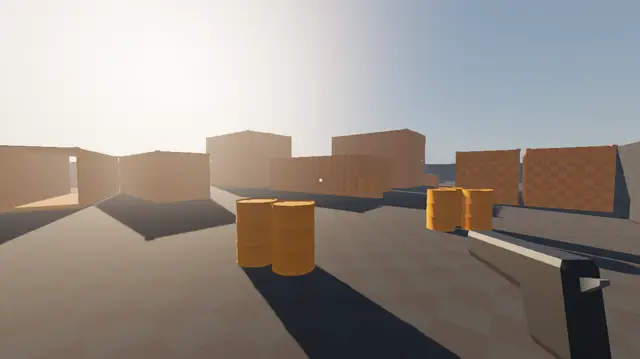

An FPS multiplayer template with everything you'd need to get started. Includes a full map with custom 3d assets.Features:- Multiplayer- Full map with custom assets- Controller support (including menus)- Cinematic Main menu- Pause menu- Options menu with: - Fullscreen - Fps and ping counters - Mouse and controller sensitivity- Bullets wall collision- Random respawn on map- Adjusted light and environment ("better graphics")QOL:- Configurable random respawns Player > Inspector > Spawns- Tooltips for exported variablesThe 3d assets are made by me and go by the same MIT license, so you are free to use them in your commercial games.Credits:- Textures used are made by https://kenney.nl/ and pre-packaged for Godot by Calinou- The base multiplayer functionality was made by following a tutorial from DevLogLogan https://youtu.be/n8D3vEx7NAE