



Synchronize an animation player position with a position input value.This forces a transition between points in the animation rather than sudden jumps due to erratic position inputs.The demo shows an HSlider being used to move a Sprite whose position is determined by an animation track.
Translations From JSON (Godot 4.x)
An asset by AliYil
Quick Information

Translations From JSON (Godot 4.x)
A Godot plugin for importing JSON files for translations.Usage:1. Install the plugin into your project and activate it.2. Add JSON translations files into your project in .json format.3. Make sure the JSON files are imported as "JSON Translation".4. Add your JSON files to translations using Project Settings > Localization > Translations > Add (Change "All Recognized" to "All files (*)" to see the JSON file)JSON FormatThe json data in file must be an object with locale and messages keys."locale" field signify which locale the texts are in."message" field must be an object that contains keys and corresponding text as string value.Example JSON{ "locale": "en", "messages": { "HELLOWORLD": "Hello world!", "ANOTHERTEXT": "This is another text." }}
Supported Engine Version
4.0
Version String
2.0
Support Level
community
Modified Date
3 years ago
Git URL
Issue URL
Translations From JSON for Godot 4.x
A Godot plugin for importing JSON files for translations.
This is the Godot 4.x version of the plugin. If you want to use it on 3.x, head over to the 3.x branch.
Usage
- Install the plugin into your project and activate it.
- Add JSON translations files into your project in .json format.
- Make sure the JSON files are imported as "JSON Translation".
- Add your JSON files to translations using Project Settings > Localization > Translations > Add (Change "All Recognized" to "All files (*)" to see the JSON file)
JSON Format
The json data in file must be an object with locale and messages keys.
- "locale" field signify which locale the texts are in.
- "message" field must be an object that contains keys and corresponding text as string value.
Example JSON
{
    "locale": "en",
    "messages": {
        "HELLOWORLD": "Hello world!",
        "ANOTHERTEXT": "This is another text."
    }
}
A Godot plugin for importing JSON files for translations. Usage: 1. Install the plugin into your project and activate it. 2. Add JSON translations files into your project in .json format. 3. Make sure the JSON files are imported as "JSON Translation". 4. Add your JSON files to translations using Project Settings > Localization > Translations > Add (Change "All Recognized" to "All files (*)" to see the JSON file) JSON Format The json data in file must be an object with locale and messages keys. "locale" field signify which locale the texts are in. "message" field must be an object that contains keys and corresponding text as string value. Example JSON { "locale": "en", "messages": { "HELLOWORLD": "Hello world!", "ANOTHERTEXT": "This is another text." } }
Reviews
0 total reviews
Quick Information
Translations From JSON (Godot 4.x)
A Godot plugin for importing JSON files for translations.Usage:1. Install the plugin into your project and activate it.2. Add JSON translations files into your project in .json format.3. Make sure the JSON files are imported as "JSON Translation".4. Add your JSON files to translations using Project Settings > Localization > Translations > Add (Change "All Recognized" to "All files (*)" to see the JSON file)JSON FormatThe json data in file must be an object with locale and messages keys."locale" field signify which locale the texts are in."message" field must be an object that contains keys and corresponding text as string value.Example JSON{ "locale": "en", "messages": { "HELLOWORLD": "Hello world!", "ANOTHERTEXT": "This is another text." }}
Supported Engine Version
4.0
Version String
2.0
Support Level
community
Modified Date
3 years ago
Git URL
Issue URL
Related Assets
More in Misc

With easy menus you don't have to program your own main, options and pause menu anymore!It features:* Keyboard & Gamepad Support* Setting of Various Audio & Video Settings* Autosaving and Loading of Settings (Data Persistence)* Various Signals to Connect Easy Menus with your existing CodeFor usage information visit the Github of the project. https://github.com/SavoVuksan/EasyMenus
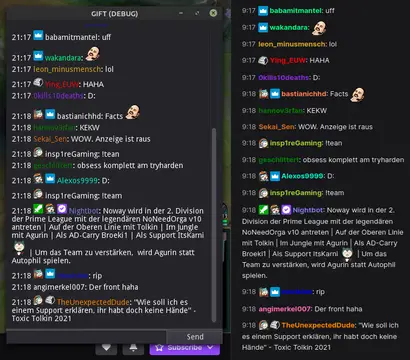

This addon provides a node that can be used to easily interact with the Twitch IRC chat. Commands are registered similar to how you connect a node.Features:- connect to Twitch using a secure websocket- listen to events like follows with EventSub- join/leave channels, request twitch capabilities- send chat messages/whispers/raw data- register commands with min/max amount of args- check for permissions to execute the command- many signals to process additional data- shows raw data in output log while in debug mode- automatically download & cache emotes and user badges You will need to register an application on https://dev.twitch.tv/, then use the client id and client secret to login.The Gift.gd script in the repository should get you started.


This plugin allows you to run a set of commands when your project is initialized. This can be done by adding your list of commands to `res://assets/startup_runner/command.txt`, and enabling the plugin.This can be used to, say, start your music the moment the project loads or open your favorite git client.