


Replicate Operating System key presses and release into Godot.Useful if there is a need to listen key press/release when Godot window is not focus. Examples:- Overlays (like Steam and Discord show overlays)- Streaming software (like OBS Studio use to change scenes)- VTuber software (change character state)Compatibility with Linux (X11) and Windows.
Papershot: A node that takes screenshots of its viewport
An asset by anniryynanen
Quick Information

Papershot: A node that takes screenshots of its viewport
Don't want to think about screenshots for every jam game? Papershot to the rescue!Papershot is a node that takes screenshots of its viewport. Screenshots can be taken either by calling Papershot.take_screenshot(), or by configuring a shortcut. They're saved with filenames such as "Screenshot 2024-07-26 17-46-21-149.jpg".If you use Papershot and would like more features or configuration options, open an issue or contact me.Configuration options:- folder: Folder to save screenshots in- shortcut: Shortcut for taking a screenshot- file_format: Format to save screenshots in, JPG or PNGSignals:- screenshot_saved(image, path)- io_error(error, path)
Supported Engine Version
4.3
Version String
1.1.0
Support Level
community
Modified Date
1 year ago
Git URL
Issue URL

Don't want to think about screenshots for every jam game? Papershot to the resque!
Papershot is a node that takes screenshots of its viewport. Screenshots can be taken either by calling Papershot.take_screenshot(), or by configuring a shortcut. They're saved with filenames such as "Screenshot 2024-07-26 17-46-21-149.jpg".
If you use Papershot and would like more features or configuration options, open an issue or contact me.
Configuration options:
folder: Folder to save screenshots inshortcut: Shortcut for taking a screenshotfile_format: Format to save screenshots in, JPG or PNG
Signals:
screenshot_saved(image, path)io_error(error, path)
Don't want to think about screenshots for every jam game? Papershot to the rescue! Papershot is a node that takes screenshots of its viewport. Screenshots can be taken either by calling Papershot.take_screenshot(), or by configuring a shortcut. They're saved with filenames such as "Screenshot 2024-07-26 17-46-21-149.jpg". If you use Papershot and would like more features or configuration options, open an issue or contact me. Configuration options: - folder: Folder to save screenshots in - shortcut: Shortcut for taking a screenshot - file_format: Format to save screenshots in, JPG or PNG Signals: - screenshot_saved(image, path) - io_error(error, path)
Reviews
0 total reviews
Quick Information
Papershot: A node that takes screenshots of its viewport
Don't want to think about screenshots for every jam game? Papershot to the rescue!Papershot is a node that takes screenshots of its viewport. Screenshots can be taken either by calling Papershot.take_screenshot(), or by configuring a shortcut. They're saved with filenames such as "Screenshot 2024-07-26 17-46-21-149.jpg".If you use Papershot and would like more features or configuration options, open an issue or contact me.Configuration options:- folder: Folder to save screenshots in- shortcut: Shortcut for taking a screenshot- file_format: Format to save screenshots in, JPG or PNGSignals:- screenshot_saved(image, path)- io_error(error, path)
Supported Engine Version
4.3
Version String
1.1.0
Support Level
community
Modified Date
1 year ago
Git URL
Issue URL
Related Assets
More in Scripts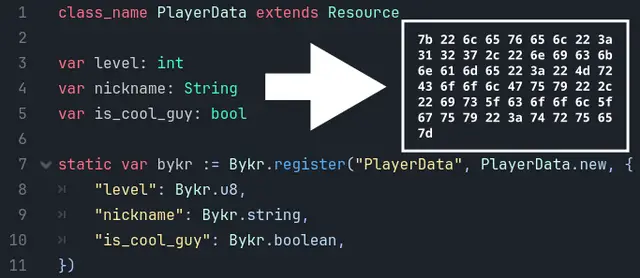

Converts gdscript objects to bytes and vice versa, to save bandwidth or disk space.

JavaScript Signals for Godot! Vue, Solid.js, Qwik like syntax in Godot.Make your code reactive!


Godot PostgreSQL Client is a GDscript script / class that allows you to connect to a Postgres backend and run SQL commands there. It is able to send data and receive it from the backend. Useful for managing player user data on a multiplayer game, by saving a large amount of data on a dedicated Postgres server from GDscript.The class is written in pure GDScript which allows it not to depend on GDExtention. This makes it ultra portable for many platforms.Detailed documentation: https://github.com/Marzin-bot/PostgreSQLClient/wiki/Documentation