

Synchronize an animation player position with a position input value.This forces a transition between points in the animation rather than sudden jumps due to erratic position inputs.The demo shows an HSlider being used to move a Sprite whose position is determined by an animation track.
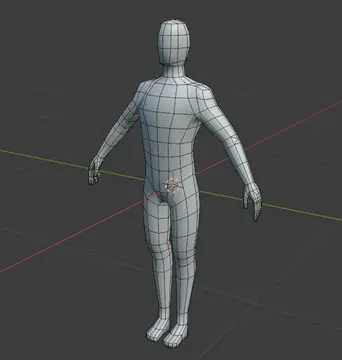
Mesh: 3D Male Base (Rigged)
An asset by boqsc0
Quick Information

Mesh: 3D Male Base (Rigged)
A 3d rigged male base mesh, provided under the CC0 license. Primarily released by orange-juice-games.itch.io under CC0 license.2025-02-11 Fixed origin geometry - Tested on Godot 4.32025-02-12 1.0.2 The rotation and location were fixed.If you can improve it, please create an issue with details on GitHub Repository. https://github.com/BoQsc/Godot-Male-Base-Mesh/To use this 3D Male Base Mesh, you can drag .glb file into the scene, right click on the male_base_mesh node and click "Make Local"You may then add to the scene a Camera3D node and a DirectionalLight3D. Then click button "Run Project" (F5) button to run the scene. For New to Godot: dealing with Gizmos If you are very new to Godot Engine, you might also want to temporary hide weird colored wireframes temporary: these are known as Gizmos and can be disabled by clicking "Perspective" button on the left top corner in the scene of Godot
Supported Engine Version
4.3
Version String
1.0.2
Support Level
community
Modified Date
8 months ago
Git URL
Issue URL
A 3d rigged male base mesh, provided under the CC0 license. Primarily released by orange-juice-games.itch.io under CC0 license. 2025-02-11 Fixed origin geometry - Tested on Godot 4.3 2025-02-12 1.0.2 The rotation and location were fixed. If you can improve it, please create an issue with details on GitHub Repository. https://github.com/BoQsc/Godot-Male-Base-Mesh/ To use this 3D Male Base Mesh, you can drag .glb file into the scene, right click on the male_base_mesh node and click "Make Local" You may then add to the scene a Camera3D node and a DirectionalLight3D. Then click button "Run Project" (F5) button to run the scene. For New to Godot: dealing with Gizmos If you are very new to Godot Engine, you might also want to temporary hide weird colored wireframes temporary: these are known as Gizmos and can be disabled by clicking "Perspective" button on the left top corner in the scene of Godot
Reviews
0 total reviews
Quick Information
Mesh: 3D Male Base (Rigged)
A 3d rigged male base mesh, provided under the CC0 license. Primarily released by orange-juice-games.itch.io under CC0 license.2025-02-11 Fixed origin geometry - Tested on Godot 4.32025-02-12 1.0.2 The rotation and location were fixed.If you can improve it, please create an issue with details on GitHub Repository. https://github.com/BoQsc/Godot-Male-Base-Mesh/To use this 3D Male Base Mesh, you can drag .glb file into the scene, right click on the male_base_mesh node and click "Make Local"You may then add to the scene a Camera3D node and a DirectionalLight3D. Then click button "Run Project" (F5) button to run the scene. For New to Godot: dealing with Gizmos If you are very new to Godot Engine, you might also want to temporary hide weird colored wireframes temporary: these are known as Gizmos and can be disabled by clicking "Perspective" button on the left top corner in the scene of Godot
Supported Engine Version
4.3
Version String
1.0.2
Support Level
community
Modified Date
8 months ago
Git URL
Issue URL
Related Assets
More in Misc

A simple car demo to help you make your own cars in godot 4.0 .Just import the cars folder and drop Doge.tscn in your scene.


With easy menus you don't have to program your own main, options and pause menu anymore!It features:* Keyboard & Gamepad Support* Setting of Various Audio & Video Settings* Autosaving and Loading of Settings (Data Persistence)* Various Signals to Connect Easy Menus with your existing CodeFor usage information visit the Github of the project. https://github.com/SavoVuksan/EasyMenus
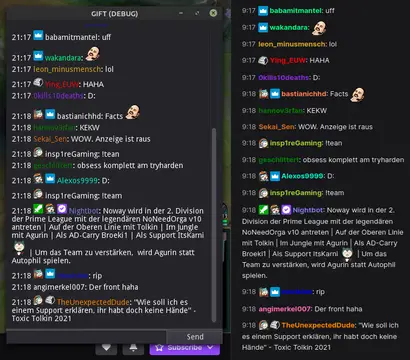

This addon provides a node that can be used to easily interact with the Twitch IRC chat. Commands are registered similar to how you connect a node.Features:- connect to Twitch using a secure websocket- listen to events like follows with EventSub- join/leave channels, request twitch capabilities- send chat messages/whispers/raw data- register commands with min/max amount of args- check for permissions to execute the command- many signals to process additional data- shows raw data in output log while in debug mode- automatically download & cache emotes and user badges You will need to register an application on https://dev.twitch.tv/, then use the client id and client secret to login.The Gift.gd script in the repository should get you started.