


This tool allows you to convert multiple textures into materials with the click of a button.It supports:- Batch Processing: Select 1, 10 or 100 textures. It all works.- Zero Configuration: Creates StandardMaterial3D resources with the texture assigned to the Albedo slot.Usage guide:1. Select your textures in the FileSystem.2. Ensure your textures are set to the 3D Texture preset in the Import tab.3. Go to Project -> Tools -> Create Materials from Textures.4. Click Create Materials from Textures.
AmbientCG Material Downloader (Godot 4.4+)
An asset by VenitStudios
Quick Information

AmbientCG Material Downloader (Godot 4.4+)
AmbientCG Downloader Godot Plugin For Godot 4.4+Downloads Files from AmbientCG.com and automatically populates StandardMaterial3D, 3D Environments.AmbientCG license: https://docs.ambientcg.com/license/
Supported Engine Version
4.4
Version String
2.0.0
Support Level
community
Modified Date
7 months ago
Git URL
Issue URL
AmbientCG Material Download Plugin
AmbientCG Downloader Editor Plugin For Godot 4.x Downloads Files from AmbientCG.com and automatically populates StandardMaterial3D*
https://godotengine.org/asset-library/asset/3657
Developer Notes
- Substance Materials DO NOT download properly, they are ignored by the material browser. This may change later on.
Easy to Search and Download PBR Surfaces
Simple to use Automatic Material Population

AmbientCG Downloader Godot Plugin For Godot 4.4+ Downloads Files from AmbientCG.com and automatically populates StandardMaterial3D, 3D Environments. AmbientCG license: https://docs.ambientcg.com/license/
Reviews
0 total reviews
Quick Information
AmbientCG Material Downloader (Godot 4.4+)
AmbientCG Downloader Godot Plugin For Godot 4.4+Downloads Files from AmbientCG.com and automatically populates StandardMaterial3D, 3D Environments.AmbientCG license: https://docs.ambientcg.com/license/
Supported Engine Version
4.4
Version String
2.0.0
Support Level
community
Modified Date
7 months ago
Git URL
Issue URL
Related Assets
More in Materials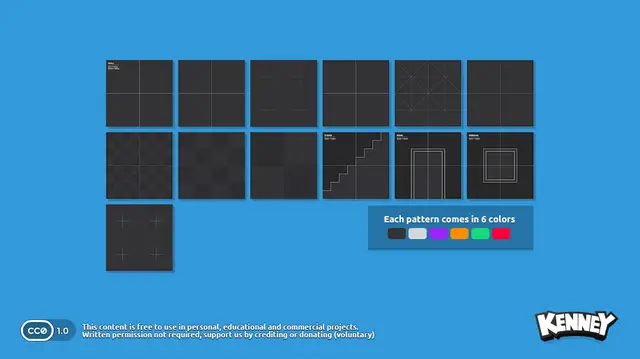

Kenney's prototype texture pack, pre-packaged for use in Godot.This package includes 13 development/prototype textures each in 6 different colors. All textures are 1024×1024.Support the original artist to create more free game assets: http://donate.kenney.nl/3.2 version of this asset: https://godotengine.org/asset-library/asset/780

Adds UDIMShaderMaterial, and UDIMTextureTilset, allowing for the use of UDIM tiled textures for 3D meshes.# Usage1. Create a UDIMShaderMaterial in a 3D material property.2. Create a UDIMTextureTileset in the "Albedo" > "Albedo Tileset" propererty of the UDIMShaderMaterial3. Click left click the UDIMTextureTileset to reveal an "Import UDIM Texture Set" button, left click it.4. Browse to and select one of any of the appropriately named UDIM tile textures from the tileset you'd like to use.5. Done!This is an early iteration, any feedback is appreciated!


Just wanted a version of squash the creeps that isn't finished without others having to download from GitHub.