OmniState: Visual Finite State machine vFSM
An asset by iimadouu
Install Asset
Install via Godot
To maintain one source of truth, Godot Asset Library is just a mirror of the old asset library so you can download directly on Godot via the integrated asset library browser
Quick Information

OmniState: Visual Finite State machine vFSM
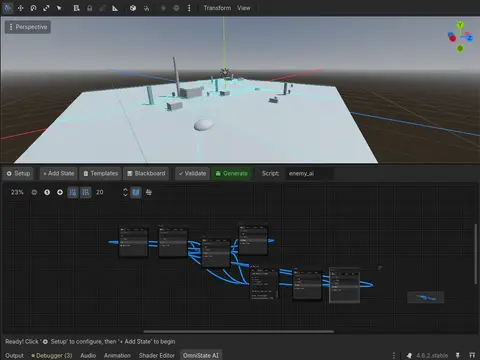
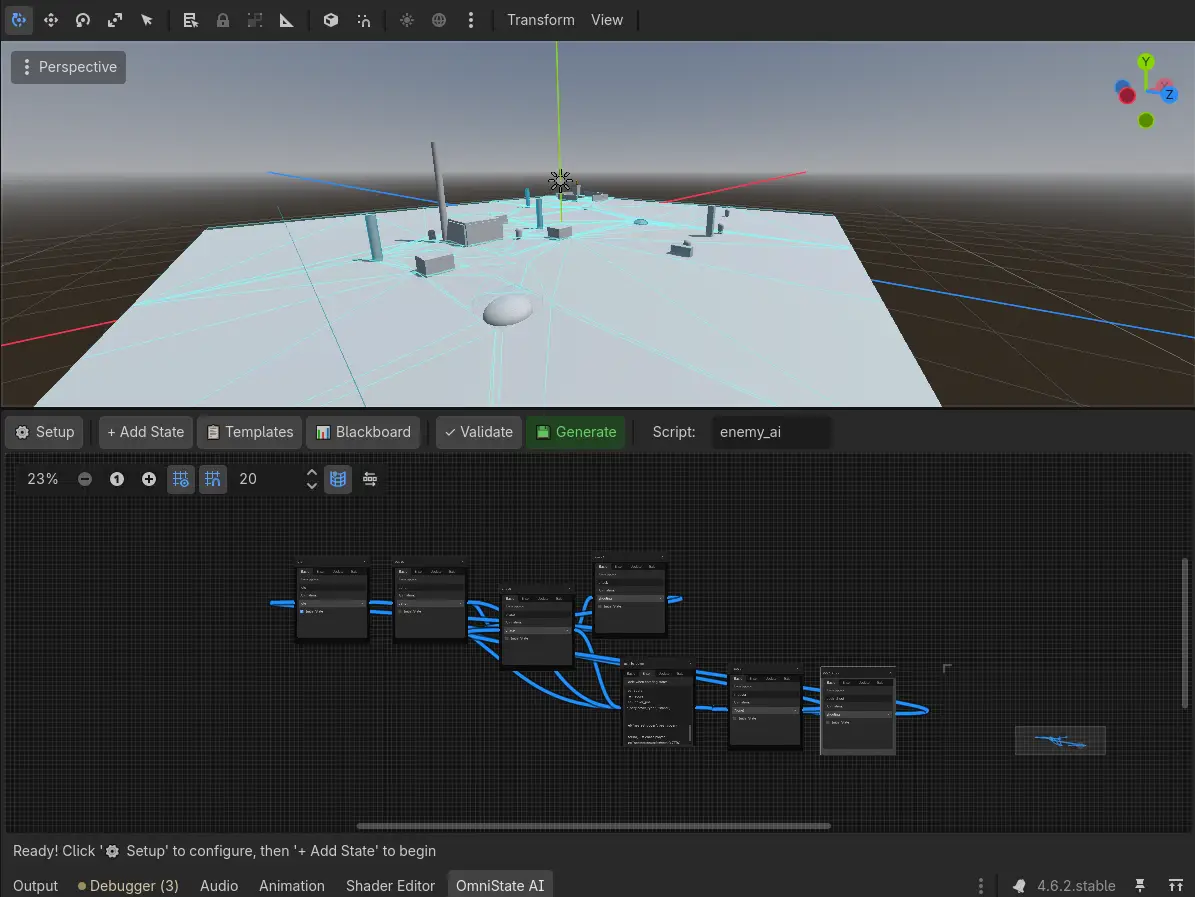
Professional visual state machine editor for Godot 4.6.x Create sophisticated AI behaviors through intuitive node-based interface.Transforms AI development from tedious coding into visual design. Create complex enemy behaviors, NPC interactions, and boss patterns through an intuitive graph editor with professional-grade transition system matching Unreal Engine 5/6 quality. The plugin generates clean, production-ready GDScript code with professional structure, type hints, and comprehensive error handling.
Supported Engine Version
4.6
Version String
1.0.1
License Version
MIT
Support Level
community
Modified Date
3 hours ago
Git URL
Issue URL
OmniState Visual FSM
Version 1.0.1 | Released: May 9, 2026 | Godot 4.6.x
A professional-grade visual state machine editor for Godot 4.x with AAA-quality transition system and intelligent auto-recovery. Create sophisticated AI behaviors through an intuitive node-based interface. Never lose your work - graph persists between sessions and auto-recovers from code files!


** Please, If you find this tool helpful, consider helping me grow through my BEP20 USDT wallet: 0xee1e5f87180d91a11a7f4c57eb0a8ea4a40317f9**

🎯 What is OmniState AI?
OmniState AI transforms AI development from tedious coding into visual design. Create complex enemy behaviors, NPC interactions, and boss patterns through an intuitive graph editor with professional-grade transition system matching Unreal Engine 5/6 quality. The plugin generates clean, production-ready GDScript code with professional structure, type hints, and comprehensive error handling.
Key Highlights
- ✅ Visual State Machine Editor - Node-based workflow with drag-and-drop
- ✅ AAA Transition System - 4-tab editor with cooldowns, delays, blending
- ✅ Never Lose Work - Auto-save on exit, auto-load on startup, auto-recovery from code
- ✅ Bidirectional Sync - Edit in visual editor OR code editor, sync both ways
- ✅ Smart Merge - Add custom functions to generated files, they're preserved
- ✅ Auto-Recovery - Rebuild graph from code files if JSON is lost
- ✅ Professional Code Generation - AAA-quality, well-structured scripts
- ✅ Advanced Conditions - 3 modes + 9 quick presets + syntax highlighting
- ✅ Priority System - Control transition evaluation order (0-100)
- ✅ Timing Control - Cooldowns and delays for realistic behavior
- ✅ Animation Blending - Smooth transitions between animations
- ✅ Debug System - Per-transition logging with colors
- ✅ Blackboard Variables - Shared data between states
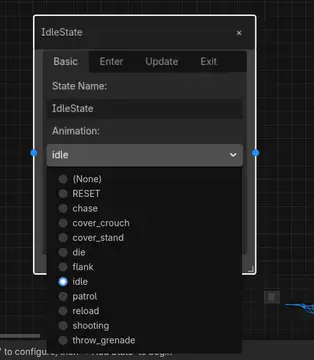
- ✅ Animation Integration - Auto-detect and assign animations
- ✅ State Templates - Pre-built behaviors for rapid development
- ✅ Zero Boilerplate - Focus on logic, not structure
🔄 Workflow: Never Lose Your Work ⭐ NEW in v1.0.1
OmniState AI now has multiple layers of protection to ensure you never lose your work:
Layer 1: Auto-Save on Exit
- Graph automatically saves when you close Godot
- Saves to:
res://ai_states/[fsm_name]/[fsm_name]_graph.json - Includes: nodes, positions, code blocks, transitions, connections
Layer 2: Auto-Load on Startup
- Graph automatically loads when you open the plugin
- Seamless continuation of your work
- No manual save/load needed
Layer 3: Auto-Recovery from Code
- If graph JSON is missing, automatically rebuilds from generated
.gdfiles - Scans
res://ai_states/folder for FSM directories - Extracts code from
enter(),update(),exit()functions - Reconstructs transitions from main FSM file
- Perfect for version control workflows (add
*_graph.jsonto.gitignore)
Layer 4: Bidirectional Sync
- Edit generated
.gdfiles in your IDE - Click 🔄 Sync from Files to import changes back to visual editor
- Best of both worlds: visual design + code editing
Layer 5: Smart Merge
- Add custom functions to generated files
- Add custom properties (@export, var, @onready)
- They're automatically preserved when you regenerate
- Only
enter(),update(),exit()are regenerated
Workflow Examples
Scenario 1: Normal Development
1. Create states in visual editor
2. Add code to enter/update/exit blocks
3. Click "💾 Save & Generate"
4. Close Godot → Auto-saves graph
5. Reopen Godot → Auto-loads graph
6. Continue working seamlessly
Scenario 2: Code-First Editing
1. Generate initial FSM from visual editor
2. Open generated .gd files in VS Code
3. Edit enter/update/exit functions
4. Add custom helper functions
5. Return to visual editor
6. Click "🔄 Sync from Files"
7. Visual editor now shows your code changes
8. Custom functions preserved on next generate
Scenario 3: Version Control
1. Add *_graph.json to .gitignore
2. Commit only .gd files to Git
3. Team member clones repo
4. Opens OmniState AI panel
5. Auto-recovery rebuilds graph from .gd files
6. Full visual editor restored automatically
Scenario 4: Addon Reinstallation
1. Delete addon folder
2. Reinstall addon
3. Open OmniState AI panel
4. Auto-recovery finds your ai_states/ folder
5. Rebuilds entire graph from code files
6. Back to work in seconds
📦 Installation
Method 1: Direct Use (Assets Library)
- Go to Project → Project Settings → Plugins
- Find "OmniState Visual AI"
- Check the Enable checkbox
- Look for the "OmniState AI" tab at the bottom of the editor
Method 2: Install in Another Project
- Copy the entire
addons/omnistate_ai/folder - Paste into your target project's
addons/directory - Enable in Project Settings → Plugins
🚀 Quick Start (5 Minutes)
Step 1: Enable & Configure
- Enable the plugin (see Installation above)
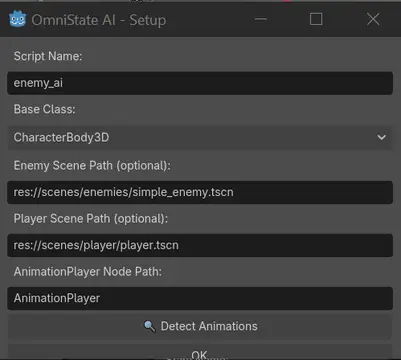
- Click ⚙ Setup in the OmniState AI panel
- Configure:
- Script Name:
enemy_ai - Base Class:
CharacterBody3D - Enemy Scene:
res://scenes/enemy.tscn(optional) - AnimationPlayer Path:
AnimationPlayer
- Script Name:
- Click 🔍 Detect Animations (if you provided enemy scene)
- Click OK
Step 2: Add Blackboard Variables
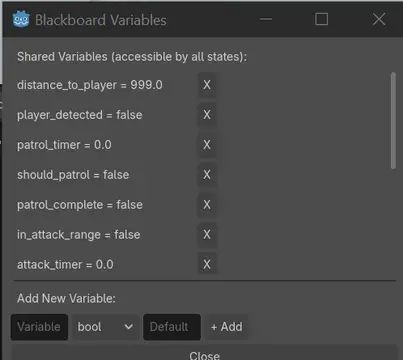
- Click 📊 Blackboard
- Add these variables:
player_detected(bool) = falsedistance_to_player(float) = 999.0health(int) = 100can_see_player(bool) = false
- Click Close
Step 3: Create States
- Click 📋 Templates → Patrol (mark as Initial State in Basic tab)
- Click 📋 Templates → Chase
- Click 📋 Templates → Attack
Step 4: Add Logic
Patrol State - Update Tab:
# Detect player
if owner.player:
    var distance = owner.global_position.distance_to(owner.player.global_position)
    owner.bb_set("distance_to_player", distance)
    owner.bb_set("player_detected", distance < 20.0)

    # Check line of sight
    var space_state = owner.get_world_3d().direct_space_state
    var query = PhysicsRayQueryParameters3D.create(
        owner.global_position,
        owner.player.global_position
    )
    var result = space_state.intersect_ray(query)
    owner.bb_set("can_see_player", result.is_empty() or result.collider == owner.player)
Chase State - Update Tab:
# Chase player
if owner.player:
    var direction = (owner.player.global_position - owner.global_position).normalized()
    owner.velocity = direction * 6.0
    owner.move_and_slide()
    owner.look_at(owner.player.global_position, Vector3.UP)

    # Update distance
    var distance = owner.global_position.distance_to(owner.player.global_position)
    owner.bb_set("distance_to_player", distance)
Attack State - Update Tab:
# Attack player
if owner.player:
    owner.look_at(owner.player.global_position, Vector3.UP)

    # Simple attack logic
    var attack_timer = owner.bb_get("attack_timer", 0.0)
    attack_timer += delta

    if attack_timer >= 1.0:  # Attack every second
        print("Attacking player!")
        # Add your attack logic here
        attack_timer = 0.0

    owner.bb_set("attack_timer", attack_timer)

    # Update distance
    var distance = owner.global_position.distance_to(owner.player.global_position)
    owner.bb_set("distance_to_player", distance)
Step 5: Connect States with Advanced Transitions
Patrol → Chase Transition
- Drag from Patrol (right blue dot) to Chase (left blue dot)
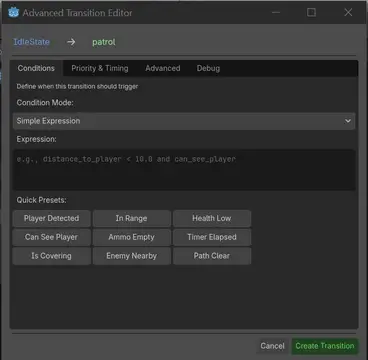
- Advanced Transition Editor opens with 4 tabs:
Conditions Tab:
- Mode: Simple Expression
- Click preset: "Player Detected" (inserts condition)
- Or manually enter:
blackboard.get("player_detected", false) and blackboard.get("can_see_player", false)
Priority & Timing Tab:
- Priority:
10 - Enable Cooldown: ✅ (checked)
- Cooldown Duration:
1.0seconds (prevents rapid switching) - Enable Delay: ✅ (checked)
- Delay Duration:
0.3seconds (reaction time)
Advanced Tab:
- Can Interrupt: ✅ (checked)
- Enable Animation Blend: ✅ (checked)
- Blend Duration:
0.2seconds
Debug Tab:
- Enable Debug Logging: ✅ (checked)
- Debug Label:
"Player spotted - begin chase" - Debug Color: Yellow
- Click "Create Transition"
Chase → Attack Transition
- Drag from Chase to Attack
Conditions Tab:
- Click preset: "In Range"
- Modify to:
blackboard.get("distance_to_player", 999) < 5.0 and blackboard.get("can_see_player", false)
Priority & Timing Tab:
- Priority:
5(higher priority than returning to patrol) - Enable Cooldown: ✅
- Cooldown Duration:
0.5seconds
Advanced Tab:
- Can Interrupt: ✅
- Enable Animation Blend: ✅
- Blend Duration:
0.15seconds - Custom Code:
# Play attack sound
if owner.has_node("AudioPlayer"):
    owner.get_node("AudioPlayer").play()
Debug Tab:
- Enable Debug Logging: ✅
- Debug Label:
"Engaging target - attack range" - Debug Color: Red
- Click "Create Transition"
Attack → Chase Transition
- Drag from Attack to Chase
Conditions Tab:
- Expression:
blackboard.get("distance_to_player", 999) > 7.0
Priority & Timing Tab:
- Priority:
15 - Enable Cooldown: ✅
- Cooldown Duration:
1.0seconds - Enable Delay: ✅
- Delay Duration:
0.5seconds (don't chase immediately)
Advanced Tab:
- Can Interrupt: ✅
- Enable Animation Blend: ✅
- Blend Duration:
0.2seconds
Debug Tab:
- Enable Debug Logging: ✅
- Debug Label:
"Target out of range - resume chase" - Debug Color: Orange
- Click "Create Transition"
Chase → Patrol Transition (Fallback)
- Drag from Chase to Patrol
Conditions Tab:
- Expression:
not blackboard.get("player_detected", false) or not blackboard.get("can_see_player", false)
Priority & Timing Tab:
- Priority:
50(lower priority - fallback) - Enable Delay: ✅
- Delay Duration:
3.0seconds (give up after 3 seconds)
Advanced Tab:
- Can Interrupt: ✅
- Enable Animation Blend: ✅
- Blend Duration:
0.3seconds
Debug Tab:
- Enable Debug Logging: ✅
- Debug Label:
"Lost player - return to patrol" - Debug Color: Gray
- Click "Create Transition"
Step 6: Generate & Use
- Click 💾 Generate
- Check console for success message:
============================================================
🚀 GENERATING STATE MACHINE: enemy_ai
============================================================
✓ Generated professional main FSM with transitions and blackboard
✓ Generated state: patrol
✓ Generated state: chase
✓ Generated state: attack
============================================================
✓ GENERATION COMPLETE!
📁 Location: res://ai_states/enemy_ai/
📄 Main script: enemy_ai.gd
📄 State files: 3 files
============================================================
- Find scripts in
res://ai_states/enemy_ai/ - Attach
enemy_ai.gdto your enemy's root node - Add player to "player" group:
- Select player node
- Inspector → Node → Groups
- Add "player" group
- Run your game! 🎮
What You'll See:
- Enemy patrols initially
- Detects player within 20 units
- Waits 0.3 seconds (reaction time)
- Smoothly transitions to chase (0.2s blend)
- Chases player with smooth movement
- Attacks when within 5 units
- Returns to chase if player moves away (7+ units)
- Returns to patrol if player lost for 3 seconds
- All transitions logged in console with colors!
✨ Complete Feature List
💾 Persistence & Recovery ⭐ NEW in v1.0.1
- Auto-save on exit - Graph automatically saves when closing Godot
- Auto-load on startup - Graph automatically loads when opening plugin
- Auto-recovery system - Rebuild graph from generated code files
- Bidirectional sync - Edit code in IDE, sync back to visual editor
- Smart merge - Custom functions preserved during regeneration
- Never lose work - Multiple layers of protection
- Version control friendly - Works with Git workflows
- Team collaboration - Share code, auto-recover graph
🎨 Visual Editor
- GraphEdit-based canvas - Familiar node workflow
- Drag-and-drop - Intuitive state placement
- Visual connections - Draw transition arrows
- Minimap - Navigate large state machines
- Auto-arrange - Organize nodes automatically
- Zoom controls - Scale from overview to detail
- Context menus - Right-click for quick actions
- Delete options - Close button (×), Delete key, or right-click menu
- Resizable nodes - Adjust to fit content
- Color-coded ports - Blue connection points
📝 Advanced State Nodes
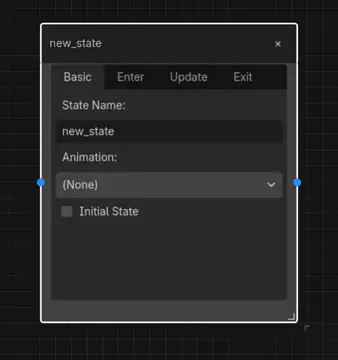
- Tabbed interface with 4 tabs:
- Basic: Name, animation, initial state checkbox, behaviors
- Enter: Code when entering state
- Update: Code every frame (_physics_process)
- Exit: Code when leaving state
- Animation dropdown - Auto-populated from detection
- Syntax highlighting - GDScript code coloring in editors
- Behavior system - Add custom behavior functions
- Color picker - Customize node colors
- Close button - Easy deletion with × button
🔗 AAA Transition System ⭐ v1.0.0
4-Tab Advanced Editor
Professional transition configuration matching Unreal Engine 5/6:
Tab 1: Conditions
3 Condition Modes:
- Simple Expression - Write any GDScript expression
- Multiple Conditions (AND) - All must be true
- Multiple Conditions (OR) - Any can be true
9 Quick Presets - One-click insertion:
- Player Detected -
blackboard.get("player_detected", false) - In Range -
blackboard.get("distance_to_player", 999) < 10.0 - Health Low -
blackboard.get("health", 100) < 30 - Can See Player -
blackboard.get("can_see_player", false) - Ammo Empty -
blackboard.get("ammo", 0) == 0 - Timer Elapsed -
blackboard.get("state_timer", 0) > 5.0 - Is Covering -
blackboard.get("in_cover", false) - Enemy Nearby -
blackboard.get("enemies_nearby", 0) > 0 - Path Clear -
blackboard.get("path_blocked", true) == false
- Player Detected -
Syntax Highlighting - Keywords, operators, comments
Code Editor - Full GDScript support with 80 lines
Preset Buttons - Grid layout for easy access
Expression Builder - Visual condition builder for AND/OR modes
Tab 2: Priority & Timing
Priority System (0-100)
- 0 = Highest priority (checks first)
- 100 = Lowest priority (checks last)
- Automatic sorting and evaluation
- Helpful hints for best practices
Cooldown System
- Prevent rapid state switching
- Duration: 0.1 - 60 seconds
- Per-transition cooldown tracking
- Prevents state "flickering"
- Blackboard-based implementation
Delay System
- Add deliberate transition delays
- Duration: 0.1 - 10 seconds
- Condition must remain true during delay
- More realistic AI behavior
- Reaction time simulation
Tab 3: Advanced
Interrupt Control
- Can/Cannot interrupt current state
- Useful for animations that must complete
- Prevents jarring mid-action transitions
- State-level control
Animation Blending
- Smooth transitions between animations
- Blend time: 0.0 - 2.0 seconds
- Professional animation quality
- No sudden animation pops
- Automatic AnimationPlayer integration
Custom Transition Code
- Execute GDScript when transitioning
- Play sounds, set variables, trigger events
- Full code editor with syntax highlighting
- 100 lines of custom logic
- Access to owner, blackboard, states
Tab 4: Debug
Debug Logging
- Enable per-transition logging
- Custom debug labels
- Track transition execution
- Console output with timestamps
Debug Colors
- Assign colors to transitions
- Color-coded console output
- Visual identification in logs
- Easier debugging of complex FSMs
- 16 million color options
Transition Features Summary
- Multiple transitions per state (unlimited)
- Expression-based condition evaluation
- Priority-sorted checking
- Cooldown management
- Delay handling
- Interrupt control
- Animation blending
- Custom code execution
- Debug logging with colors
- Visual connection lines
- Easy deletion and modification
📊 Blackboard System
- Shared variables - Data accessible by all states
- Type support - bool, int, float, String, Vector3
- Visual editor - Manage through UI (📊 button)
- Helper functions - bb_set(), bb_get(), bb_has()
- Default values - Set initial values
- Runtime updates - Modify during gameplay
- Persistent data - Survives state changes
- Unlimited variables - No restrictions
🎬 Animation Integration
- Auto-detection - Scan enemy scene for animations
- Dropdown selection - Choose per state
- Flexible paths - Any AnimationPlayer location
- Automatic playback - Plays on state enter
- Blend support - Smooth animation transitions
- Speed control - Adjust animation speed
📋 State Templates
Pre-built behaviors for rapid development:
- Idle - Waiting and looking around
- Patrol - Following waypoints
- Chase - Pursuing player
- Attack - Combat behavior
- Cover - Tactical positioning
- Flee - Escape and retreat
Each template includes:
- Pre-configured state name
- Suggested animation
- Basic code structure
- Common behaviors
- Best practice patterns
💾 Professional Code Generation
- Well-structured - Clean, organized output
- Professional headers - Project name, timestamp, metadata
- Class names - Proper GDScript conventions
- Type hints - Full type annotations
- Docstrings - Function documentation
- Error handling - Warnings and error messages
- Helper functions - Utility methods included
- Organized sections - Clear separation of concerns
- Advanced transition logic - Cooldowns, delays, blending
- Debug integration - Logging code generation
- Smart merge - Preserves custom functions and properties ⭐ NEW
- Clear headers - Indicates what's safe to edit vs regenerated ⭐ NEW
✅ Validation System
- State count - Verify states exist
- Initial state check - Ensure one marked
- Connection validation - Check for disconnected states
- Name validation - Detect unnamed/duplicate states
- Transition validation - Verify targets exist
- Condition syntax - Basic expression checking
- Comprehensive reporting - Detailed error messages
⚙️ Setup Wizard
- Configuration dialog - One-time setup
- Base class selection - CharacterBody3D, CharacterBody2D, Node3D
- Scene paths - Link enemy and player scenes
- AnimationPlayer path - Specify location
- Animation detection - 🔍 Auto-detect all animations
- Persistent settings - Configuration saved for session
- Validation - Checks for valid paths
📚 Usage Examples
Example 1: Advanced Tactical Shooter AI
Complete AI with cooldowns, delays, and blending for realistic behavior.
States: Idle → Patrol → Alert → Chase → Attack → Cover → Reload
State Logic
Idle State - Update:
# Look around randomly
var look_timer = owner.bb_get("look_timer", 0.0)
look_timer += delta

if look_timer >= 2.0:
    owner.rotate_y(randf_range(-PI/4, PI/4))
    look_timer = 0.0

owner.bb_set("look_timer", look_timer)

# Check for player
if owner.player:
    var distance = owner.global_position.distance_to(owner.player.global_position)
    owner.bb_set("distance_to_player", distance)
    owner.bb_set("player_detected", distance < 25.0)
Patrol State - Update:
# Move between waypoints
var waypoints = owner.bb_get("waypoints", [])
if waypoints.is_empty():
    return

var current_wp = owner.bb_get("current_waypoint", 0)
var target = waypoints[current_wp]

var direction = (target - owner.global_position).normalized()
owner.velocity = direction * 3.0
owner.move_and_slide()

if owner.global_position.distance_to(target) < 1.0:
    current_wp = (current_wp + 1) % waypoints.size()
    owner.bb_set("current_waypoint", current_wp)

# Always check for player
if owner.player:
    var distance = owner.global_position.distance_to(owner.player.global_position)
    owner.bb_set("distance_to_player", distance)

    # Line of sight check
    var space_state = owner.get_world_3d().direct_space_state
    var query = PhysicsRayQueryParameters3D.create(
        owner.global_position + Vector3.UP,
        owner.player.global_position + Vector3.UP
    )
    var result = space_state.intersect_ray(query)
    var can_see = result.is_empty() or result.collider == owner.player
    owner.bb_set("can_see_player", can_see)
    owner.bb_set("player_detected", distance < 20.0 and can_see)
Alert State - Enter:
# Play alert animation and sound
if owner.animation_player:
    owner.animation_player.play("alert")

if owner.has_node("AudioPlayer"):
    owner.get_node("AudioPlayer").play()

# Set alert timestamp
owner.bb_set("alert_time", Time.get_ticks_msec() / 1000.0)
Alert State - Update:
# Look at last known player position
if owner.player:
    owner.look_at(owner.player.global_position, Vector3.UP)

    # Update detection
    var distance = owner.global_position.distance_to(owner.player.global_position)
    owner.bb_set("distance_to_player", distance)

    var space_state = owner.get_world_3d().direct_space_state
    var query = PhysicsRayQueryParameters3D.create(
        owner.global_position + Vector3.UP,
        owner.player.global_position + Vector3.UP
    )
    var result = space_state.intersect_ray(query)
    var can_see = result.is_empty() or result.collider == owner.player
    owner.bb_set("can_see_player", can_see)
    owner.bb_set("alert_confirmed", can_see)
Chase State - Update:
# Chase player aggressively
if owner.player:
    var direction = (owner.player.global_position - owner.global_position).normalized()
    owner.velocity = direction * 7.0
    owner.move_and_slide()
    owner.look_at(owner.player.global_position, Vector3.UP)

    # Update distance
    var distance = owner.global_position.distance_to(owner.player.global_position)
    owner.bb_set("distance_to_player", distance)

    # Check line of sight
    var space_state = owner.get_world_3d().direct_space_state
    var query = PhysicsRayQueryParameters3D.create(
        owner.global_position + Vector3.UP,
        owner.player.global_position + Vector3.UP
    )
    var result = space_state.intersect_ray(query)
    owner.bb_set("can_see_player", result.is_empty() or result.collider == owner.player)

    # Update health and ammo
    owner.bb_set("health_low", owner.bb_get("health", 100) < 40)
    owner.bb_set("ammo_low", owner.bb_get("ammo", 30) < 10)
Attack State - Update:
# Attack player
if owner.player:
    owner.look_at(owner.player.global_position, Vector3.UP)

    # Attack logic
    var attack_timer = owner.bb_get("attack_timer", 0.0)
    attack_timer += delta

    if attack_timer >= 0.5:  # Attack every 0.5 seconds
        # Fire weapon
        print("BANG! Attacking player")

        # Reduce ammo
        var ammo = owner.bb_get("ammo", 30)
        ammo -= 1
        owner.bb_set("ammo", ammo)
        owner.bb_set("ammo_low", ammo < 10)

        attack_timer = 0.0

    owner.bb_set("attack_timer", attack_timer)

    # Update distance
    var distance = owner.global_position.distance_to(owner.player.global_position)
    owner.bb_set("distance_to_player", distance)
Cover State - Enter:
# Find nearest cover
var cover_points = owner.get_tree().get_nodes_in_group("cover")
var nearest_cover = null
var nearest_distance = INF

for cover in cover_points:
    var dist = owner.global_position.distance_to(cover.global_position)
    if dist < nearest_distance:
        nearest_distance = dist
        nearest_cover = cover

if nearest_cover:
    owner.bb_set("cover_position", nearest_cover.global_position)
    owner.bb_set("in_cover", false)
Cover State - Update:
# Move to cover
var cover_pos = owner.bb_get("cover_position")
if not cover_pos:
    return

var in_cover = owner.bb_get("in_cover", false)

if not in_cover:
    # Move to cover
    var direction = (cover_pos - owner.global_position).normalized()
    owner.velocity = direction * 5.0
    owner.move_and_slide()

    if owner.global_position.distance_to(cover_pos) < 1.0:
        owner.bb_set("in_cover", true)
        owner.velocity = Vector3.ZERO
else:
    # In cover - wait for reload or health recovery
    pass
Reload State - Update:
# Reload weapon
var reload_timer = owner.bb_get("reload_timer", 0.0)
reload_timer += delta

if reload_timer >= 2.0:  # 2 second reload
    owner.bb_set("ammo", 30)  # Full ammo
    owner.bb_set("ammo_low", false)
    owner.bb_set("reload_complete", true)
    reload_timer = 0.0

owner.bb_set("reload_timer", reload_timer)
Advanced Transitions
Idle → Patrol
- Condition:
true(always transition) - Priority: 100 (lowest)
- Delay: 1.0 seconds
- Blend: 0.3 seconds
- Debug: "Starting patrol"
Patrol → Alert
- Condition:
blackboard.get("player_detected", false) - Priority: 10
- Delay: 0.3 seconds (reaction time)
- Cooldown: 2.0 seconds
- Blend: 0.2 seconds
- Custom Code:
owner.get_node("AudioPlayer").play() - Debug: "Player detected - going on alert" (Yellow)
Alert → Chase
- Condition:
blackboard.get("alert_confirmed", false) and blackboard.get("can_see_player", false) - Priority: 5
- Delay: 0.5 seconds (confirmation time)
- Blend: 0.2 seconds
- Debug: "Alert confirmed - begin chase" (Orange)
Chase → Attack
- Condition:
blackboard.get("distance_to_player", 999) < 8.0 and blackboard.get("can_see_player", false) - Priority: 0 (highest!)
- Cooldown: 0.5 seconds
- Blend: 0.15 seconds
- Custom Code:
print("Engaging target!") - Debug: "In attack range - engage!" (Red)
Attack → Cover
- Condition:
blackboard.get("health_low", false) or blackboard.get("ammo_low", false) - Priority: 1 (very high)
- Delay: 0.2 seconds
- Blend: 0.2 seconds
- Debug: "Taking cover - low health/ammo" (Purple)
Cover → Reload
- Condition:
blackboard.get("in_cover", false) and blackboard.get("ammo_low", false) - Priority: 5
- Cannot Interrupt: true (must reach cover first)
- Blend: 0.1 seconds
- Custom Code:
owner.bb_set("reload_timer", 0.0) - Debug: "Reloading weapon" (Cyan)
Reload → Attack
- Condition:
blackboard.get("reload_complete", false) - Priority: 10
- Cooldown: 1.0 seconds
- Blend: 0.2 seconds
- Custom Code:
owner.bb_set("reload_complete", false) - Debug: "Reload complete - re-engage" (Green)
Attack → Chase
- Condition:
blackboard.get("distance_to_player", 999) > 10.0 - Priority: 20
- Cooldown: 1.0 seconds
- Delay: 0.5 seconds
- Blend: 0.2 seconds
- Debug: "Target out of range - chase" (Orange)
Chase → Patrol
- Condition:
not blackboard.get("can_see_player", false) - Priority: 50 (fallback)
- Delay: 5.0 seconds (give up after 5 seconds)
- Blend: 0.3 seconds
- Debug: "Lost player - return to patrol" (Gray)
Example 2: Boss Battle with Phases
Multi-phase boss with dramatic transitions and custom code.
States: Phase1 → Phase2 → Phase3 → Enraged
Phase Transitions
Phase1 → Phase2
- Condition:
blackboard.get("health", 100) < 70 - Priority: 0
- Cannot Interrupt: true (finish current attack)
- Delay: 1.0 seconds (dramatic pause)
- Blend: 1.5 seconds (long dramatic blend)
- Custom Code:
# Phase 2 activation
print("PHASE 2 ACTIVATED!")
owner.get_node("AudioPlayer").play("phase2_music")
owner.get_node("ParticleEffects").emit()
owner.bb_set("attack_speed", 1.5)  # Faster attacks
owner.bb_set("damage_multiplier", 1.3)
- Debug: "=== PHASE 2 ACTIVATED ===" (Red)
Phase2 → Phase3
- Condition:
blackboard.get("health", 100) < 40 - Priority: 0
- Cannot Interrupt: true
- Delay: 2.0 seconds (longer dramatic pause)
- Blend: 2.0 seconds
- Custom Code:
# Phase 3 - Final Form
print("FINAL PHASE!")
owner.get_node("AudioPlayer").play("phase3_music")
owner.spawn_minions()
owner.bb_set("attack_speed", 2.0)
owner.bb_set("damage_multiplier", 1.6)
owner.bb_set("can_summon", true)
- Debug: "=== PHASE 3 - FINAL FORM ===" (Purple)
Any Phase → Enraged
- Condition:
blackboard.get("health", 100) < 10 - Priority: 0 (overrides everything!)
- Can Interrupt: true
- Blend: 0.5 seconds
- Custom Code:
# ENRAGED MODE
print("BOSS ENRAGED!")
owner.modulate = Color.RED
owner.bb_set("speed_multiplier", 2.5)
owner.bb_set("damage_multiplier", 2.0)
owner.bb_set("attack_speed", 3.0)
owner.get_node("AudioPlayer").play("enrage_roar")
- Debug: "!!! ENRAGED MODE !!!" (Orange)
Example 3: Stealth Game Guard
Realistic guard AI with investigation and alert states.
States: Patrol → Investigate → Search → Alert → Chase → Attack
Key Transitions
Patrol → Investigate
- Condition:
blackboard.get("heard_noise", false) - Priority: 15
- Delay: 0.5 seconds (reaction time)
- Cooldown: 3.0 seconds (don't investigate every sound)
- Blend: 0.3 seconds
- Custom Code:
owner.bb_set("investigation_point", owner.bb_get("noise_position")) - Debug: "Heard something - investigating" (Yellow)
Investigate → Search
- Condition:
blackboard.get("reached_investigation_point", false) and not blackboard.get("found_player", false) - Priority: 10
- Delay: 1.0 seconds (look around first)
- Blend: 0.2 seconds
- Debug: "Nothing here - searching area" (Orange)
Search → Patrol
- Condition:
blackboard.get("search_timer", 0) > 10.0 - Priority: 50 (fallback)
- Delay: 2.0 seconds
- Blend: 0.4 seconds
- Custom Code:
owner.bb_set("search_timer", 0.0) - Debug: "Search complete - resume patrol" (Gray)
Investigate → Alert
- Condition:
blackboard.get("found_player", false) - Priority: 5
- Can Interrupt: true
- Blend: 0.1 seconds (fast reaction)
- Custom Code:
owner.get_node("AudioPlayer").play("alert_sound") - Debug: "PLAYER FOUND!" (Red)
📁 Generated File Structure
res://ai_states/your_fsm_name/
├── your_fsm_name.gd          # Main FSM controller (attach this!)
├── idle_state.gd             # Individual state files
├── patrol_state.gd
├── chase_state.gd
├── attack_state.gd
└── ...
Main FSM Script Features
- State management system
- Blackboard dictionary with your variables
- Transition checking with priorities
- Expression evaluation for conditions
- Helper functions (bb_set, bb_get, force_state)
- State history tracking
- Player and navigation references
- Professional structure with sections
State Script Features
- enter() function with your Enter code
- update() function with your Update code
- exit() function with your Exit code
- Animation constant (if selected)
- Proper indentation and formatting
🎮 Real-World Use Cases
- FPS Enemy AI - Patrol, detect, chase, take cover, flank, suppress
- Stealth Game Guards - Patrol routes, investigate sounds, alert states
- Boss Battles - Phase transitions based on health/time
- NPC Behaviors - Idle, wander, interact, flee, follow
- Racing AI - Follow path, overtake, avoid obstacles, pit stop
- RTS Units - Move, attack, retreat, gather, build
- Puzzle Game AI - Pattern-based movement and reactions
- Sports Game AI - Position, pass, shoot, defend
🔧 Technical Details
Performance
- Minimal overhead per frame
- Efficient transition checking
- No unnecessary allocations
- Optimized for many AI entities
- Scalable to large state machines
Code Quality
- Type hints for all variables and functions
- Null safety checks
- Error handling with push_error() and push_warning()
- Expression-based condition evaluation
- Priority-sorted transition checking
- State history for debugging
- Helper methods for common operations
Compatibility
- Godot: 4.0, 4.1, 4.2, 4.3+
- Platforms: Windows, macOS, Linux, Web, Mobile
- 3D: CharacterBody3D, Node3D
- 2D: CharacterBody2D, Node2D
- Version Control: Git-friendly text files
💡 Tips & Best Practices
- Start Simple - Begin with 2-3 states, test, then expand
- Use Blackboard - Share data between states efficiently
- Validate Often - Click ✓ Validate to catch errors early
- Name Clearly - Use descriptive names like "patrol_alert" not "state1"
- Test Incrementally - Generate and test after each major change
- Leverage Templates - Use pre-built behaviors as starting points
- Use Priorities - Control transition order when multiple conditions are true
- Comment Your Code - Add comments in the code editors
- Check History - Use state_history for debugging
- Read Generated Code - It's meant to be read and customized!
🐛 Troubleshooting
"AnimationPlayer not found"
- Check the AnimationPlayer path in Setup Wizard
- Verify the path is relative to your enemy node
- Common paths:
AnimationPlayer,Model/AnimationPlayer
"No initial state defined"
- Mark one state as "Initial State" in the Basic tab
- Only one state can be initial
"Transitions not working"
- Verify conditions are being set in blackboard
- Use print() statements to debug condition values
- Check transition conditions in the dialog
"Player not found"
- Add your player to the "player" group
- Or manually set:
player = get_node("/root/Player")
"States not switching"
- Ensure you're using blackboard.get() in conditions
- Check state names match exactly (case-sensitive)
- Verify initial state is marked
📖 Documentation
Complete Guides
- TRANSITION_SYSTEM.md - Advanced transition system guide
- BLACKBOARD_GUIDE.md - Complete Blackboard tutorial
- QUICK_START_BLACKBOARD.md - 5-minute Blackboard guide
- CHANGELOG.md - Version history and updates
- QUICKSTART.md - 5-minute getting started guide
- EXAMPLES.md - 4+ complete example state machines
v1.0.0 ⭐
- TRANSITION_SYSTEM.md - Complete guide to the AAA transition system
- 4-tab editor walkthrough
- All features explained with examples
- Real-world use cases
- Best practices and guidelines
- Performance optimization tips
- Comparison to Unreal Engine 5/6
Quick Reference
Transition System Features
4-Tab Advanced Editor:
├── Conditions Tab
│   ├── 3 Modes (Simple, AND, OR)
│   ├── 9 Quick Presets
│   ├── Syntax Highlighting
│   └── Code Editor (80 lines)
│
├── Priority & Timing Tab
│   ├── Priority (0-100)
│   ├── Cooldown System (0.1-60s)
│   └── Delay System (0.1-10s)
│
├── Advanced Tab
│   ├── Interrupt Control
│   ├── Animation Blending (0-2s)
│   └── Custom Code (100 lines)
│
└── Debug Tab
    ├── Debug Logging
    ├── Custom Labels
    └── Color Picker

Key Features:
✅ Cooldowns - Prevent state flickering
✅ Delays - Realistic reaction time
✅ Interrupts - Protect animations
✅ Blending - Smooth transitions
✅ Custom Code - Unlimited flexibility
✅ Debug Logging - Track execution
✅ 9 Presets - One-click insertion
✅ Syntax Highlighting - Professional editors
Priority Guidelines
Priority Range | Use Case              | Examples
---------------|----------------------|---------------------------
0-10           | Emergency/Critical   | Flee, Die, Enrage
11-30          | Combat Actions       | Attack, Defend, Reload
31-60          | Movement             | Chase, Patrol, Wander
61-100         | Idle/Fallback        | Return to Patrol, Idle
Cooldown Guidelines
Duration  | Purpose                    | Example
----------|----------------------------|---------------------------
0.5-1s    | Prevent flickering         | Chase ↔ Attack
2-3s      | Tactical decisions         | Cover, Reload
5-10s     | Major state changes        | Alert → Patrol
10-30s    | Special abilities          | Boss special attacks
Delay Guidelines
Duration  | Purpose                    | Example
----------|----------------------------|---------------------------
0.1-0.3s  | Reaction time (human-like) | Patrol → Alert
0.5-1s    | Decision making            | Alert → Chase
1-2s      | Confirmation               | Investigate → Search
2-5s      | Dramatic pauses            | Boss phase transitions
5-10s     | Give up/timeout            | Search → Patrol
Blackboard Helper Functions
# Set value
owner.bb_set("key", value)

# Get value with default
var value = owner.bb_get("key", default_value)

# Check if exists
if owner.bb_has("key"):
    # Do something

# Common patterns
owner.bb_set("distance_to_player", distance)
owner.bb_set("player_detected", distance < 20.0)
owner.bb_set("can_see_player", raycast_result)
owner.bb_set("health_low", health < 30)
owner.bb_set("ammo_low", ammo < 10)
State Access in Code
# In state Update/Enter/Exit code, access owner:
owner.player              # Player reference (Node)
owner.animation_player    # AnimationPlayer
owner.blackboard          # Blackboard (Dictionary)
owner.navigation_agent    # NavigationAgent3D
owner.current_state       # Current state object
owner.previous_state      # Previous state object
owner.state_history       # Array of state names

# State control
owner.force_state("state_name")           # Force change
owner.change_state("state_name")          # Normal change
var current = owner.get_current_state_name()  # Get current
var previous = owner.get_previous_state()     # Get previous

# Blackboard shortcuts
owner.bb_set("key", value)
owner.bb_get("key", default)
owner.bb_has("key")
Quick Preset Conditions
# 1. Player Detected
blackboard.get("player_detected", false)

# 2. In Range
blackboard.get("distance_to_player", 999) < 10.0

# 3. Health Low
blackboard.get("health", 100) < 30

# 4. Can See Player
blackboard.get("can_see_player", false)

# 5. Ammo Empty
blackboard.get("ammo", 0) == 0

# 6. Timer Elapsed
blackboard.get("state_timer", 0) > 5.0

# 7. Is Covering
blackboard.get("in_cover", false)

# 8. Enemy Nearby
blackboard.get("enemies_nearby", 0) > 0

# 9. Path Clear
blackboard.get("path_blocked", true) == false
🗺️ Roadmap
Version 1.0.1 ✅ RELEASED! (May 9, 2026)
- ✅ Graph Persistence (auto-save/load)
- ✅ Auto-Recovery System (rebuild from code)
- ✅ Bidirectional Sync (code ↔ visual editor)
- ✅ Smart Merge (preserve custom code)
- ✅ Enhanced Documentation
- ✅ Bug Fixes and Improvements
Version 1.0.0 ✅ RELEASED! (May 8, 2026)
- ✅ AAA-Quality Transition System (4-tab editor)
- ✅ Cooldown System (prevent flickering)
- ✅ Delay System (realistic reactions)
- ✅ Interrupt Control (protect animations)
- ✅ Animation Blending (smooth transitions)
- ✅ Custom Transition Code (unlimited flexibility)
- ✅ Debug Logging with Colors
- ✅ 9 Quick Presets
- ✅ Syntax Highlighting
- ✅ Enhanced Code Generation
Version 1.1 (Planned - Q3 2026)
- Save/Load state machine configurations (JSON format)
- Visual debugging mode (runtime state visualization)
- More FPS templates (Flank, Suppress, Reload, Grenade)
- Copy/paste states (with all settings)
- Undo/redo system (full history)
- State groups/folders (organize large FSMs)
- Transition visualization (arrows with labels)
- Performance profiler (track state execution time)
Version 1.2 (Planned - Q4 2026)
- Behavior tree integration (hybrid FSM + BT)
- Sub-state machines (nested states)
- Parallel states (multiple active states)
- State machine templates (save/load entire FSMs)
- Runtime state editor (modify in-game)
- Breakpoint system (pause on state change)
- Variable watchers (monitor blackboard in real-time)
Version 2.0 (Vision - 2027)
- Utility AI support (score-based decisions)
- Hierarchical state machines (parent/child states)
- Team coordination system (multi-agent FSMs)
- Machine learning integration (train AI behaviors)
- Visual scripting nodes (no-code state logic)
- Multiplayer synchronization (networked FSMs)
- Advanced pathfinding integration
- Perception system (sight, sound, smell)
🤝 Contributing
Contributions are welcome! Whether it's:
- Bug reports
- Feature requests
- Code contributions
- Documentation improvements
- Example state machines
📄 License
MIT License - Free to use in personal projects!
🙏 Credits
Created with ❤️ for the Godot community
Special Thanks:
- Godot Engine team for the amazing engine
- Community for feedback and support
📞 Support
- Issues: Report bugs and request features
- Documentation: Check the included .md files
- Examples: See EXAMPLES.md for complete implementations
⭐ Show Your Support
If you find OmniState AI useful:
- Star the repository
- Share with other developers
- Create and share your state machines
- Contribute improvements
- Report bugs and suggest features
- Donations
Version: 1.0.1
Documentation Version: 1.0.1
Release Date: May 9, 2026
Last Updated: May 9, 2026
Godot Version: 4.6.2
Status: ✅ Production Ready
Start building amazing AI now! 🚀🎮
Please note that the generated scripts may contain few syntax errors sometimes, but most of them a indentation errors
Professional visual state machine editor for Godot 4.6.x Create sophisticated AI behaviors through intuitive node-based interface.
Transforms AI development from tedious coding into visual design. Create complex enemy behaviors, NPC interactions, and boss patterns through an intuitive graph editor with professional-grade transition system matching Unreal Engine 5/6 quality. The plugin generates clean, production-ready GDScript code with professional structure, type hints, and comprehensive error handling.
Reviews
Quick Information
OmniState: Visual Finite State machine vFSM
Professional visual state machine editor for Godot 4.6.x Create sophisticated AI behaviors through intuitive node-based interface.Transforms AI development from tedious coding into visual design. Create complex enemy behaviors, NPC interactions, and boss patterns through an intuitive graph editor with professional-grade transition system matching Unreal Engine 5/6 quality. The plugin generates clean, production-ready GDScript code with professional structure, type hints, and comprehensive error handling.
Supported Engine Version
4.6
Version String
1.0.1
License Version
MIT
Support Level
community
Modified Date
3 hours ago
Git URL
Issue URL