A 3D drop-in replacement for the Godot engine that adds stability and fluids. This version is cross platform deterministicThis version does NOT have:- SIMD (Single instruction, multiple data) operations for even faster performance- parallel solving.This version is more an advanced version and it's not for normal use cases.
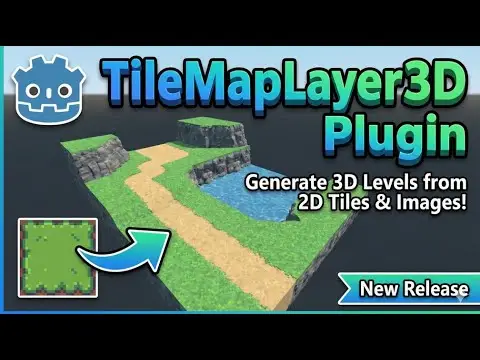
Multiple new features in version 0.8.0. See GitHub for details and documentation => https://github.com/DanTrz/TileMapLayer3D/2D to 3D level and asset Creation. Inspired by the 2D TileMapLayer node. This Plugin allows you to create 3D levels with 2D Tiles and Textures.You can paint and erase as you would in a full Tiling and Level creation system. Supports Animated Tiles, Terrain Generation and multiple smart operations.It supports Collision and exporting the Level and Assets as separate meshes.Allows tiling across all three 3D axes, with a perfect grid-based structure.You can also create Objects and reusable assets with this plugin.Auto-tiling is stable, but Requires 3x3 (minimal) TileSet with 47 Pieces (uses same Terrain configuration as TileMapLayer nodes for 2D)0.4.0 new Features (Please back up your work before updating - some breaking changes)-BOX & PRISM Mesh Modes - 3D tiles with configurable depth-SpriteMesh Integration - Generate standalone 3D meshes from tile selections-Backface Painting - Double-sided walls for interior/exterior rooms-Spatial Chunking - 50x50x50 unit regions for better performance with 50,000+ tiles-Columnar Storage - ~47% smaller scene files with sparse data storage-Auto-Migration System - All old scene formats automatically upgraded (see GitHub for migration instructions)-Enhanced Collision - Binary export and BOX/PRISM support-18 Orientations - Base 6 + 12 tilted variants for ramps/slopes-UI/UX Improvements - SelectionManager, state persistence, defensive resets- Integration with SpriteMesh (https://github.com/98teg/SpriteMesh)** by [98teg] also under MIT
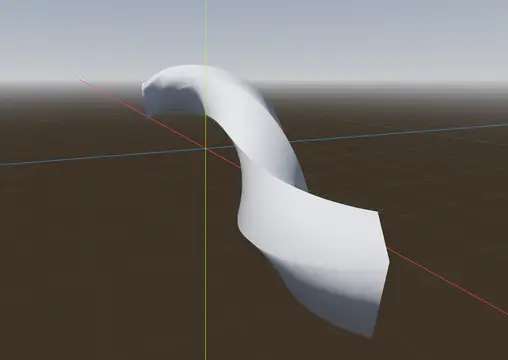
A collection of several helper nodes to extrude 2D profiles, 3D meshes, 3D Scenes and 3D MultiMesh instances along paths in real time. Implemented as a C++ GDExtension with built-in documentation.
Provides basic first-person PlayerCharacter3D based on CharacterBody3D.PlayerCharacter3D is a simple inheritance of CharacterBody3DDefault Features:Subnode: MeshInstance3D: CapsuleMesh;Subnode: CollisionShape3D: CapsuleShape3D;Subnode: Camera3D;
*All informations are in the Github repository page !A simple state machine first person controller asset made in Godot 4.-------------------------------------------------------------------------------------------This asset provides a fully commented, finite state machine based first-person controller with a modular camera system and a debug properties HUD. It is 100% written in GDScript and follows GDScript conventions. My main goal with this project is to provide an easy + complete way to manage and modify a controller for first person games.A test map is included to demonstrate the controller's capabilities.The controller uses a finite state machine architecture where each state has its own script, making it straightforward to add, remove, or modify behaviors. All movement parameters, camera settings, and keybindings are exposed as export variables in the inspector for easy customization.- Godot 4.4, 4.5, 4.6: Fully supported.- Godot 4.0 - 4.3: Should work, but you will need to delete the .uid files.-------------------------------------------------------------------------------------------Features :Movement : - Finite state machine based controller - Smooth acceleration and deceleration - Slope and hill traversal - Walking - Crouching (continuous hold or toggle) - Running (continuous hold or toggle) - Jumping (configurable multi-jump) - Jump buffering - Coyote time - Air control (customizable via curves) - Bunny hopping (with optional auto bunny hop)Camera : - Per-state FOV transitions - Forward and side tilt - Head bob - Zoom - Configurable mouse sensitivityUI : - Crosshair/reticle - Debug properties HUD - Input action checker
> MagicaVoxel large voxel model support, faster import speed, automatic material mapping- Merge models- Multi-threaded Mesh generation- Automatically generate metal, roughness, emissive, and other maps- Solves the issue of slow import and crashing when importing .vox models larger than 255*255*255

A simple GDExtension Terrain heightmap editor for Godot engine.Key Features :Sculpt - Sculpt your terrain with a heightmap- Increase the terrain- Decrease the terrain- Smooth the terrain- Flattern the terrain- Set height (paint to a specific height)- Set angle (paint from a starting point with a specific angle)Paint textures - Add colors to your terrain with the textures painting tool- Normal map and roughness texture are supportedFoliage - Add foliage to your terrain (ex. Grass)- The foliage follows the main camera with a given maximum distancePacked scenes - Scatter packed scenes to the terrain- Multiple objects can be scattered with one brush- Random Y rotation is supported- The packed scenes will always follow the terrain- Live adjustment of the position while the terrain is sculptingWater - Add water to your terrain- The water will make the terrain go lower for the painted area- The packed scenes and the foliage will also get lower with the water- Support for custom shaderWater flow - Paint the direction of the waterSnow - Add thick snow to your terrain- The texture of the snow is configurable so it's easy to make something like sand- Support for custom shaderHole - Paint hole in the terrainMultiple brushes- Custom brushes are also availablePie menuShortcuts- The plugin has been made so it's really easy to use. A lot of shortcuts are available.- LShift - Reverse the tool. Usually, this option will go from "Add" to "Remove". For the sculpting option, this does the "Smooth" option.- V - Show the PieMenu for the current tool- B - Show the PieMenu for the current brush- N - Show the PieMenu for the current tool option (ex. While painting the textures, the PieMenu will show textures)- G - Show a quick select for the brush size- H - Show a quick select for the brush strength- K - Toggle "Auto add zones"- X - Lock on X axis- Z - Lock on Z axis- Shortcuts can be Re-Assigned. To Access them, Goto 'Project->Tools->TerraBrush Key bindings' to access the keymap, and ability to re-assign keys.Settings - Some settings are available in the "ProjectSettings->TerraBrush" (ex. The decal color)LOD - The terrain is created using a custom clipmap mesh so less vertices are needed.MultiZones - The terrain support creates multiple zones (or chunks or regions) to improve performances on bigger terrain.Heightmap based blending - Textures can be blended with heightmaps/bumpmaps with custom intensity.
Adds an easy-to-use, customizable day & night cycle for Godot 4 projects.
Actually good first person controller for the Godot Engine. MIT License (credit Colormatic Studios)This first person controller was made because there weren't many first person controllers for Godot at the time, and the ones that did exist were pretty bad.It is highly customizable and comes with many features, QOL, and readable code.Move with WASD, space to jump, shift to sprint, C to crouch.FEATURES: In-air momentum Motion smoothing FOV smoothing Head bobbing Crouching Sprinting 2 crosshairs/reticles, one is animated (more to come?) Controller/GamePad support (enabled through code, see wiki) In-editor tools (enable editable children to use)If you make a cool game with this addon, I would love to hear about it!Check out the Colormatic Git page for a wiki and more.https://git.colormatic.org/ColormaticStudios/quality-godot-first-person
Gizmo3D encapsulates the Godot Engines 3D move/scale/rotation gizmos into a customizable node for use at runtime. The major differences are that you can edit all transformations at the same time, and customization options have been added. The selection box and axes can be toggled, colors changed, snapping intervals changed, and more. Transformation methods can be easily overriden to customize the default behavior. It is available in both C# and GDScript.For usage, it's recommended to take a look at the demo project - note that to use the demo you will have to git clone the repo, since the artifact is setup for use with the Godot Asset Library.Gizmo3D is largely a port of C++ code from the Godot Engine source. The license for the Godot Engine can be found at https://godotengine.org/license/.
A 3D drop-in replacement for the Godot engine that adds stability and fluids. This version is deterministic, just not cross platform deterministic.This version has:- SIMD (Single instruction, multiple data) operations for even faster performance- parallel solving.
A universal, noise-based shake node that allows the stacking of multiple different shake layers. Can be used for camera shake and more!