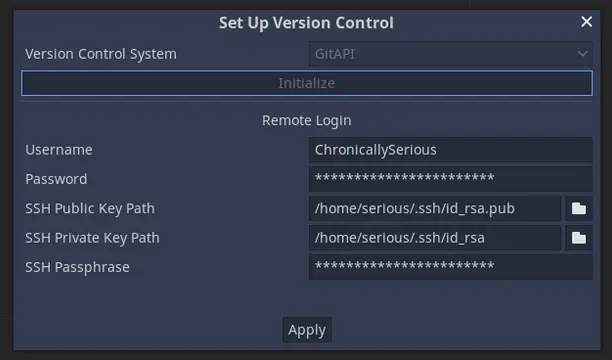
This official plugin lets you interact with Git without leaving the Godot editor. More information can be found at https://github.com/godotengine/godot-git-plugin/wiki.Only compatible with Godot 3.5+.
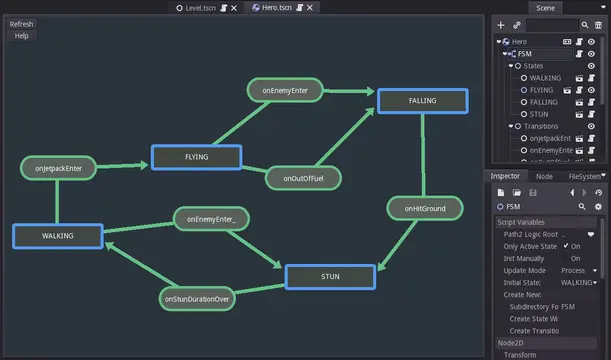
Finite state machine plugin for Godot. It allows you to setup your states easily inside your project. Basically it consist of "Finite state machine" node which is able to hold child nodes that are representing individual states and transitions. It's created with the ease of additional states creation in mind, it will create for you script files for states and transitions. The file will be created in special "FSM" folder inside directory that's holding currently edited scene.This plugin have also visual graph tool for creating fast fast prototyping :)For more info check Video, Github and FSM.gd readme section. If you are not sure what Finite Machine state is, you can read about them here: http://www.gameprogrammingpatterns.com/state.htmlKEEP IN MIND that while we are using this plugin and it should be well tested, we take no responsibility for any damage caused by this code. You should always use Version control systems in your project.
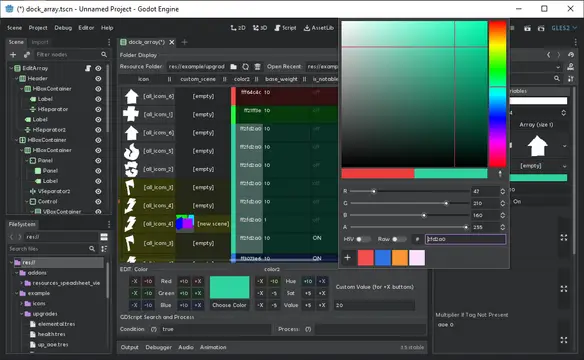
A plugin for Godot 3 that adds a tab for editing folders of Resources as data tables, as well as creating Resources from a CSV file.- Edit Text, Numbers, Bools and Colors even without the Inspector, and Resources and Enums with it;- Select multiple cells in one column (Shift/Ctrl+Click) to edit them in the Inspector simultaneously;- Multi-cell text editing with commonly used text navigation keybindings;- Copy-paste Text into Cells (one line, one cell);- Special mass operations for some datatypes - Multiply/add numbers; - Rotate color hues/adjust sat/val/RGB; - Chop texture into atlas, assign results to each selected resource;- Sort entries by column;- Search by evaluating GDScript expression;- Row stylization (color-type cells change look of the row until next color-type);- Saves recently opened folders between sessions.For available keybindings, please refer to the included About menu orhttps://github.com/don-tnowe/godot-resources-as-sheets-plugin/blob/master/README.mdFor a sample dataset, check out the Example folder. The newest version is always up on: https://github.com/don-tnowe/godot-resources-as-sheets-plugin/tree/godot-3
Works with 3.4.x and 3.5Easily add node references to scripts and copy the variable name to your clipboard.1. Select one or more nodes. There will be a dropdown menu in the scene toolbar if the plugin detects that one of the node's parents has a script. The plugin will scan recursively up the tree.2. Select the parent to which you want to add the reference.3. Select the last option to copy the last created reference's variable name.4. Reload the parent script by closing it and reopening it. For some reason, I can't get it to reload automatically.5. Now you can use that variable.
Interact with WebAssembly modules from Godot.Inspect Wasm modules, access globals, call functions, and manipulate memory.Documentation: https://github.com/ashtonmeuser/godot-wasm/wikiRepository: https://github.com/ashtonmeuser/godot-wasm
One SDK for cross-platform publishing HTML5 games.Supported platforms:+ Playgama+ Crazy Games+ Game Distribution+ Yandex Games+ Wortal+ PlayDeck+ Telegram+ VK.COM+ VK Play+ OK.RU+ Absolute Games+ Other [Work In Progress]
Hierarchical Finite State Machine​ As we all know, state machine is a very common design pattern. Here provide a powerful and easy-to-use Godot plugin for Hierarchical Finite State Machine with visual editing.Features1. Perfect visual editor2. Supports hierarchical nesting and can be used in complex situations3. Diversified transition plans4. Two development modes: signal callback and attached state script5. Develop base GDscript, compatible with Godot basic version and mono version6. **Allows `C#`script to attached as state script.**7. **Suppoets `GDscript` and `C#` script to implement the logic of transition( full version only). **8.**Has ability of working with animaions( Can be an Animation State Mechine)( New).**Installation​ Clone this repo and copy "addons" folder in your project,then Activate this plugin in Project Settings -> Plugins.Demo video link:https://www.bilibili.com/video/BV1AB4y1c79PNOTE:​ Please obey the license(read LICENSE.md for more) when you using this plugin.The full version is under a custom license.The trial version is under the GNU Lesser General Public License v3.0.TutorialPlease jump to the github for read document.​ This plugin still is a alpha version . there might have some bugs in this plugin . Please submit issues to report the bugs or offer proposals.If this plugin can help you , please consider to sponsor me by getting the full version :https://afdian.net/@Daylily-Zeleenhttps://godotmarketplace.com/?post_type=product&p=37138
A GDScript thread pool to asynchronously execute taskswith a bunch of useful features from task time limit to the highly useful join() functionfor further information an documentation please head to the GitHub pagehttps://github.com/ChromiumOS-Guy/ThreadPoolPlusPlusworks on v3.4.4 - v3.5
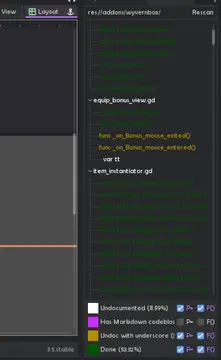
Helps see where you don't have comments on properties and methods inside scripts. Useful for writing addons, as comments are shown as documentation in external editors.- Double-click to show line in script editor;- Lists undocumented members in white, documented in dark green;- Members starting with underscores are highlighted differently if you want to keep them private;- Checkboxes to hide properties P= and methods F= of any category- Shows where Markdown codeblocks were used (shown as code in VSCode, but not in Godot 4 auto-docs so easy porting later)- Shows completion percentage.For now, only supports GDScript.
Get Frames times of an AnimationPlayer in milliseconds. This can be useful if you want to synchronize the timing of animations made with AnimationPlayer with your Aseprite project. Because Asesprite handles frame times in a different way than Godot.How to use:Just copy the "addons/get_animplayer_frame_millis" folder to your addons. And enable the plugin from Project Settings. Now you have a new dock, select any AnimationPlayer and in the dock you can get all frame data. When you click any frame button, the frame duration in milliseconds will be copied to clipboard.
Godot.XT enables the use of asynchronous resources as assets.The plugin creates a "URL" manager where you assign an identifier to an asynchronous resource using a <XT+[ResourceType]> file.*Only supports images for now
This is a tool to assist with creating mods for a game called Your Only Move Is Hustle. (https://store.steampowered.com/app/2212330/Your_Only_Move_Is_HUSTLE/). The assistant adds a new panel that allows you to create a new mod from select templates, along with making the process of configuring the metadata and exporting the mod faster, easier, and more convenient.