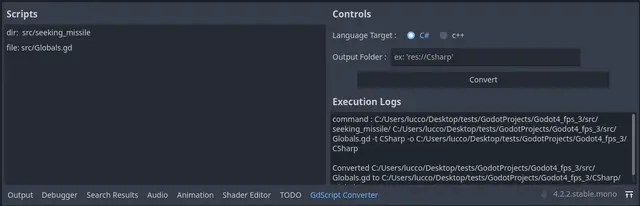
Converts GDscript to C# and c++ with advanced features like type inference.Requires Python installed (tested with 3.12.5).To use :* drag&drop files and folders from the FileSystem dock* (optional) choose C# or c++* (optional) change the output folder* click the convert button.
Console that can drop down with the ~ key, as seen in games like Quake, that allows developer to add commands to quickly test things.Simply use "Console.add_command("command_name", <function>, <num_parameters>)" to add console commands! Parameters are passed in as strings.Other useful settings:Console.enable_on_release_buildConsole.pause_enabledConsole.enabledAnd signals you can connect to:console_openedconsole_closedconsole_unknown_command
Unit testing tool (C#/GDScript) for Godot game engine with library for generating random data. Features: JSON output Flaky tests Parametrized tests Parallelized tests Simple mocking library Extensions for Random class Accessible via editor or CLI Basic support for fuzz testing Simple syntax for writing tests Writing and executing tests in C# and GDScript Custom assertion library (over 130 assertions)
Plugin that can run your project and pass some data from editor to your game. For example, you can run the game and spawn player at the position of cursor in the editor to quickly test parts of a level.Before using the plugin, you need to configure it first by editing "addons/CustomRunner/Config.gd" file, following the comments in the file. There are 3 methods to change:_can_play_scene() - called when pressing the plugin shortcut (F7 by default). The current scene is passed to that method and if it returns true, the plugin will run the project. You can for example check if this scene is a Level class (if you have one)._gather_variables() - called before running the project from the plugin. Use add_variable() to add variables that you want to pass from editor to the game. By default it passes "scene" variable, which contains filename of the current scene. There's also an example line that adds current cursor position._get_game_scene() - return the main scene you want to run. This should be your "game" scene, i.e. scene that has player, HUD and instantiates the level etc. Leave empty to run the currently opened scene instead.After the project is started using the plugin, use CustomRunner.get_variable(variable_name) to retrieve the data passed from the editor. You can also use CustomRunner.is_custom_running() to check if the game is running using the plugin and data is available.You can use Shift + F7 to repeat the last custom run, in case you want to test the same scene multiple times.Check the repository page for more info and example project. The CustomRunner class also has a documentation.
Plugin for easy screen transitions and node references. (More features to come in the future!)Just install and use it directly in your code:SceneManager.change_scene('res://demo/test.tscn')(Make sure the plugin is enabled in Project -> Project Settings -> Plugins)We also have more customization options!SceneManager.change_scene( 'res://demo/test2.tscn', { "pattern": "scribbles", "pattern_leave": "squares" })Read the full API docs at the Github page!
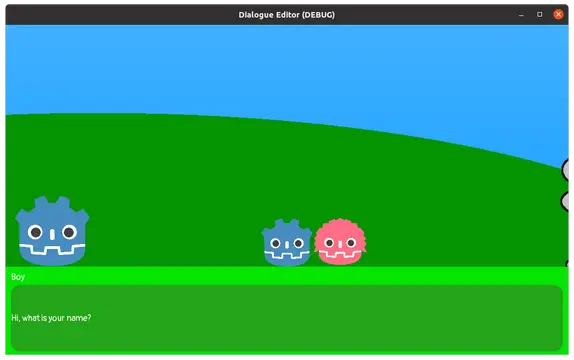
This is a Godot Editor plugin to manage dialogues in godot. The plugin allows you to quickly and easily manage all your actors and dialogues. You can also create your own dialog ui. Resources are assigned very easily using drag and drop. The assigned resources can be viewed in preview window, to check them. You can also test all your dialogues in preview mode with simple play system.Version: 0.0.9 godot 4 rc1
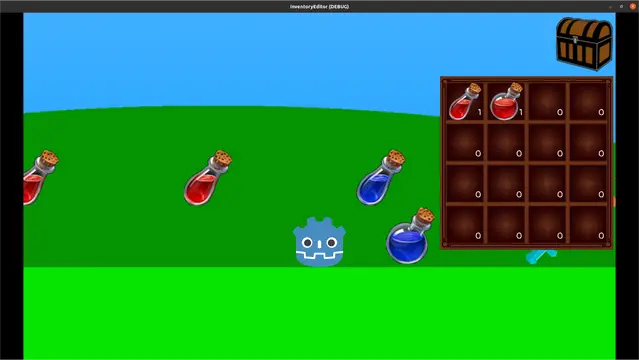
This is a Godot Editor plugin to manage inventories and items in godot. The plugin allows you to quickly and easily manage all your inventories and items. You can also create your own inventory and items ui. Resources are assigned very easily using drag and drop. The assigned resources can be viewed in preview window, to check them. You can also test all your inventories and items in preview mode.Version: 0.1.5 godot 4 rc1
A simple and extensible quest system built for Godot 4.xFor the Godot 4.4+ version, look at https://godotengine.org/asset-library/asset/3809By design, quest system aims to be more versatile by being modular and making the developers handle the quest resources as they wish.This way it is possible to make every kind of quest, imagination is your only limit.Features:* Easy to use API* Support for custom quests* Support for CSV and POT localisation* Easy serialization & deserialization* Tested API with Unit TestsFor issues or questions, feel free to ask on the addon repo by clicking the "Submit an issue" button.For the documentation, head to https://shomy.is-a.dev/quest-system/
SCML importer for GODOT. Written to convert BrashMonkey Spriter created characters and animations into a Godot scene and animations.Usage: * install plugin * enable plugin * import scml along with images maintaining the relativity that the SCML expects * open the scml file in godot using the FileSystem dock0.10.0 was developed in 4.3 but is expected to continue to work in 4.X since no breaking changes were made (quick test confirmed this).For a full description of the changes please go to the github README.Changes from 0.10.0: * Logic that was removing duplicate keyframes on a track was only removing subset but leaving the last remaining set. * Fix for interval not being present in attributes breaking import
A powerful validation plugin for Godot that catches errors before they reach runtime. Validate scenes, nodes, and resources using a declarative, test-driven approach. No @tool required!This version adds some bugfixes and some usage hints in the documentation.This plugin works with pure gdscript, but also supports C#.NOTE FOR GDSCRIPT-only USERS: You can safely uncheck importing the '/godot_doctor/core/c_sharp' and 'godot_doctor/examples/csharp' if you are not using the 'Mono' version of Godot.Key Features- No-code validations- No @tool required - keep gameplay code free of editor logic- Verify type of PackedScene - introduces type safety to PackedScene references- Automatic scene validation - errors appear instantly when saving scenes- Dedicated validation dock - click errors to jump directly to problem nodes- Supports Nodes and Resources - validate both scenes and data assets- Declarative, test-driven syntax - write validations like unit tests- Reusable & nested conditions - scale from simple checks to complex rules- Run on the CLI for integration with your CI/CD pipeline.- Pure gdscript and C# supported New in this version: https://github.com/codevogel/godot_doctor/releases/tag/2.1.3* Full documentation, examples, and setup guide available on GitHub (click the 'VIEW FILES' button)
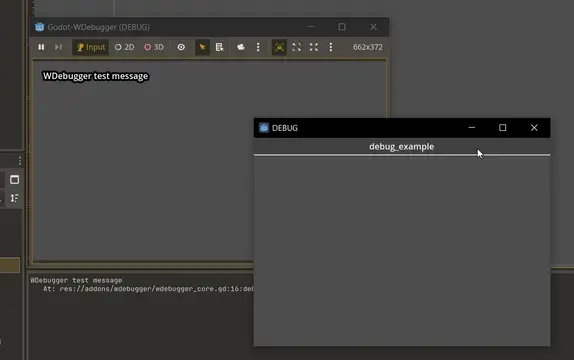
# WDebugger: A Git-friendly DebuggerMost (if not all) of the debugging plugins have two major flaws that I always disliked:1. They are not git-friendly. You can't ignore the debugging functions, therefore they're committed to the git history. This causes: - Bloat in your git history - Unwanted changes to files when you just want to change a debugging function - Conflicts when working in a team - which is probably the most important issue2. They take too much space on the game, which interfers with the testing; Whether be a debugging console that pops up, or just normal GUI buttons you have defined.To Address and fix these issues, I made this plugin. It solves the first issue by separating the debugging functions in a specific file (which you can put in `.gitignore` afterwards); And solves the second problem by introducing a Window node that is separate from the main window.If you enjoyed the plugin, please give it a star on Github: https://github.com/zmn-hamid/Godot-WDebugger## How To TestJust enable the plugin in the settings and run your game. If you're happy with the plugin, you can continue to the next section:## How To Use1. Define your debug functions inside `addons/wdebugger/wdebugger_core.gd` with the given instruction inside that file.2. Open `.gitignore` file in your root directory and write the path to the core file inside of it:`addons/wdebugger/wdebugger_core.gd`3. Enable the plugin and enjoy!## How To Move The Core File1. Cut/Copy the core file and paste it anywhere you want2. Define this new path inside `.gitignore` and `addons/wdebugger/wdebugger.gd` -> `wdebugger_core_path` variable.## ContributionEven though this is a fully functional plugin, any reasonable and beneficial contributionis highly appreciated. Feel free to make your changes and make a pull request or to just simply open an issue Please visit the project on github for more info: https://github.com/zmn-hamid/Godot-WDebugger# LicenseThis project is licensed under the GNU General Public License (GPL) v3. See `LICENSE` for full terms.
Tiles multiple instances of the game in a grid across your monitor. Helpful for testing multiplayer Godot games!