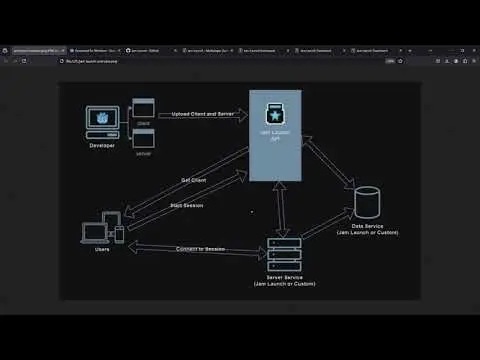
Tools for rapidly developing and deploying multiplayer games with Godot 4Learn more at https://jamlaunch.com
Arcweave Godot Plugin is a plugin for importing Arcweave Projects from arcweave.com in Godot and using them in your Projects.
This plugin provides methods for creating MQTT clients. MQTT is a lightweight and widely used network protocol based on publisher-subscriber principle. This plugin is based on Paho lib which is a wildly used MQTT library (https://projects.eclipse.org/projects/iot.paho).This plugin is part of a collection of plugins for communication in Godot (https://github.com/GDWired).Runs on Windows, Linux and macOS for Godot 4.1.
Interact with WebAssembly modules from Godot.Inspect Wasm modules, access globals, call functions, and manipulate memory.Documentation: https://github.com/ashtonmeuser/godot-wasm/wikiRepository: https://github.com/ashtonmeuser/godot-wasm
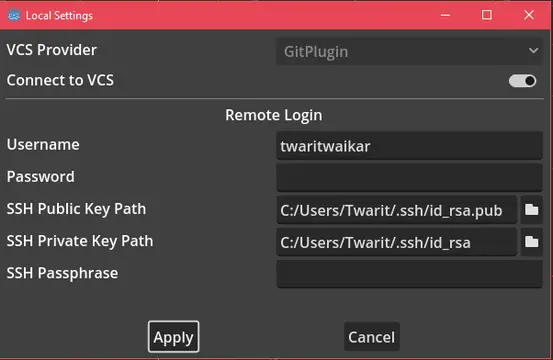
This official plugin lets you interact with Git without leaving the Godot editor. More information can be found at https://github.com/godotengine/godot-git-plugin/wiki.Only compatible with Godot 4.1+.
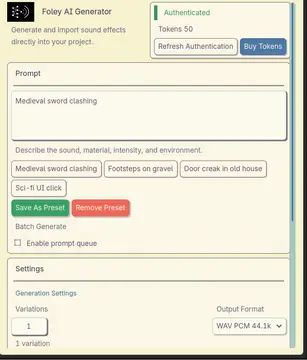
Generate and import Foley AI sound effects directly inside the Godot editor.Features:- Docked generator panel for full Foley generation workflows- Quick Generate dialog from the FileSystem context menu- Variation generation from previously generated clips- Prompt presets, recent prompts, and batch prompt queues- Token/account lookup and retry handling for transient API failures- Import pipeline with deterministic naming and metadata sidecars- Preview, reveal, and copy-path actions for imported clipsRequirements:- Godot 4.6- A Foley AI API keyNotes:- Make sure to create an API key at www.foley-ai.com under "settings" and paste it into the project settings for the plugin.- Output defaults to res://audio/foley_ai- Metadata is stored as hidden .foley.json sidecars beside each generated clip- This is an editor-only addon
Compatible with Godot 4.1-stable and later version!## Features- Format with **shortcut** - Defaults to **Shift+Alt+F**- Format on save - Off by default, can be enabled by [editing the preferences in EditorSettings](#editing-preferences)- Format through **tool menu** - **Project -> Tool -> GDScript Formatter: Format script**- Format through **command palette** - Open the command palette (Default **Ctrl+Shift+P**) and run command `Format GDScript`## Installation**GDScript Formatter** relies on [**GDToolkit**](https://github.com/Scony/godot-gdscript-toolkit) which uses Python and Pip package manager. You need to install them in order to use the addon.1. Install Python (if you do not have it already) - Download installer from [https://www.python.org/downloads/] - Make sure to enable "Add python.exe to PATH" when installing - If you forget you can [add python.exe to PATH after installation](https://realpython.com/add-python-to-path/) - Pip is included with python2. Install the Godot plugin - In Godot editor, click "AssetLib" and search "GDScript Formatter" - Install the plugin - Enable the plugin through **Project -> Project Settings -> Plugins**3. Install GDToolkit - **Project -> Tool -> GDScript Formatter: Install/Update gdtoolkit** **Note: if your python is not install for all users, you might need to change the command by [editing the preference](# Editing Preferences)**## Editing PreferencesYou can edit GDScript Formatter's behavior through the **Editor -> Editor Settings -> General -> GDScript Formatter**. You can change whether files are formatted on save, the gdformat command, line length, shortcut, and other values.If you need to change preference for specific project, you can check `GDScript_Formatter/custom_settings_enabled` and modify settings in **Project -> Project Settings -> General -> GDScript Formatter**.## OthersIf this plugin can help you, please consider to [buy me a coffee](https://afdian.com/a/Daylily-Zeleen), I would try my best to release more plugins and maintain old plugins.-----------------------------------------------一个用于格式化GDSCript脚本的Godot4.x插件。## 特性- 使用**快捷键**进行脚本格式化 - 默认快捷键为**Shift+Alt+F**- 保存脚本时自动格式化 - 默认关闭,通过在编辑器设置中[编辑偏好设置](#偏好设置)进行开启。- 通过**工具菜单**进行格式化 - **项目 -> 工具 -> GDScript Formatter: Format script**- 通过**命令面板**进行格式化 - 打开命令面板(默认快捷键为**Ctrl+Shift+P**)并运行命令`Format GDScript`。## 安装**GDScript Formatter**依赖于[**GDToolkit**](https://github.com/Scony/godot-gdscript-toolkit)。如果你没有自行安装**GDToolKit**,可使用本插件**安装/更新GDToolkit**的功能,这需要你先自行安装**Pip**(通过安装**Python**获得),具体步骤如下:1. 安装Python(如果你没有安装的话) - 从 [https://www.python.org/downloads/] 下载Python安装包。 - 确保在安装时开启了"**Add python.exe to PATH**"选项 - 如果你忘记开启该选项,亦可[在安装之后将"python.exe"添加到PATH中](https://realpython.com/add-python-to-path/) - **Pip**将被包含在**Python**中。2. 在你的Godot项目中安装"**GDScript Formatter**"插件 - 在Godot编辑器中,点击"AssetLib"并搜索"GDScript Formatter" - 安装该插件 - 通过**项目 -> 项目设置 -> 插件**开启"GDScript Formatter"3. 安装GDToolkit - **项目 -> 工具 -> GDScript Formatter: Install/Update gdtoolkit** **注意:如果你的Python仅为部分部分用户安装,可能需要前往编辑器设置来调整[偏好设置](#偏好设置)中的命令。**## 偏好设置你可以通过编辑编辑器设置来修改**GDScript Formatter**的行为(**编辑器 -> 编辑器设置 -> 通用 -> GDScript Formatter**)。其中包括格式化时每行的最大长度,是否开启保存时自动格式化,快捷键,实际使用的pip命令,实际使用的gdformat命令等。如果你需要为特定项目设置不同的偏好设置,可以在项目设置中(**项目 -> 项目设置 -> 通用 -> GDScript Formatter**)勾选上`GDScript_Formatter/custom_settings_enabled`并调整其他设置。## 其他如果这个插件能帮到你还请为我[充电](https://afdian.com/a/Daylily-Zeleen),我也会尽力推出新的插件和维护老的插件。一个用于格式化GDSCript脚本的Godot4.x插件。## 特性- 使用**快捷键**进行脚本格式化 - 默认快捷键为**Shift+Alt+F**- 保存脚本时自动格式化 - 默认关闭,通过在编辑器设置中[编辑偏好设置](#偏好设置)进行开启。- 通过**工具菜单**进行格式化 - **项目 -> 工具 -> GDScript Formatter: Format script**- 通过**命令面板**进行格式化 - 打开命令面板(默认快捷键为**Ctrl+Shift+P**)并运行命令`Format GDScript`。## 安装**GDScript Formatter**依赖于[**GDToolkit**](https://github.com/Scony/godot-gdscript-toolkit)。如果你没有自行安装**GDToolKit**,可使用本插件**安装/更新GDToolkit**的功能,这需要你先自行安装**Pip**(通过安装**Python**获得),具体步骤如下:1. 安装Python(如果你没有安装的话) - 从 [https://www.python.org/downloads/] 下载Python安装包。 - 确保在安装时开启了"**Add python.exe to PATH**"选项 - 如果你忘记开启该选项,亦可[在安装之后将"python.exe"添加到PATH中](https://realpython.com/add-python-to-path/) - **Pip**将被包含在**Python**中。2. 在你的Godot项目中安装"**GDScript Formatter**"插件 - 在Godot编辑器中,点击"AssetLib"并搜索"GDScript Formatter" - 安装该插件 - 通过**项目 -> 项目设置 -> 插件**开启"GDScript Formatter"3. 安装GDToolkit - **项目 -> 工具 -> GDScript Formatter: Install/Update gdtoolkit** **注意:如果你的Python仅为部分部分用户安装,可能需要前往编辑器设置来调整[偏好设置](#偏好设置)中的命令。**## 偏好设置你可以通过编辑编辑器设置来修改**GDScript Formatter**的行为(**编辑器 -> 编辑器设置 -> 通用 -> GDScript Formatter**)。其中包括格式化时每行的最大长度,是否开启保存时自动格式化,快捷键,实际使用的pip命令,实际使用的gdformat命令等。如果你需要为特定项目设置不同的偏好设置,可以在项目设置中(**项目 -> 项目设置 -> 通用 -> GDScript Formatter**)勾选上`GDScript_Formatter/custom_settings_enabled`并调整其他设置。## 其他如果这个插件能帮到你还请为我[充电](https://afdian.com/a/Daylily-Zeleen),我也会尽力推出新的插件和维护老的插件。
This plugin allow a fast and easyer way to comunicate with the Joystick service using Godot engine. With the addition of the "JoystickClient" Node you can easily get all the JSON data inside all your configurations.See about joystick in:https://www.getjoystick.com
OS.execute() lets you get the output, but it blocks the thread.OS.create_process() kicks off a process in the background, but drops the output.Better Processes lets you interactively create a background process.It's built in Rust. Compiles to GDExtention. You won't have to worry about that.Add a ProcessNode. Connect the stdout/stderr signals. Set the cmd,args, start_on_ready (or run "start" as needed) if you need it. If the process is still running when this node is deleted, it will close the child process. Or create a Process object and call `start(cmd,args)`. You'll have to explicitly call `read_stdout()` and `read_stderr`. However the advantage is that when the last reference goes out of scope, it closes the child process.Note: Due to GodotRust's current strictness, you must use the correct type args, no implicit typing. For example:`myProcess.start("ping",["google.com"] as PackedStringArray)`The `as PackedStringArray` is important here.
Steamworks API plug-in for Godot Engine. Available for the Windows 32/64-bit, Linux 32/64-bit platforms, and Mac universal. It is based on GodotSteam 4.15 with Steamworks SDK 1.62.This version is meant for Godot Engine 4.1 to 4.3 but should also work in 4.4; other versions include:Godot 4.4: https://godotengine.org/asset-library/asset/2445 Godot 4.0: https://godotengine.org/asset-library/asset/1768Previous versions of the plug-in can also be found at the GodotSteam repository: https://codeberg.org/godotsteam/godotsteam/releases.You can find the full documentation with tutorials at https://godotsteam.com.It does not require enabling but you may need to restart your editor.
Godot RL Agents is a fully open source package that allows video game creators, AI researchers and hobbyists the opportunity to learn complex behaviors for their Non Player Characters or agents.Find out more at the libraries github repo: https://github.com/edbeeching/godot_rl_agents
Steamworks Server API plug-in for Godot Engine. Available for the Windows 32/64-bit, Linux 32/64-bit platforms, and Mac universal. It is based on GodotSteam 4.6 with Steamworks SDK 1.62.This version is meant for Godot Engine 4.1.x to 4.3.x; for other versions:Godot 4.4: https://godotengine.org/asset-library/asset/3901Previous versions of the plug-in can be found at the GodotSteam Server repository: https://codeberg.org/godotsteam/godotsteam-server/releases.You can find the full documentation with tutorials at https://godotsteam.com.It does not require enabling but you may need to restart your editor.