


This addon adds a container, that can have multiple tabs, which the user can change by swiping left or right on the screen. It is based on the ScrollContainer node.Getting Started:• Download the addon and place it into your project directory, either manually, or through the Asset Store• Activate it in the Project Settings ("Plugins" tab)• Add a BetterTabContainer node to a scene. It is recommended that it is either set to full rect or has a "Fill" horizontal size flag• Add multiple nodes to it. Each child node counts as a separate tab, it can be any type of Control node. Please ignore the "ScrollContainer can only have one node" warning, I am actively trying to get rid of it• Done!Customizing the Node:• You can set the "Current Tab" property in the inspector. By default, it is set to 0, meaning the first tab is active on start• You can connect the "tab_switched" signal to another node to detect when it's changed• If you want to change the tab through code (for example, if you have a list of tab buttons next to the container), you can call the switch_tab(tab) method• You might also want to hide the horizontal scroll bar, as it does nothing• If you want to be able to swipe on tabs, make sure to set all of the children containers' mouse filter to "Pass", so it detects input
Aseprite Animation Importer - Godot 4
An asset by Atkintc
Quick Information

Aseprite Animation Importer - Godot 4
This tool allows you to quickly import animations from an Aseprite JSON file and spritesheet. Updated for Godot 4 Beta 5.
Supported Engine Version
4.0
Version String
1.0
Support Level
community
Modified Date
3 years ago
Git URL
Issue URL

A plugin for the Godot Engine that imports animations from Aseprite
Forked from Aseprite Importer and updated for Godot v4

What does it actually do?
This plugin creates / modifies animations in an AnimationPlayer node that change the offset and region_rect properties of a Sprite2D/Sprite3D node based on the animation tags of a Sprite Sheet JSON data file generated by Aseprite.
Download and Installation
Downloading from the Godot Asset Library
- In the Godot editor, open the AssetLib tab
- Search for
Aseprite Importer - Click on the asset name and click the Download button in the preview window
- After the download is finished, click Instal... and then Install in the popup
- Go to Projects -> Project Settings... and enable the plugin in the Plugins tab
Downloading from the GitHub repository
- Download or clone this repository and copy the
/addons/aseprite_importerfolder into yourproject/addonsfolder - In the Godot Editor, go to Projects -> Project Settings... and enable the plugin in the Plugins tab
Usage
Exporting from Aseprite
- In Aseprite, go to File -> Export Sprite Sheet
- Configure how you want the Sprite Sheet image to be exported
- In the Output section:
- Enable the option Output File and select the directory where you want the texture file to be saved;
- Enable the option JSON Data and select the directory where you want the JSON data file to be saved (preferably in the same directory of the image)
- Enable the option Meta -> Tags
Importing to Godot
- Open the scene where you want to import the animations
- Open the plugin from the Aseprite Importer button in the top nav (next to the "2D", "3D", "Script", and "AssetLib" buttons)
- Select the JSON Data file
- Select the texture file if it has not been automatically loaded
- Select which tags you want to be imported
- Select the
AnimationPlayernode where you want the animations to be added/modified - Select The
Sprite2D/Sprite3Dnode you want to be affected by the animations - Press Generate Animations
Compatability
- Tested with Godot v4.0 alpha 14
Limitations
- For now the plugin doesn't keep track of the selected files in the disk to automatically re-import the changes;
- It also is not integrated with the Godot's UndoRedo system.
License
This tool allows you to quickly import animations from an Aseprite JSON file and spritesheet. Updated for Godot 4 Beta 5.
Reviews
0 total reviews
Quick Information
Aseprite Animation Importer - Godot 4
This tool allows you to quickly import animations from an Aseprite JSON file and spritesheet. Updated for Godot 4 Beta 5.
Supported Engine Version
4.0
Version String
1.0
Support Level
community
Modified Date
3 years ago
Git URL
Issue URL
Related Assets
More in 2D Tools

This addon includes some common emotion expression icon animations, which are generally used in dialogue.Please check the repository for more information.
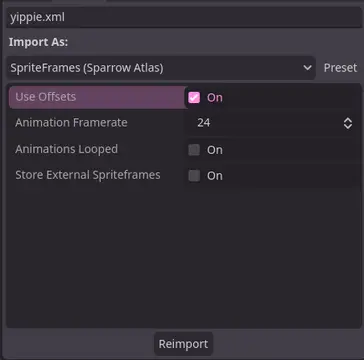

A Godot addon that adds a ResourceImporter for the Sparrow Texture Atlas XML Format.


TileBitTools is a Godot 4 plugin for autotile templates and terrain bit editing.- Built-in autotile templates for all 3 terrain modes* 3x3 minimal, 3x3 16-tile and 2x2 templates from Godot 3 documentation* Blob, Wang and Wang 3-terrain templates to match Tilesetter's default export* 256-tile Corners and Sides templates from TilePipe2 (requires plugin for use)* Simple 9- and 4-tile templates- Custom user template creation- Bulk terrain bit editing buttons: Fill, Set Bits, and Clear- Customization options in Project SettingsSee github.com/dandeliondino/tile_bit_tools for full Readme and Wiki documentation