
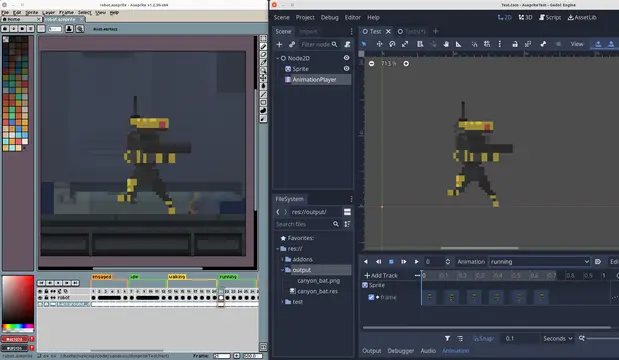

Import Aseprite animations to AnimationPlayers, AnimatedSprites2D, AnimatedSprite3D and SpriteFrames.Features:- Generate sprite sheet and import animations to AnimationPlayer, AnimatedSprite, AnimatedSprite3D or SpriteFrames resource.- Adds Inspector docks for easy import and re-import.- Filters out layers you don't want in the final animation, using regex.- Supports slices. Import only a region from your file./- Supports Aseprite animation direction (forward, reverse, ping-pong).- Supports loopable and non-loopable animations.- Separates each Aseprite Tag into animations. In case no tags are defined, imports everything as default animation.- AnimatedSprite - Creates SpriteFrames with Atlas Texture to be used in AnimatedSprites. - Converts Aseprite frame duration (defined in milliseconds) to Godot's animation FPS. This way you can create your animation with the right timing in Aseprite, and it should work the same way in Godot. - Choose to export the Aseprite file as a single SpriteFrames resource, or separate each layer in different resources. - Adds Aseprite file importer to Godot (check limitations section).- AnimationPlayer - Adds and removes animation tracks without removing other existing tracks. - You are free to import multiple files to the same AnimationPlayer or import each layer to their own Sprite and AnimationPlayer.Aseprite Wizard is only required during development. If you decide to not use it anymore, you can remove the plugin and all animations previously imported should keep working as expected.
SmartShape2D - Godot3
An asset by SirRamESQ
Quick Information

SmartShape2D - Godot3
This plugin allows you to create nicely textured 2D polys. Simply place a few points then create / assign the shape material and you should have a good looking polygon.The textures used are similar to what you would use if making terrain using TileMaps/TileSetsSee Homepage here:https://github.com/SirRamEsq/SmartShape2DA Sample Godot Project can be found here:https://github.com/SirRamEsq/SmartShape2D-DemoProjectSmartShape2D + Aseprite tutorial can be found here (Thanks Picster!):https://www.youtube.com/watch?v=r-pd2yuNPvA
Supported Engine Version
3.5
Version String
2.3
Support Level
community
Modified Date
3 years ago
Git URL
Issue URL
SmartShape2D


SmartShape2D + Aseprite tutorial can be found here (Thanks Picster!):
About
This plugin allows you to create nicely textured 2D polys. Simply place a few points then create / assign the shape material and you should have a good looking polygon.
The textures used are similar to what you would use if making terrain using TileMaps/TileSets
This plugin is under ACTIVE DEVELOPMENT! If you find any issues, by all means let us know. Read the section below on Contributing and post an issue if one doesn't already exist
If you enjoy this tool and want to support its development, I'd appreciate a coffee :)

Support
- Supported and Tested on Godot 3.2
- Should work with later versions of Godot 3.x
Demo
A Sample Godot Project can be found here: https://github.com/SirRamEsq/SmartShape2D-DemoProject
Documentation
- How To Install
- Quick Start
- Quick Start Video (In Progress)
- Migrating from 1.x
- Shapes
- Toolbar
- Resources
- Controls and Hotkeys
- FAQ
- Version History
Contibuting
Issues
If you have any suggestions or find any bugs, feel free to add an issue.
Please include the following three bits of information in each issue posted:
- Bug / Suggestion
- Godot Version
- SmartShape2D Version
Some Guidelines for Issues:
- Attaching a sample project where the issue exists is the fastest way for us to see what's going on
- Try to be as descriptive as possible
- Pictures and screenshots will also be very helpful
Issues can be added here
Development
We have a set of tests we run against the code (courtesy of GUT). If making a merge request, please ensure that the tests pass. If the tests have been updated appropriately to pass, please note this in the merge request.
Discord
We have a Discord server for the plugin. https://discord.gg/mHWDPBD3vu
Here, you can:
- Ask for help
- Showcase your project
- Speak with the developers directly
This plugin allows you to create nicely textured 2D polys. Simply place a few points then create / assign the shape material and you should have a good looking polygon. The textures used are similar to what you would use if making terrain using TileMaps/TileSets See Homepage here: https://github.com/SirRamEsq/SmartShape2D A Sample Godot Project can be found here: https://github.com/SirRamEsq/SmartShape2D-DemoProject SmartShape2D + Aseprite tutorial can be found here (Thanks Picster!): https://www.youtube.com/watch?v=r-pd2yuNPvA
Reviews
0 total reviews
Quick Information
SmartShape2D - Godot3
This plugin allows you to create nicely textured 2D polys. Simply place a few points then create / assign the shape material and you should have a good looking polygon.The textures used are similar to what you would use if making terrain using TileMaps/TileSetsSee Homepage here:https://github.com/SirRamEsq/SmartShape2DA Sample Godot Project can be found here:https://github.com/SirRamEsq/SmartShape2D-DemoProjectSmartShape2D + Aseprite tutorial can be found here (Thanks Picster!):https://www.youtube.com/watch?v=r-pd2yuNPvA
Supported Engine Version
3.5
Version String
2.3
Support Level
community
Modified Date
3 years ago
Git URL
Issue URL
Related Assets
More in 2D Tools

Renders Latex in Godot Mono! Usage Instructions:1.Create a Godot Mono project and build a C#-script.2. Install from the Godot Asset Store from inside the Engine or by cloning. When including in an existing project, you won't need the *.godot and *.sln.3. The add-on depends on CSharpMath.SkiaSharp, licensed under MIT, as a nuget package. You to integrate this into your existing Godot Mono project by copying the <ItemGroup>-tags into your project's .csproj-file from GodoTeX.csproj.4. Enable the addon in the settings, as usual. You can now create a LaTeX node and start your math excapades!
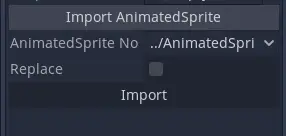

A basic plugin to automatically import all frames from an AnimatedSprite as animations in an AnimationPlayer, with the appropriate FPS. It adds a section under AnimationPlayer's inspector to import frames from AnimatedSprites in the scene.
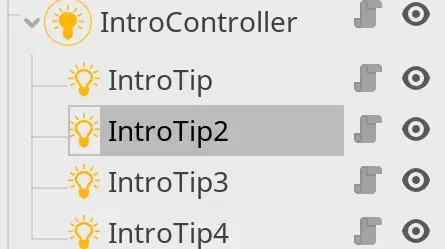

easy to use add-on for creating tutorials and introduction section inside Godot scenes.Create an IntroController, and set its name/theme (for label and buttons). Then add IntroTip nodes to it as children. set highlighted area for your tip using Godot's native polygon tool, give it a tip text, and then start the intro by calling start() on Introcontroller.