



A simple branching dialogue editor and stateless runtime.Create your dialogue right in the Godot Editor itself with a simple script-like language and the built-in syntax checker.Then, in your game, use the DialogueManager global to fetch lines of dialogue. There is an example dialogue balloon to help get you started on creating your own to fit in better with your game. The GitHub repository also contains a few extra example balloon implementations.
GDSQL - Ultimate Database
An asset by jinyangcruise
Quick Information

GDSQL - Ultimate Database
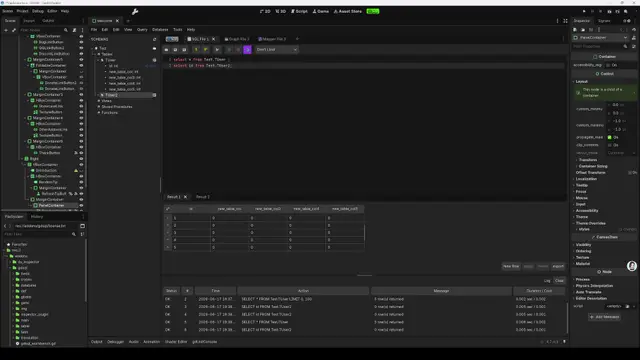
GDSQL, a ConfigFile-based SQL system. Pure GDScript, zero dependencies, no server required, AI friendly. Features: visual database management, Excel-like inline editing with auto-fill, MyBatis-style ORM (GBatis), code generator, and encryption. Supports csv/json/cfg import-export.SQL Query EngineA complete SQL engine built in pure GDScript, supporting:Statements: SELECT, INSERT, UPDATE, DELETE, REPLACEConditions: WHERE with AND, OR, IN, NOT INSorting & Grouping: ORDER BY (multi-column, ASC/DESC), GROUP BY with HAVINGPagination: LIMIT and OFFSETJoins: LEFT JOIN with chainable multi-table supportSet Operations: UNION ALLSubqueries: Both correlated and non-correlatedAggregates: COUNT, SUM, AVG, MIN, MAX, GROUP_CONCATExpressions: Arithmetic operators, string concatenation, function calls, type conversion, SQL-compatible NULL semantics (three-valued logic)INSERT variants: INSERT IGNORE (skip on duplicate key), INSERT ... ON DUPLICATE KEY UPDATE (upsert)LRU Cache: Auto-caches the last 1024 parsed SQL statements for faster repeated queriesYou can execute raw SQL strings directly via SQLParser.parse_to_dao(), or use the visual SQL editor in the workbench.Visual WorkbenchA dedicated main screen in the editor, consisting of integrated panels:Database Tree Browser — Navigate all databases and tables hierarchically. Right-click for context menus (create, delete, rename, etc.).Data Table Viewer — Browse and edit data in an Excel-like grid. Click any cell to edit inline with instant commit. Drag column borders to resize. Sort by clicking column headers. Supports type-appropriate editors for int, float, Vector2, and more.Table Structure Editor — View and modify column definitions: name, data type, default value, comments, primary key, and auto-increment settings.Schema Management — Visually create and delete databases and tables through dialog-based workflows.SQL Query Editor — Write and execute SQL with syntax awareness. Results appear in a grid panel below. Query history is automatically recorded. Export results as CSV, JSON, or CFG.Diff View — Compare table content between two versions with color-coded highlights: added rows (green), deleted rows (red), modified rows (yellow).Table Inspector — Detailed column definitions, table metadata, and data statistics in the right panel.Smart Auto-FillAccelerates data entry with intelligent pattern prediction:Least-squares fitting: Analyzes existing numeric samples to predict subsequent valuesMulti-type support: Numbers, strings with numeric placeholders (e.g. "enemy_001" → "enemy_002"), Vector2/3/4, Vector2i/3i/4i, Resource pathsPattern recognition: Detects numbering sequences and fills accordinglyDrag-to-fill: Select a range, drag the fill handle, and watch values populate automatically
Supported Engine Version
4.5
Version String
0.5.14
Support Level
community
Modified Date
1 month ago
Git URL
Issue URL
GDSQL
Database SQL Workbench Plugin for Godot Engine
English | 简体中文


A database SQL workbench plugin for Godot Engine built on top of the ConfigFile system. It provides a visual database management interface, Excel-like data editing, a full SQL query engine, a MyBatis-style ORM mapping framework (GBatis), and AES-256-CBC data encryption. Pure GDScript, zero external dependencies, no database server required.
Features
SQL Query Engine
- Full SQL syntax: SELECT / INSERT / UPDATE / DELETE / REPLACE
- Conditional queries: WHERE, AND, OR, IN, NOT IN, BETWEEN, LIKE, IS NULL
- Sorting & grouping: ORDER BY, GROUP BY, HAVING
- Pagination: LIMIT, OFFSET
- Joins: LEFT JOIN with chainable multi-table support
- Set operations: UNION ALL
- Subqueries: Correlated and non-correlated
- Aggregate functions: COUNT, SUM, AVG, MIN, MAX, GROUP_CONCAT, and more
- Expression evaluation: SQL-compatible null semantics, operators, function calls, type conversion
- LRU cache: Auto-caches the last 1024 parsed SQL statements
Visual Database Workbench
Available as a dedicated main screen in the Godot Editor:
- Database tree browser: Navigate all databases and tables in a tree view
- Data table viewer: Browse and edit data in an Excel-like grid
- Inline editing: Modify data directly in table cells with instant effect
- Drag-to-resize columns: Freely adjust column widths
- Table structure editor: View and modify column definitions, types, defaults, and comments
- Schema management: Visually create / delete / edit databases and tables
- Data import/export: CSV, JSON, and CFG formats
- Diff view: Compare table content with highlighted additions, deletions, and changes
- SQL query editor: Write and execute SQL with automatic query history
- Export query results: Export results as CSV, JSON, or CFG
Smart Auto-Fill
- Least-squares fitting: Predicts and fills subsequent data based on existing samples
- Multi-type support: Numbers, strings (with numeric placeholders), Vector2/3/4, Vector2i/3i/4i, Resource paths
- Pattern recognition: Detects numbering patterns (e.g.
"name_001","name_002") and fills accordingly
Fluent DAO API
Complete database operations through GDScript method chaining — no XML required:
# Select
var result = GDSQL.BaseDao.new()
    .use_db("game_config")
    .select("id, name, hp, mp")
    .from("c_hero")
    .where("hp > 100 AND mp >= 50")
    .order_by("hp")
    .limit(10)
    .query()

# Insert
GDSQL.BaseDao.new()
    .use_db("game_config")
    .insert_into("c_hero")
    .values({"id": 101, "name": "NewHero", "hp": 200})
    .query()

# Update
GDSQL.BaseDao.new()
    .use_db("game_config")
    .update("c_hero")
    .sets({"hp": 300})
    .where("id = 101")
    .query()

# Delete
GDSQL.BaseDao.new()
    .use_db("game_config")
    .delete_from("c_hero")
    .where("id = 101")
    .query()
Mapper Graph Visual Editor
A drag-and-drop graph editor for designing table relationships:
- Node-based editing: Display tables as graph nodes with free-form layout
- One-click code generation:
- Entity class (
.gd): Auto-generatedclass_nameentity with typed properties - XML mapping file (
.xml): Complete GBatis mapping - Mapper Graph file (
.gdmappergraph): Persisted layout and relationships
- Entity class (
- Type inference: Database column types → GDScript types
- Relationship visualization: Lines show foreign-key connections
- Incremental sync: Detects schema changes and highlights differences
Data Encryption
- AES-256-CBC: Built on Godot's native
AESContext - DEK hierarchy: Data encryption key + user password dual-layer protection
- Key derivation: HMAC-SHA256 with random salt
- Verification: Built-in verify code detects wrong passwords
- Flexible granularity: Database-level and table-level encryption
- Editor support: Encrypted files require a password to view in-editor
XML Editor
- Built-in XML editor with syntax highlighting
- Find and replace
- Tree view navigation and multi-tab editing
Internationalization
13 languages: Simplified Chinese, Traditional Chinese, English, Japanese, Korean, French, German, Spanish, Italian, Portuguese (BR), Russian, Polish, Turkish.
Highlights
Comparison
| Feature | GDSQL | SQLite / GDSQLite | Custom Resource |
|---|---|---|---|
| Storage | .cfg plain text |
Binary | .tres / .res |
| SQL queries | Full syntax | ✅ | ❌ |
| Visual editor | Built into Godot | Third-party | Built into Godot |
| Excel-like editing | Inline + auto-fill | ❌ | ❌ |
| ORM mapping | ✅ GBatis | ❌ | ❌ |
| Code generation | Entity + XML mapping | ❌ | ❌ |
| Runtime CRUD | Fluent API / GBatis | SQL | ❌ |
| Encryption | AES-256-CBC | Manual | Godot built-in |
| VCS friendly | Plain text, diffable | Binary | Diffable |
| No external services | ✅ | ✅ | ✅ |
| Cross-platform | Godot everywhere | Needs compilation | Godot everywhere |
Key Advantages
Zero external dependencies — No database engine, no database server, no additional runtime. Install as a plugin and it works.
ConfigFile-based storage — All data lives in
.cfgplain text files, Godot's native format. Version control friendly (git diff), editable in any text editor, accessible outside the Godot editor.Unified editor & runtime API — The same API works in-editor for development and in the exported game for runtime access. No need to maintain two data access layers.
Dual development modes — Use the fluent DAO API for quick data access, or GBatis XML mapping files for complex queries and result mapping.
End-to-end ORM pipeline — From visual graph editor to auto-generated entity classes and mapping files to runtime CRUD. Developers focus on business logic while the tool handles the boilerplate.
Excel-grade data editing — Inline cell editing, draggable columns, long-content viewing, and smart auto-fill dramatically improve editing efficiency.
Built-in security — Sensitive game data can be encrypted directly at the plugin level.
All-in-one solution — A single plugin covers data definition, management, querying, editing, encryption, and code generation.
Contributing
See CONTRIBUTING.md for development setup, including the pre-push git hook for manifest management.
Quick Start
- Place this repository into your Godot project's
addons/directory - Enable GDSQL in Godot Editor → Project Settings → Plugins
- Click the GDSQL main screen button at the top of the editor
- Create databases and tables in the workbench
- Use
GDSQL.BaseDaoor GBatis for runtime queries
Advanced: GBatis ORM Framework
GBatis is the built-in ORM framework, fully implementing MyBatis 3 capabilities. SQL statements live in XML mapping files, completely separate from GDScript code — ideal for complex queries and object mapping.
GBatis supports two working modes:
- Manual authoring: Advanced users can fully customize XML and entity code for fine-grained control
- Visual generation: The built-in Mapper Graph editor lets you design relationships through drag-and-drop, then generate initial versions with one click:
- XML mapping files (
.xml): Complete resultMap and dynamic SQL - Entity class code (
.gd):class_nameGDScript class with typed properties - Mapper Graph file (
.gdmappergraph): Persisted node layout for incremental updates
- XML mapping files (
The two approaches can be combined: quickly scaffold with the visual editor, then manually fine-tune.
Core Capabilities
- XML mapping files: SQL in XML, decoupled from code
- Dynamic SQL:
<if>,<where>,<set>,<foreach>,<trim>,<bind> - Result mapping:
<resultMap>for complex nested object mapping - Associations & collections: One-to-one and one-to-many via
<association>/<collection> - Discriminator: Polymorphic mapping based on field values
- L1 / L2 caching: Configurable cache for query performance
- Auto-mapping: NONE and PARTIAL levels
- useGeneratedKeys: Auto-populate generated primary keys
- Multi-parameter binding: Named and positional parameter support
GBatis Example
<mapper namespace="HeroMapper">
    <resultMap id="heroResult" type="HeroEntity">
        <id property="id" column="id"/>
        <result property="name" column="name"/>
        <result property="hp" column="hp"/>
        <result property="mp" column="mp"/>
    </resultMap>

    <select id="selectHeroesByHp" resultMap="heroResult">
        SELECT * FROM c_hero WHERE hp > #{minHp} ORDER BY hp DESC
    </select>
</mapper>
Create a class extending GBatisMapper and point its mapper_xml property to the XML file above. The SQL methods become directly callable.
Fluent DAO vs. GBatis
| Scenario | Recommended | Why |
|---|---|---|
| Simple CRUD | Fluent DAO | Concise, no extra files |
| Complex queries / joins | GBatis | SQL-code separation, powerful mapping |
| Team collaboration | GBatis | DBA handles XML, devs call methods |
| Rapid prototyping | Fluent DAO | Zero config, write and use |
Limitations
- Performance ceiling: As a pure GDScript implementation, GDSQL is not designed for real-time high-throughput scenarios.
- Data volume: Optimized for game configuration data (hundreds to tens of thousands of records), not for data warehouses or datasets exceeding hundreds of thousands of rows.
- Concurrent access: The ConfigFile-based engine does not support multi-threaded concurrent writes. All operations should run on the main thread.
- No server mode: Local-only, file-based data store. No network access, no client-server architecture, no multi-user concurrency.
- No referential integrity: Foreign key relationships exist at the application level; the storage engine itself does not enforce constraints.
- Limited indexing: Indexes are maintained in memory via
ImprovedConfigFile.set_indexed_props()— no persistent index structure.
Future Plans
- Performance roadmap: Identify hot paths and optimize — both GDScript-level and via GDExtension for critical sections
- Extended SQL syntax: Window functions, CTEs (Common Table Expressions), full JOIN support (INNER, RIGHT, FULL)
- DDL language support:
CREATE TABLE,ALTER TABLE,DROP TABLEstatements - Query planner optimization: Better execution order, LEFT JOIN predicate push-down
- More ease-of-use features: Simplify common workflows, lower the learning curve
- Quality-of-life improvements: Better error messages, undo/redo, batch operations, enhanced keyboard shortcuts
- Comprehensive documentation site: Dedicated API reference, tutorials, and real-world examples
- Testing infrastructure: Expanded unit test coverage and integration tests for the full query lifecycle
License
GDSQL, a ConfigFile-based SQL system. Pure GDScript, zero dependencies, no server required, AI friendly. Features: visual database management, Excel-like inline editing with auto-fill, MyBatis-style ORM (GBatis), code generator, and encryption. Supports csv/json/cfg import-export. SQL Query Engine A complete SQL engine built in pure GDScript, supporting: Statements: SELECT, INSERT, UPDATE, DELETE, REPLACE Conditions: WHERE with AND, OR, IN, NOT IN Sorting & Grouping: ORDER BY (multi-column, ASC/DESC), GROUP BY with HAVING Pagination: LIMIT and OFFSET Joins: LEFT JOIN with chainable multi-table support Set Operations: UNION ALL Subqueries: Both correlated and non-correlated Aggregates: COUNT, SUM, AVG, MIN, MAX, GROUP_CONCAT Expressions: Arithmetic operators, string concatenation, function calls, type conversion, SQL-compatible NULL semantics (three-valued logic) INSERT variants: INSERT IGNORE (skip on duplicate key), INSERT ... ON DUPLICATE KEY UPDATE (upsert) LRU Cache: Auto-caches the last 1024 parsed SQL statements for faster repeated queries You can execute raw SQL strings directly via SQLParser.parse_to_dao(), or use the visual SQL editor in the workbench. Visual Workbench A dedicated main screen in the editor, consisting of integrated panels: Database Tree Browser — Navigate all databases and tables hierarchically. Right-click for context menus (create, delete, rename, etc.). Data Table Viewer — Browse and edit data in an Excel-like grid. Click any cell to edit inline with instant commit. Drag column borders to resize. Sort by clicking column headers. Supports type-appropriate editors for int, float, Vector2, and more. Table Structure Editor — View and modify column definitions: name, data type, default value, comments, primary key, and auto-increment settings. Schema Management — Visually create and delete databases and tables through dialog-based workflows. SQL Query Editor — Write and execute SQL with syntax awareness. Results appear in a grid panel below. Query history is automatically recorded. Export results as CSV, JSON, or CFG. Diff View — Compare table content between two versions with color-coded highlights: added rows (green), deleted rows (red), modified rows (yellow). Table Inspector — Detailed column definitions, table metadata, and data statistics in the right panel. Smart Auto-Fill Accelerates data entry with intelligent pattern prediction: Least-squares fitting: Analyzes existing numeric samples to predict subsequent values Multi-type support: Numbers, strings with numeric placeholders (e.g. "enemy_001" → "enemy_002"), Vector2/3/4, Vector2i/3i/4i, Resource paths Pattern recognition: Detects numbering sequences and fills accordingly Drag-to-fill: Select a range, drag the fill handle, and watch values populate automatically
Reviews
0 total reviews
Quick Information
GDSQL - Ultimate Database
GDSQL, a ConfigFile-based SQL system. Pure GDScript, zero dependencies, no server required, AI friendly. Features: visual database management, Excel-like inline editing with auto-fill, MyBatis-style ORM (GBatis), code generator, and encryption. Supports csv/json/cfg import-export.SQL Query EngineA complete SQL engine built in pure GDScript, supporting:Statements: SELECT, INSERT, UPDATE, DELETE, REPLACEConditions: WHERE with AND, OR, IN, NOT INSorting & Grouping: ORDER BY (multi-column, ASC/DESC), GROUP BY with HAVINGPagination: LIMIT and OFFSETJoins: LEFT JOIN with chainable multi-table supportSet Operations: UNION ALLSubqueries: Both correlated and non-correlatedAggregates: COUNT, SUM, AVG, MIN, MAX, GROUP_CONCATExpressions: Arithmetic operators, string concatenation, function calls, type conversion, SQL-compatible NULL semantics (three-valued logic)INSERT variants: INSERT IGNORE (skip on duplicate key), INSERT ... ON DUPLICATE KEY UPDATE (upsert)LRU Cache: Auto-caches the last 1024 parsed SQL statements for faster repeated queriesYou can execute raw SQL strings directly via SQLParser.parse_to_dao(), or use the visual SQL editor in the workbench.Visual WorkbenchA dedicated main screen in the editor, consisting of integrated panels:Database Tree Browser — Navigate all databases and tables hierarchically. Right-click for context menus (create, delete, rename, etc.).Data Table Viewer — Browse and edit data in an Excel-like grid. Click any cell to edit inline with instant commit. Drag column borders to resize. Sort by clicking column headers. Supports type-appropriate editors for int, float, Vector2, and more.Table Structure Editor — View and modify column definitions: name, data type, default value, comments, primary key, and auto-increment settings.Schema Management — Visually create and delete databases and tables through dialog-based workflows.SQL Query Editor — Write and execute SQL with syntax awareness. Results appear in a grid panel below. Query history is automatically recorded. Export results as CSV, JSON, or CFG.Diff View — Compare table content between two versions with color-coded highlights: added rows (green), deleted rows (red), modified rows (yellow).Table Inspector — Detailed column definitions, table metadata, and data statistics in the right panel.Smart Auto-FillAccelerates data entry with intelligent pattern prediction:Least-squares fitting: Analyzes existing numeric samples to predict subsequent valuesMulti-type support: Numbers, strings with numeric placeholders (e.g. "enemy_001" → "enemy_002"), Vector2/3/4, Vector2i/3i/4i, Resource pathsPattern recognition: Detects numbering sequences and fills accordinglyDrag-to-fill: Select a range, drag the fill handle, and watch values populate automatically
Supported Engine Version
4.5
Version String
0.5.14
Support Level
community
Modified Date
1 month ago
Git URL
Issue URL
Related Assets
More in Tools

# DER AntiCheat v2.3.0 Official Documentation# DER AntiCheat v2.3.0 官方文档---## Version Information / 版本信息| | ||---|---|| **Version / 版本** | 2.3.0 || **Godot Version / 适配引擎** | 4.6+ || **Author / 作者** | 222 || **License / 协议** | MIT |---## Overview / 概述### EnglishDER AntiCheat v2.3.0 focuses on developer experience, introducing a one-click preset system, an in-game debug panel, and mobile compatibility guarantees. This release makes enterprise-grade anti-cheat accessible to developers of all skill levels. Choose from Light, Standard, or Competitive presets, or use `quick_setup()` to get started in seconds. The new In-Game Debug Panel (Ctrl+Shift+F12) provides real-time module status, runtime toggle, and live log viewing. The suite now offers **43 integrated modules** with full Android and iOS support.### 中文DER AntiCheat v2.3.0 专注于开发者体验,引入了一键预设系统、游戏内调试面板和移动端兼容性保证。本次发布让企业级反作弊对任何水平的开发者都触手可及。选择轻量、标准或竞技预设,或使用 `quick_setup()` 在几秒内启动。新的游戏内调试面板 (Ctrl+Shift+F12) 提供实时模块状态、运行时开关和实时日志查看。该套件现在提供 **43 个集成模块**,完整支持 Android 和 iOS。---## New in v2.3.0 / v2.3.0 新增### 1. Protection Preset System / 预设配置系统**English**One-click setup with three preset configurations tailored for different game types.- **Light Preset (6 modules):** Basic memory encryption and speed hack detection for single-player games- **Standard Preset (15 modules):** Injection detection, anti-debug, and save protection for multiplayer games- **Competitive Preset (38 modules):** Full protection suite for ranked matches and esports- **quick_setup() API:** Start protection with a single function call- **Inspector Editing:** All preset parameters editable in the Godot Inspector panel**中文**一键设置,三种针对不同游戏类型的预设配置。- **轻量预设 (6 模块):** 单机游戏的基础内存加密和加速检测- **标准预设 (15 模块):** 多人游戏的注入检测、反调试和存档保护- **竞技预设 (38 模块):** 排位赛和电竞的完整防护套件- **quick_setup() API:** 通过单个函数调用启动保护- **Inspector 编辑:** 所有预设参数可在 Godot Inspector 面板中编辑---### 2. In-Game Debug Panel / 游戏内调试面板**English**Runtime debug overlay accessible via Ctrl+Shift+F12, providing real-time monitoring and control.- **Module Status Dashboard:** Green/yellow/red indicators for all 38 modules- **Runtime Toggle:** Enable or disable individual modules during gameplay- **Live Log Viewer:** Last 100 log entries with real-time updates- **Stats Dashboard:** FPS, memory usage, process ID, and module statistics- **Password Protection:** Secure access control for release builds- **Hotkey:** Default Ctrl+Shift+F12 (configurable)**中文**通过 Ctrl+Shift+F12 访问的运行时调试浮层,提供实时监控和控制。- **模块状态仪表板:** 所有 38 个模块的绿/黄/红指示灯- **运行时开关:** 在游戏过程中启用或禁用单个模块- **实时日志查看器:** 最近 100 条日志条目,实时更新- **统计仪表板:** FPS、内存使用、进程 ID 和模块统计- **密码保护:** 发布版本的安全访问控制- **快捷键:** 默认 Ctrl+Shift+F12(可配置)---### 3. Mobile Compatibility / 移动端兼容**English**Full Android and iOS support confirmed with performance optimizations for mobile devices.- **ARM64 Native:** All detection modules tested on ARM64 architecture- **Low Overhead:** Object pooling and thread management optimized for battery life- **Touch Input:** Debug panel fully functional with touch interactions- **GPU Efficiency:** Minimal GPU impact during security scans**中文**完整的 Android 和 iOS 支持,针对移动设备进行性能优化。- **ARM64 原生:** 所有检测模块在 ARM64 架构上测试通过- **低开销:** 对象池和线程管理针对电池寿命优化- **触摸输入:** 调试面板完整支持触摸交互- **GPU 效率:** 安全扫描期间最小化 GPU 影响---## What's New in v2.2.0 / v2.2.0 新增### New Security Modules / 新增安全模块| Module / 模块 | Class | Description / 描述 ||:---|:---|:---|| Speed Detector V2 | DERSpeedDetectorV2 | Time-based speed hack detection with multi-level sensitivity / 基于时间的加速器检测,支持多级灵敏度 || Virtual Position Detector | DERVirtualPosDetector | GPS spoofing detection for location-based games / 面向位置游戏的 GPS 伪造检测 || File Integrity Scanner | DERFileIntegrity | SHA256 game file verification with auto-repair / SHA256 游戏文件验证,支持自动修复 || Offline Protector | DEROfflineProtector | Offline violation caching with auto-flush / 离线违规缓存,支持自动刷新 || Log Encryptor | DERLogEncryptor | AES-256-CBC encrypted log storage / AES-256-CBC 加密日志存储 |---## What's New in v2.1.0 / v2.1.0 新增| Module / 模块 | Class | Description / 描述 ||:---|:---|:---|| CCU Optimizer | DERCCUOptimizer | Dynamic quality scaling based on player count and FPS / 基于玩家数量和帧率的动态画质缩放 || Consistency Validator | DERConsistencyValidator | Server-client state validation with 5 violation actions / 服务器-客户端状态验证,5 种违规处理 || False Positive Filter | DERFalsePositiveFilter | Device-tier based false positive reduction / 基于设备档位的误报过滤 || Cloud Snapshot | DERCloudSnapshot | Encrypted cloud save sync with conflict resolution / 加密云存档同步,支持冲突解决 || Whitelist Manager | DERWhitelistManager | Hardware ID + device fingerprint whitelist / 硬件 ID + 设备指纹白名单 || Encrypted Logger | DEREncryptedLogger | AES-256-CBC encrypted logging with auto-upload / AES-256-CBC 加密日志,支持自动上传 || Device Fingerprint | DERDeviceFingerprint | Cross-platform hardware fingerprinting / 跨平台硬件指纹 |---## Quick Start / 快速上手```gdscript# One-Click Setup (New in v2.3.0) / 一键设置 (v2.3.0 新增)DERAntiCheat.quick_setup("competitive") # Light / Standard / Competitive# Or load a preset / 或加载预设DERAntiCheat.load_preset("standard")# In-Game Debug Panel / 游戏内调试面板# Press Ctrl+Shift+F12 during gameplay / 游戏时按 Ctrl+Shift+F12# Speed Detector V2 / 加速器检测 V2 (v2.2.0)var speed_detector = DERSpeedDetectorV2.new()speed_detector.speed_hack_detected.connect(func(ratio, details): print("Speed hack detected! Ratio: ", ratio))func _process(delta): speed_detector.process_frame(delta)# Virtual Position Detector / GPS 伪造检测 (v2.2.0)var pos_detector = DERVirtualPosDetector.new()pos_detector.location_fake_detected.connect(func(details): print("GPS spoof detected!"))# File Integrity Scanner / 文件完整性扫描 (v2.2.0)var integrity = DERFileIntegrity.new()integrity.save_manifest("user://file_manifest.json")integrity.start()```---Performance Comparison / 性能对比Metric / 指标 v1.9.0 v2.0.0 v2.1.0 v2.2.0 v2.3.0Memory Usage / 内存占用 200MB 100MB 95MB 92MB 90MBStartup Time / 启动时间 500ms 300ms 280ms 260ms 250msScan Lag / 扫描卡顿 50ms 20ms 18ms 15ms 12msGC Pauses / GC 暂停 10ms 3ms 3ms 2ms 2msTotal Modules / 模块总数 28 31 38 43 43---Available Presets / 可用预设Preset / 预设 Modules / 模块 Best For / 适用场景Light / 轻量 6 Single-player games, prototypes / 单机游戏、原型开发Standard / 标准 15 Most multiplayer games / 大多数多人游戏Competitive / 竞技 38 Ranked matches, esports, high-value economies / 排位赛、电竞、高价值经济---Security Features Summary / 安全功能总览Feature / 功能 v2.1.0 v2.2.0 v2.3.0Protection Presets / 预设配置 No No YesIn-Game Debug Panel / 游戏内调试面板 No No YesQuick Setup API / 快速设置 API No No YesMobile Compatibility / 移动端兼容 No No YesSpeed Detector V2 / 加速器检测 V2 No Yes YesVirtual Position Detector / GPS 伪造检测 No Yes YesFile Integrity Scanner / 文件完整性扫描 No Yes YesOffline Protector / 离线违规缓存 No Yes YesLog Encryptor / 日志加密存储 No Yes YesMemory Encryption / 内存加密 Yes Yes YesThread Pool / 线程池 Yes Yes YesInject Detection / 注入检测 Yes Yes YesVM Detection / 虚拟机检测 Yes Yes YesAnti-Debug V2 / 反调试 V2 Yes Yes YesRollback Detection / 回滚检测 Yes Yes Yes---License / 协议MIT License — Free for personal and commercial use.MIT 协议 — 免费用于个人和商业用途。---Made with dedication for the Godot community为 Godot 社区倾力打造


MVVM UI for Godot Engine


Loggot is a Godot plugin that allow total control on logs.It allow you to create different named loggers.For example you can have a logger for a Player node and another for all Enemy nodes and make each log to two separate files player.log and enemy.log.Or you can log Player output to console and Enemy output to a file. As you want.Each Logger can have multiple Appender. They also can share same appenders (ex output to same file).Appender have an Encoder to encode log event to whatever. Basically an Encoder can just output formatted text.You can wrap an Appender into an AsyncAppender and transform it to an asynchronous Appender.You can create your own Appender/Encoder and inject it to Logger/Appender. Just extends it.