iOS In-app Review Plugin enables access to Apple App Store's in-app review functionality.Installation Steps:- click `Download` button- on the installation dialog... - leave your project's root directory selected as the target directory - uncheck `Ignore asset root` checkbox - click `Install` button- enable the plugin in your project's iOS export settings via `Project->Export...->iOS` in the Godot Editor- enable the plugin via the `Plugins` tab of `Project->Project Settings...` menu, in the Godot Editor
Finite State Machine for managing different States that anything can be in. For example, an Enemy can "Attack", "Patrol", "Idle", etc.
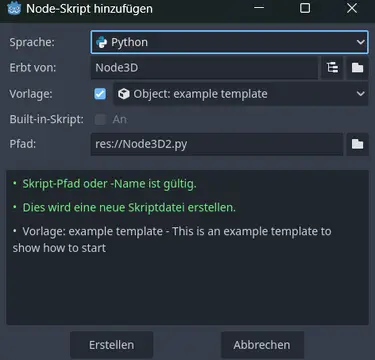
Note: To use this plugin, simply download it. You don't have to enable it in the plugins menuThe aim of this project is to integrate Python scripting into the Godot Engine, allowing developers to write scripts in Python instead of, or alongside, GDScript. This plugin enables the selection of Python as the scripting language when creating new scripts within Godot, providing an alternative for developers who are more comfortable with Python.Platform Compatibility:Please note that this plugin is currently only compatible with Windows 64-bit, Linux 64-bit and MacOS ARM64 systems. Ensure that you are working on one of these platforms to take full advantage of the Python scripting capabilities.Similarity to GDScript: The Python API is designed to be similar to GDScript, making it easier for developers familiar with GDScript to transition to or integrate Python into their projects.Getting Started:To start using Python in Godot: Install the Plugin: Download the plugin and install it in the addons folder Create Python Scripts: When creating a new script, select Python as the language. Refer to the Documentation: Look at the Github page for a short example of the api
Godot iOS Share Plugin allows sharing of text and images on the iOS platform.- click `Download` button- on the installation dialog... - leave your project's root directory selected as the target directory - uncheck `Ignore asset root` checkbox - click `Install` button- enable the addon via the `Plugins` tab of `Project->Project Settings...` menu, in the Godot Editor- enable the plugin in your project's iOS export settings via `Project->Export...->iOS` in the Godot Editor
> For Godot4.6Compass implementation for different needs in Godot Engine. Adds new Compass3D, Compass2D and CompassBar node in Editor.## Usage1. Search and add CompassBar/Compass3D/Compass2D using Ctrl-A or Add Node button2. Assign the Parent property for rotation calculation, **Parent** is the **rotating node**Open example.tscn and read README.md to understand more.Read GitHub wiki or README for latest Documentation: https://github.com/vi4hu/godot_compass/wiki/Usage
Deeplink plugin allows processing of iOS application links that enable direct navigation to requested app content.Installation Steps:- click `Download` button- on the installation dialog...-> keep `Change Install Folder` setting pointing to your project's root directory-> uncheck `Ignore asset root` checkbox-> click `Install` button- enable the addon via the Plugins tab of Project->Project Settings... menu, in the Godot Editor- enable the plugin via the iOS section of Project->Export... menu, in the Godot Editor
AndroidIAPP: Google Play Billing v8.3.0 for Godot 4.6+A clean and reliable plugin for integrating Google Play purchases into your Godot 4.6+ games. Built on the latest Billing Library v8.3.0, it provides a straightforward interface for managing everything from simple one-time purchases to complex subscription plans.Main Features:- Up-to-date: Supports the latest Google Play Billing v8 API.- Godot 4 Optimized: Full support for strict typing and signals.- Versatile: Handles consumables, non-consumables, and subscriptions (with Base Plans and Offers).- Easy Debugging: Structured logging for quick troubleshooting via logcat.Fast to integrate, easy to maintain, and ready for your next release.
Update 3.1Added item events- You can script and assign events for items like On Use, On Equip, On Unequip- Added example use event for Healing PotionUpdate 3.0 (total refactor of the system)- Universal inventory system- Equipment system- Itemization system- Affixes system- Item tooltip system- Vendor (NPC trading) system
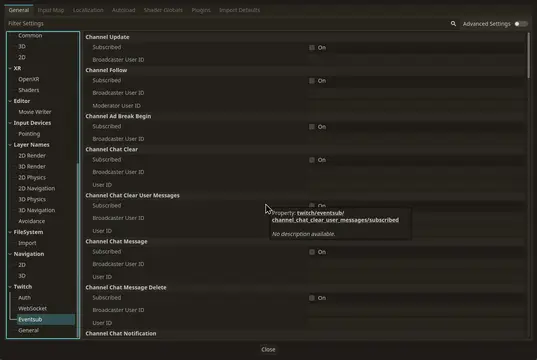
**Twitcher: Easily Add Twitch to Your Godot 4 Game!**Connect your Godot game or overlay to Twitch!* **Show Twitch Chat:** Display chat messages in your game.* **React to Events:** Make things happen when someone follows, subscribes, or uses channel points.* **Use the Twitch API:** Get user info, create clips, and much more.* **Handle Chat Commands:** Create custom commands like `!play` or `!info`.* **Easy Setup:** A helpful wizard guides you through connecting your Twitch account.* **Animated Emotes:** Supports showing Twitch's animated emotes (GIFs).Perfect for making interactive Twitch games and cool stream overlays. Full documentation available!
A GDscript port of Kate Compton's Tracery. Quoting directly from the the official website ( http://tracery.io/ ) : "Tracery is a super-simple tool and language to generate text. by GalaxyKate."
Puts the script list in a separate dock to make them always visible, and makes sure that even if you're in 2D/3D/AssetLib or some other view, by clicking on one of the script names it switches back to the script editor.
Notification Scheduler Plugin allows scheduling of local notifications on the iOS platform.Installation Steps:- click `Download` button- on the installation dialog... -> keep `Change Install Folder` setting pointing to your project's root directory -> uncheck `Ignore asset root` checkbox -> click `Install` button- enable the addon via the Plugins tab of Project->Project Settings... menu, in the Godot Editor- enable the plugin via the iOS section of Project->Export... menu, in the Godot Editor