v0.1.30 Release Notes:- support for 3.4.3 & 3.4.4- support for 3.5 beta1 thru beta5- support for 4.0 alpha1 & alpha2Do you like not needing to remember what version of Godot your project needs?Do you like not needing to remember what assets you need for your project?Do like not worrying when you upgrade your project to a new version of Godot?Do you like using the command line?Do you like opening your project immediately instead of the needing the project list?Do you want a better way to share your project with your team?Do you need to support multiple platforms?Do you have OCD and must keep your projects neat and tidy?Do you like having to store ONLY your game code in your git repository?Do you like Real Vanilla ice cream?Then this tool is for you.GSPM is a multi-platform Command Line Tool (CLI) that can be used to help you manage your Godot projects.Project information is controlled using a plain text file in YAML that defines the blue prints of your project. Here is a sample from my last LudumDare gamehttps://gitlab.com/ludumdare/ludumdare47/-/blob/master/project.ymlIt helps solve the problem of wondering what version of Godot you used, and what assets you needed in your projects while at the same time letting developers on different platforms work together.You can READ THE DOCS herehttps://gs-project-manager-docs.readthedocs.io/en/latest/Note: This tool is NOT something you "install" into your Godot project. Instead, follow the installation instructions in the documentation and the samples in the Getting Started section to help. If you have questions or find any issues, please leave them herehttps://gitlab.com/godot-stuff/gs-project-manager/-/issuesGet started using it in five minutes (assuming you already have Python installed)> pip install gspm> gspm new mygame> cd mygame> gspm install> gspm editWorks with Godot 2.x, 3.xWorks with Windows 10, Linux and MacOSRequires:Python >=3.4You can view the PyPi page herehttps://pypi.org/project/gspm/
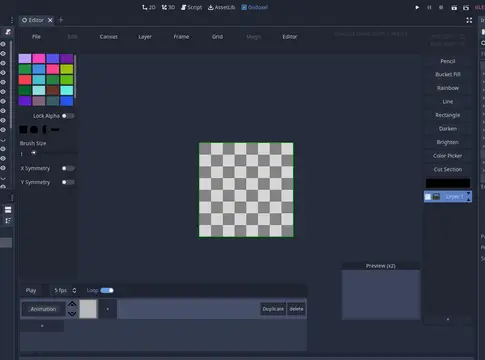
A Plugin for Godot that allows you to create images in the editor.* Save/Load Godoxel (.godoxel) (added in v0.4)* Animation-Panel (added in v0.4)* Frames with previews (added in v0.4)* Shortcut-Window with shift (added in v0.4)* Preview Window (v0.3)* Undo/Redo with Z/Y (now prints undo/redo message)* Layers* Export Frame, Layer or as single image (.png)* Multiple layers (can be (alpha)-locked/hidden)* Tools: Pencil, lighten/darken, rectangle/line, fill, ...
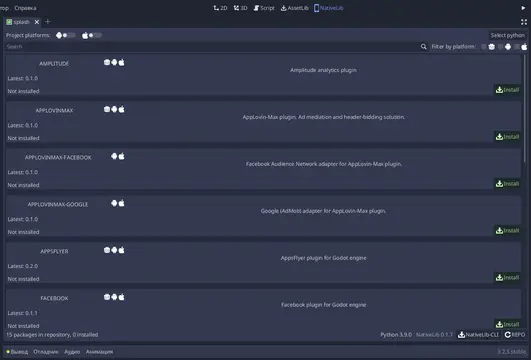
Ultimate solution to manage (install/update/uninstall) native modules for iOS, Android, MacOS, AppleTV.It automatically process packages dependencies. It will add gd wrapper for native library into your autoloading list.it has comfortable package settings editor.Now 56 native packages available:- APN- ARKit- iPhone Camera- GameCenter- iCloud- Apple AppStore- AdColony- Amplitude- Applovin- Applovin-MAX (with adapters)- Appsflyer- Facebook- Firebase (Analytics, Auth, Crashlytics, Database, Performance, Remote Config)- Flurry- GameAnalytics- GooglePlay Billing- Local/Push Notification- Multidex- NativeLib-Export- Network- Ogury Choice Manager- RateMe- Tapdaq (with adapters)- Tenjin

A Godot tool like FileSystem dock, allows you to customize filters(views) to work with project resources.=========Changes in 1.5:1. (Important) Since 1.5, this plugin saves settings with json format, and you may need to update your settings manually.2. Multi-select and dragging are fully supported. You can now drag files freely. Bugs related to `ImportDock` are also fixed.3. Remade context menu provides useful functions (more in future): - Play selected scene - Copy paths for multiple files4. Support for resource thumbnails.=========Click "View Files" for more details.
A GDNative wrapper for libOpus, allowing for very high compression rates for audio containing speech.It adds 2 nodes to Godot:- OpusEncoder- OpusDecoderThis can allow for the implementation of a very simple form of VOIP. It will not be truly streaming or real-time though. Much more work is required before we get to that.Demos:Trivial: the example/ directory in this asset has a simple demoVOIP: https://github.com/Godot-Opus/libopus-gdnative-voip-demo
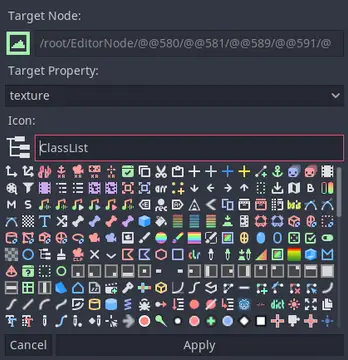
Iconify offers an easily accessible Icon picker so you can focus on building a good editor UI without constantly switching tabs to assign them via script.Features:- Search icons by name- Automatically assign icons to node properties- View all built-in editor icons to use them in a script- Keyboard shortcuts for extremely fast UI designFor full description see README.md at [https://github.com/Hugo4IT/Iconify]
This plugin helps to use the AdMob Plugin created by Poing Studios.Android: https://github.com/Poing-Studios/godot-admob-androidiOS: https://github.com/Poing-Studios/godot-admob-ios
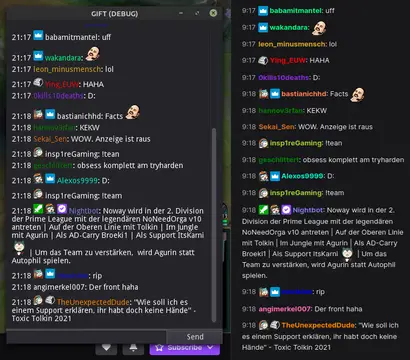
This addon provides a node that can be used to easily interact with the twitch IRC chat. Commands are registered similar to how you connect a node.Features:- connect to twitch using a secure websocket- join/leave channels, request twitch capabilities- send chat messages/whispers/raw data- register commands with min/max amount of args- check for permissions to execute the command- many signals to process additional data- shows raw data in output log while in debug mode- automatically download & cache emotes and user badges You will need to get a OAuth token. Either use this link to get a token using your own client_id from your registered application; https://twitchapps.com/tokengen/Or this link to get a token for testing;https://twitchapps.com/tmi/The Gift.gd script in the repository should get you started.
Improvement of the anchor panel UI for Godot. Based on the Proposal https://github.com/godotengine/godot-proposals/issues/3559. Created by @lentsius-bark, published by Deep Entertainment
A plugin made to convert Adobe Flash .xml animations to Godot animation type, making easier to handle multiple spritesheets.Full tutorial on github:https://github.com/Pocku/godot-sparrowatlas-editor
Inspired by https://github.com/gruns/icecreamBetter debug information using ad.p(arg) rather than print(arg)Awesome Debug returns the input argument so it can be dropped into existing code without issue.
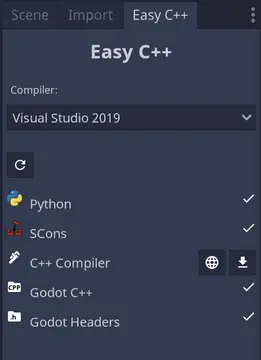
This tool allows you to easily build your GDNative code directly from Godot.Attention!!I ran into some issues where GDScript was not behaving correctly under Linux and macOS, when the addon was updated. So when the "Build Platforms" or "Build Configuration" in the new settings dialogue do not work (no tabs listed), quit Godot and start it again. Otherwise delete the folder and reinstall the addon.Changes v0.2:- Added settings dialogue.- Fixed file structure for installing from assetlib.The supported features are:- Checking and setting up your build environment.- Build using already existing SCons files.- Supports Visual Studio 2015, 2017 and 2019 compilers for Windows.- Supports GCC and Clang for Linux.- Supports Xcode for macOS.- Platforms and configurations can be freely defined in the project settings.- Generate batch files to build your project.- Create solution and build from Visual Studio.- Create generic Qt Creator project.- Update your gdnlib file.- Create a new GDNative library.Known Issues- Some batch files contain global paths.- The tool does not always correctly wait for processes running in a terminal.- When installing SCons for macOS, the button must be pressed twice, due to a hotfix that needs to be applied.Please report any issues you find at https://github.com/dkollmann/easycpp/issues.